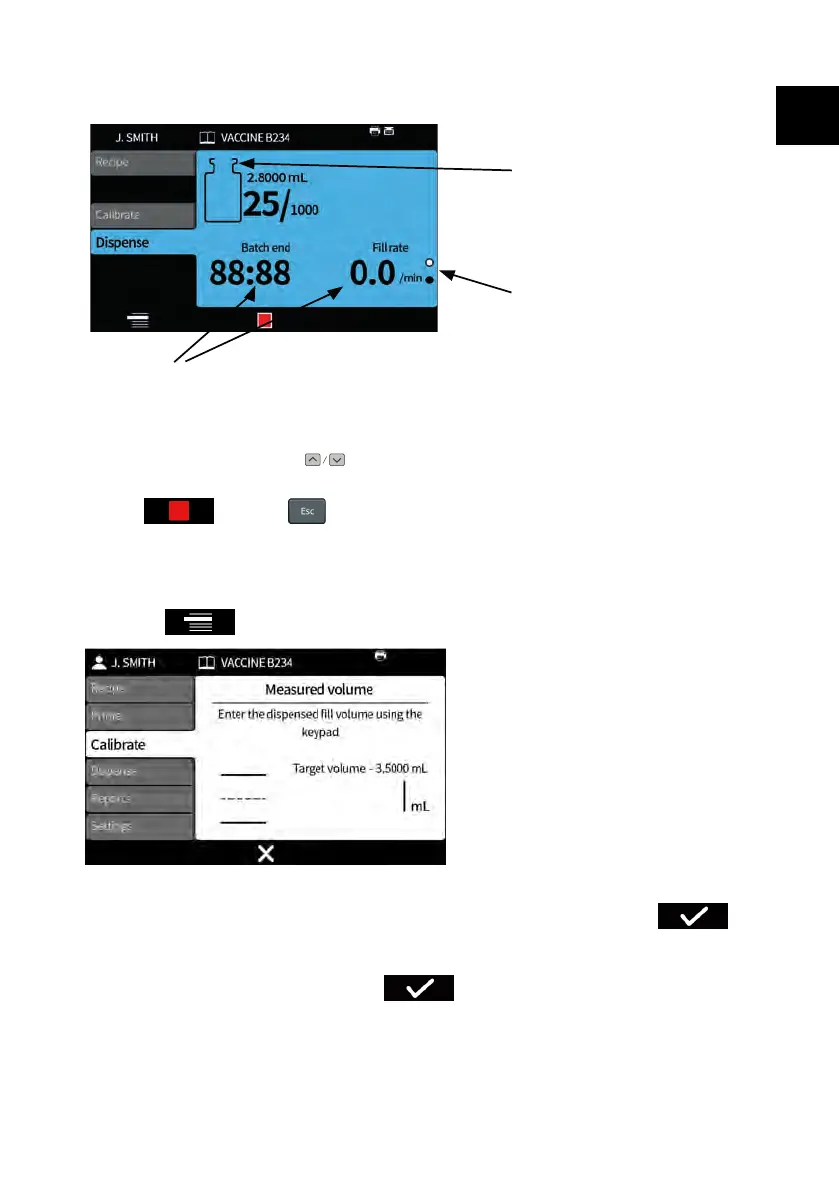
When the pump is dispensing or ready to dispense, the screen background colour is
blue.
Dispense icon
Page indicator icon
Batch information (Fill rate = Fills/min)
Figure 26 - Dispensing or ready to dispense screen
Use the up and down keys ( ) to change between display pages whilst a batch is
running.
If the key or key is pressed at any point, the pump will stop
immediately and a fill interrupt screen will be displayed.
23.3.1 Calibration whilst dispensing
1. If using a balance, tare the balance using the vial to be filled.
2.
Press to access Calibrate mode.
3. Enter the calibration value
i.
No connected balance— Use the numeric keypad. Press to
confirm.
ii. Connected balance— Place the filled vial on the balance. The value
automatically displays. Press to confirm.
PF7/PF7+ Peristaltic Filler with QC14 Pumphead User Manual 83
EN EN EN EN EN EN EN EN EN EN EN EN EN EN EN EN EN



 To Next Page