32 Troubleshooting
If the pump display remains blank when the pump is switched on, make
the following checks:
• Check that the input power is available to the pump.
• Check the fuse in the wall plug if one is present.
• Check the position of the voltage selector.
• Check the power switch at the rear of the pump.
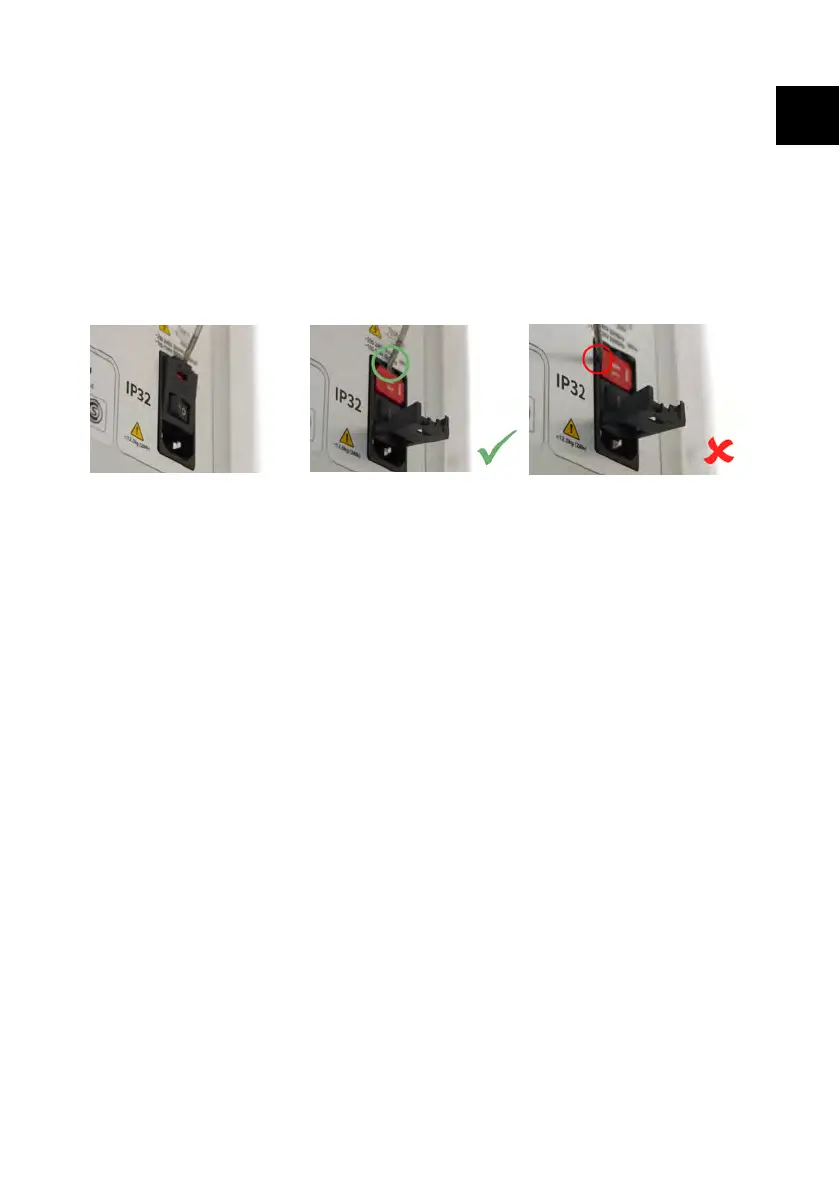
• Check the fuses in the holder in the centre of the switch plate at the rear of the
pump. Remove the fuse holder as shown in the images below:
Figure 56 - How to remove the fuse holder
If the pump runs but there is little or no flow, make the following checks:
• Check that fluid is supplied to the pump.
• Check for any kinks or blockages in the lines.
• Check that any valves in the line are open.
• Check that the tube is in the pumphead.
• Check that a tube is not split or burst.
• Check that the correct wall-thickness tube is being used.
• Check the direction of rotation.
• Check that the correct tube bridge is fitted for the selected tube
• Check the tubes are not overlapping in the rotor channels
PF7/PF7+ Peristaltic Filler with QC14 Pumphead User Manual 168
EN EN EN EN EN EN EN EN EN EN EN EN EN EN EN EN EN



 To Next Page