5322A
Operators Manual
182
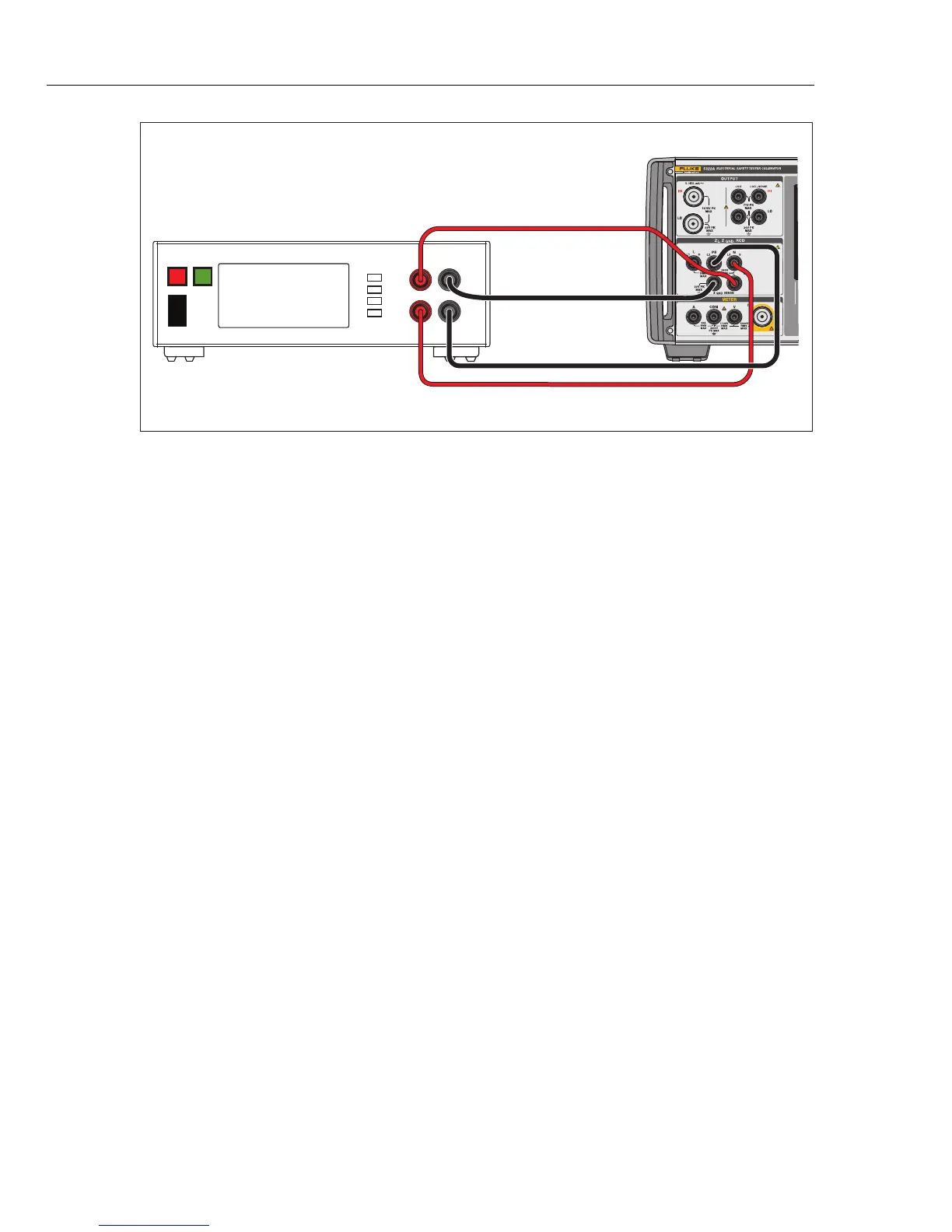
SENSE + SENSE -
CURRENT RETURN
I
O
Sense Leads
Current Leads
iep092.eps
Figure 43. Ground Bond Resistance Calibration on Bench Ground Bond Tester
Calibrate Line Impedance Testers
The Product’s Line Impedance calibration function calibrates the line impedance
function of loop testers and multifunction installation testers. Different models of
installation testers use different test current levels to avoid tripping protective
circuits. The Product limits the amount of test current that can be used during a
line impedance calibration.
XW Warning
To avoid electric shock, do not touch the L, PE, or N terminals
on the Product or DUT while performing a Line Impedance
calibration. Line voltage is present on these leads during this
calibration.
To perform a Line Impedance calibration:
1. Push .
2. Connect the DUT to the L, PE and N terminals of the Product as shown in
Figure 44. For some line impedance testers, PE does not need to be
connected.
3. Push the Setup softkey and set the desired residual impedance correction
under Line Impedance. See Select the Residual Impedance Correction Mode
in Calibrate Instruments for more information on this correction. When set,
push the EXIT softkey repeatedly to return to the main Line Impedance
display.
4. Push the Mode softkey. Then, use the cursor keys or rotary knob to highlight
Line and select it by pushing the Select softkey or pushing in the rotary knob.



 To Next Page