Soft foot
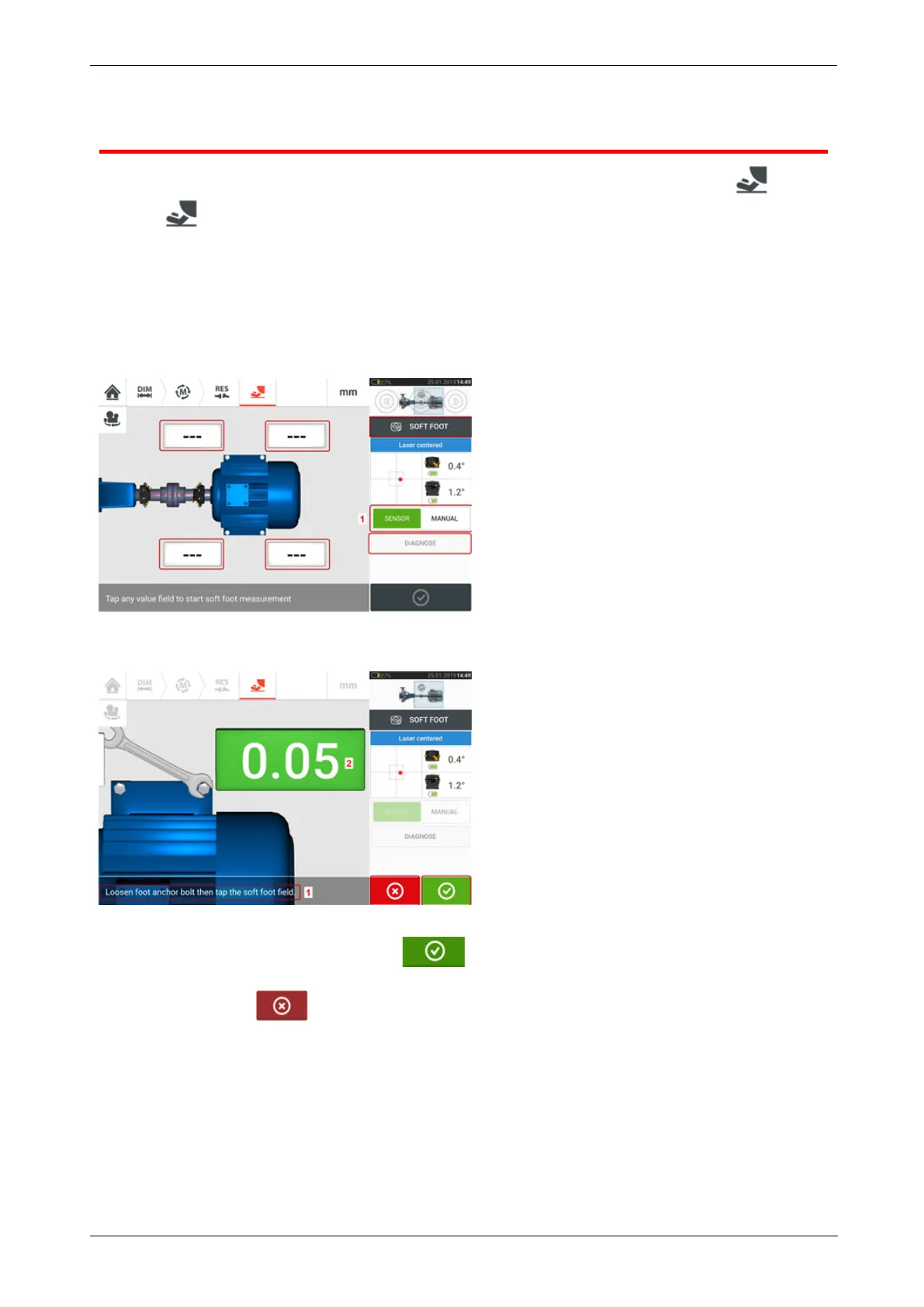
Soft foot measurement can be started from any screen where the 'Soft foot' icon [ ] is act-
ive. Tap to start soft foot measurement. The values may be determined by sensor meas-
urement or entered manually from values established using manual methods such as feeler
gauges and shims.
Sensor measurement
Activate sensor measurement by swiping the green button (1) to "Sensor". The laser beam
must have the status "Laser centered" or "Laser OK". Refer to laser beam adjustment.
Tap any one of the four pulsating value fields to start soft foot measurement at the respective
machine foot.
Loosen the corresponding foot bolt (see hint 1). The recorded soft foot value is displayed [2].
When the soft foot value stabilizes, tap the 'Proceed' icon or recorded value (2), then
tighten the bolt (see hint 1). If desired, the soft foot measurement at the corresponding foot is
canceled by tapping the 'Cancel' icon. The above soft foot measurement procedure is
repeated for all four feet positions.
102 Version:2.3
On-board help



 To Next Page