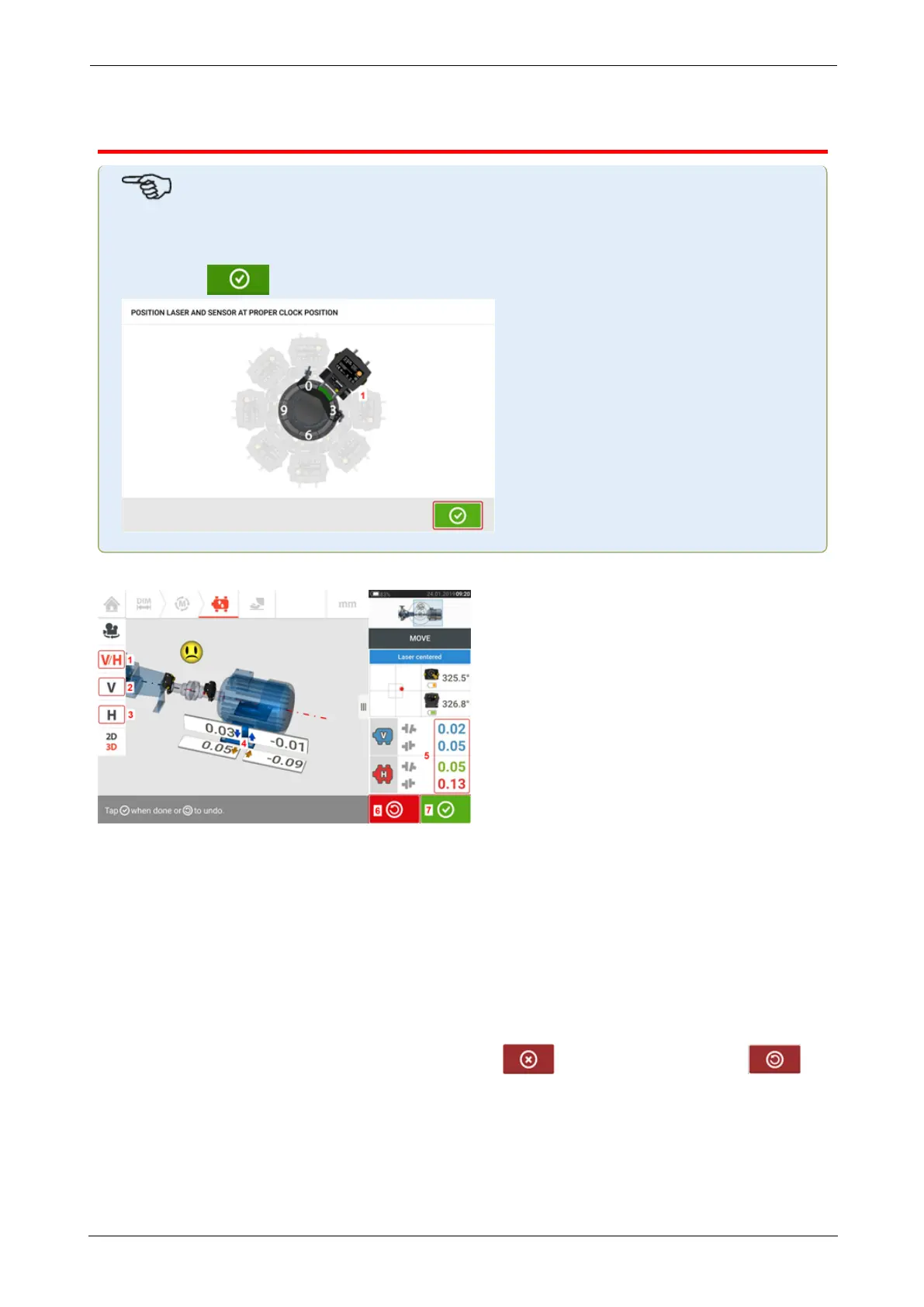
Live Move screen
Note
If Static measurement mode is selected, the Live Move screen is accessed only after the
desired 45° clock position (1) of the sensor and laser has been selected and confirmed
by tapping in the position selection screen that appears.
Live Move is monitored in both horizontal (H) and vertical (V) planes simultaneously.
l (1) Tap the 'V/H' icon to follow both vertical and horizontal foot corrections sim-
ultaneously
l (2) Tap the 'V' icon to follow the vertical foot corrections
l (3) Tap the 'H' icon to follow the horizontal foot corrections
l (4) Arrows indicate direction and magnitude to move machine feet
l (5) Tolerance coded gap and offset coupling values
l (6) Tapping the 'Undo' icon allows user to re-measure or start Live Move afresh
l (7) Tapping the 'Proceed' icon allows user to re-measure or start Live Move afresh
Once Live Move has been detected, the 'Cancel' icon replaces the 'Undo' icon .
ROTALIGNtouch EX 75
On-board help



 To Next Page