l
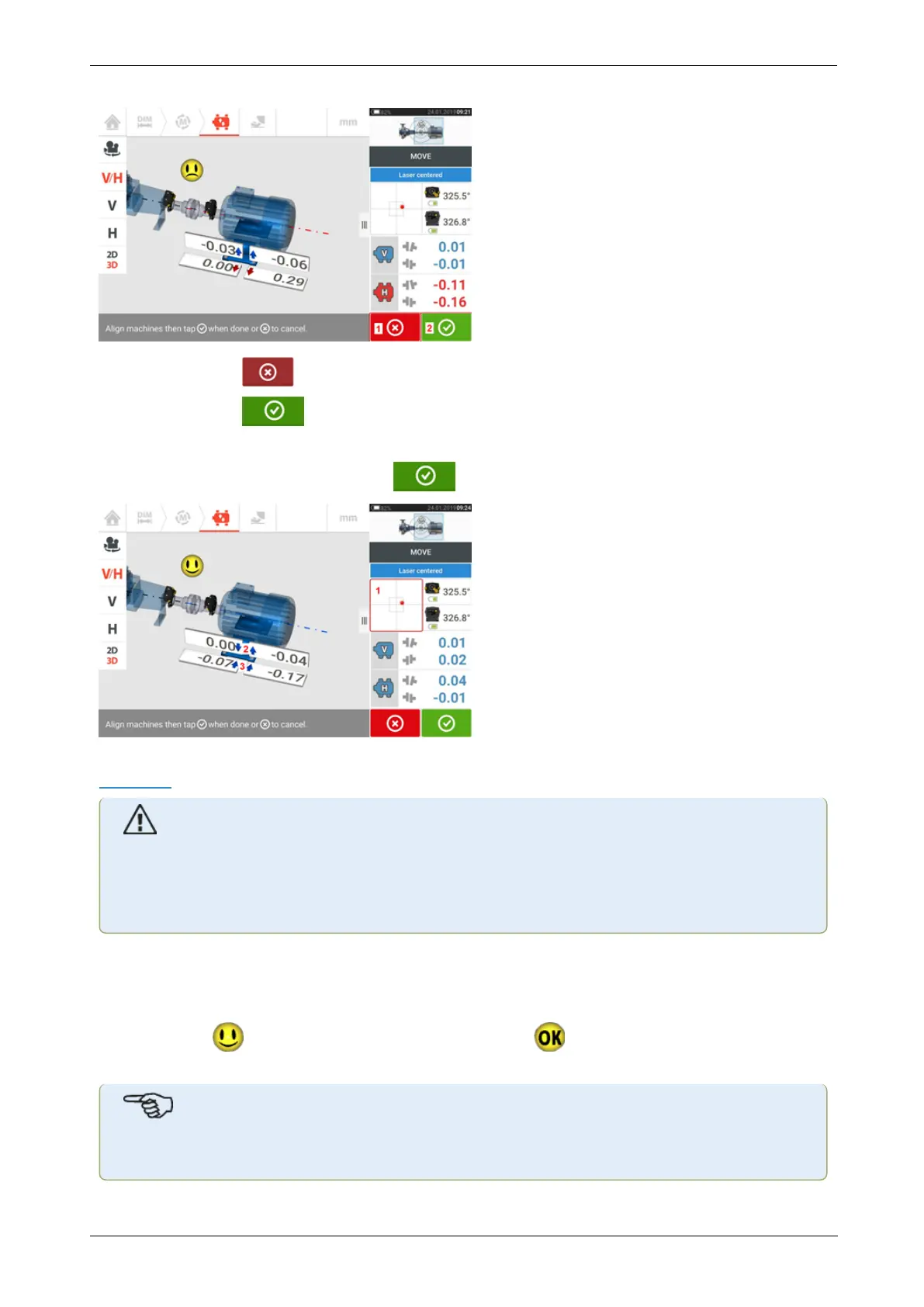
(1) Tapping the 'Cancel' icon prompts the 'Cancel Move' hint.
l
(2) Tapping the 'Proceed' icon allows Live Move to be started afresh or the
machines be remeasured.
If the laser beam is centered, tapping starts Live Move automatically.
If the laser beam is not centered, tap the detector area on the screen [1] to access the
XYView.
CAUTION
Do NOT attempt to move the machine using heavy sledgehammer blows. This can cause
bearing damage, and also produce inaccurate Live Move results. Jack bolts on the feet
or other mechanical or hydraulic devices are recommended for moving machines.
Correct the alignment condition by shimming and moving the machines laterally following the
bold vertical [2] and horizontal [3] arrows. The color coded bold arrows signify the attained
coupling tolerance as follows: Blue (excellent condition); Green (good condition) and Red
(poor condition). Machines should be moved to within acceptable tolerances indicated by a
happy smiley [ ] (excellent tolerance) or an OK icon [ ] (acceptable tolerance) while
observing shaft alignment best practices.
Note
The system monitors both horizontal and vertical Live Move concurrently. If the vertical
76 Version:2.3
On-board help



 To Next Page