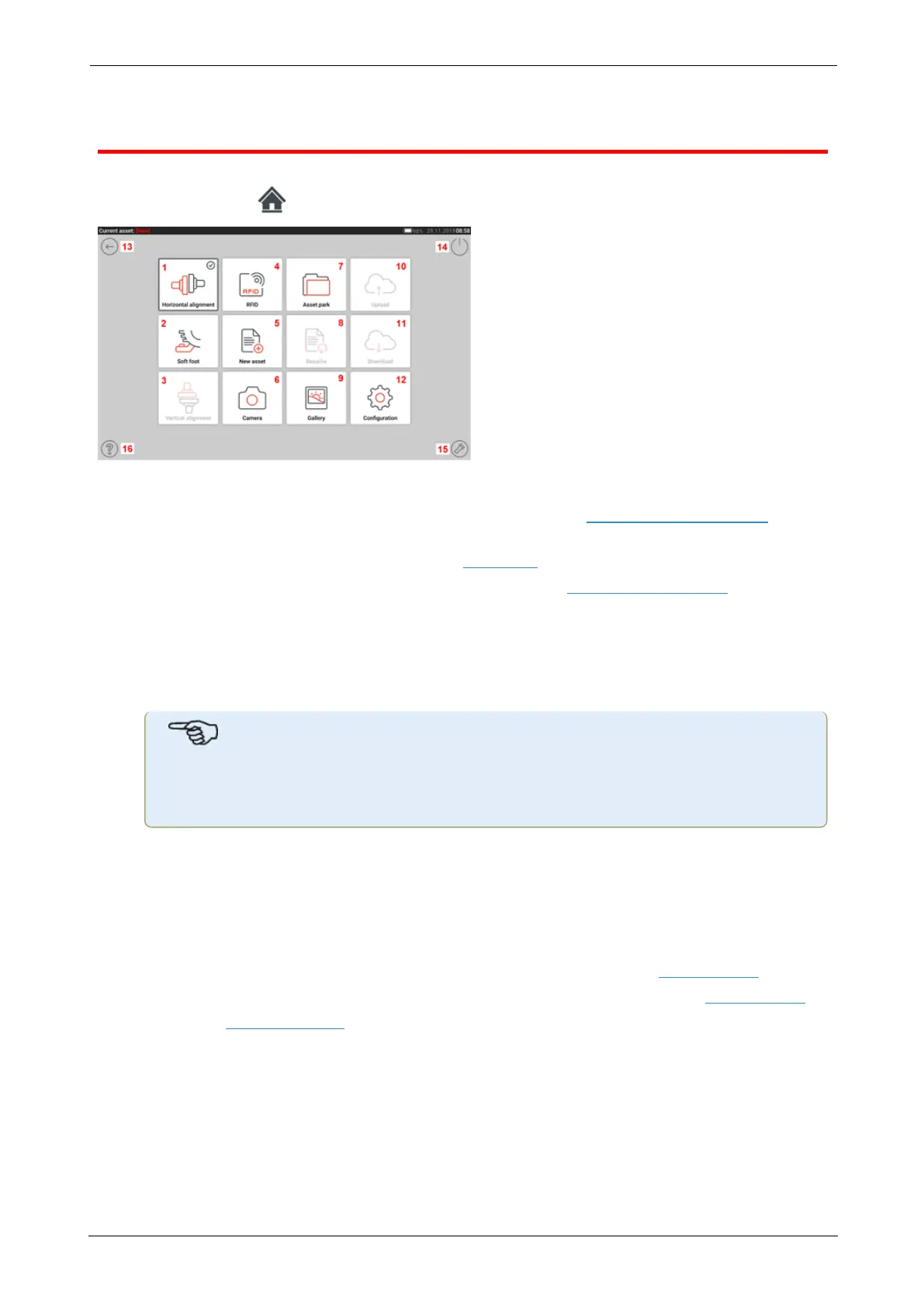
Home screen
The home screen is displayed when the device is switched on. The home screen may also be
accessed by tapping the "Home" icon.
Tapping the respective icon accesses the following respective functions:
l (1) The "Horizontal alignment" icon is used to access the horizontal alignment applic-
ation.
l (2) The "Soft foot" icon is used to access soft foot measurement.
l (3) The "Vertical alignment" icon is used to access the vertical alignment application.
If this icon is inactive, tap the "New asset" icon(5) to activate the vertical alignment
icon.
l (4) The "RFID"icon is used to open assets assigned to respective RFID tags.
l (5) The "New asset" icon is used to start a new asset (this may be a pump-motor com-
bination).
l
Note
For any opened asset, different applications that may include shaft alignment and
soft foot measurement, may be performed.
l (6) The "Camera" icon is used to access the built-in camera.
l (7) The "Asset park" icon is used to display all saved assets and templates.
l (8) The "Resume" icon is used to resume last asset opened (provided it was saved)
when the device is switched on.
l (9) The "Gallery" icon is used to display all images taken within the Shaft application.
l (10) The "Upload" icon is used to save asset measurements in the Cloud drive.
l (11) The "Download" icon is used to open asset measurements from the Cloud drive.
l (12)The "Configuration" icon is used to configure the Shaft application settings (which
include language, date, time, default settings), and access its built-in mobile con-
nectivity. Mobile connectivity enables the device to access the Cloud functionality that
allows wireless file sharing.
l (13) The "Back" icon is used to return to previous screen.
l (14) The "Power-off" icon is used to turn the touch device off.
l (15) The "Camera LEDon/off" icon is used to turn the camera LEDs on/off.
l (16) The "Help" icon is used to access the on-board help file.
ROTALIGNtouch EX 11
On-board help



 To Next Page