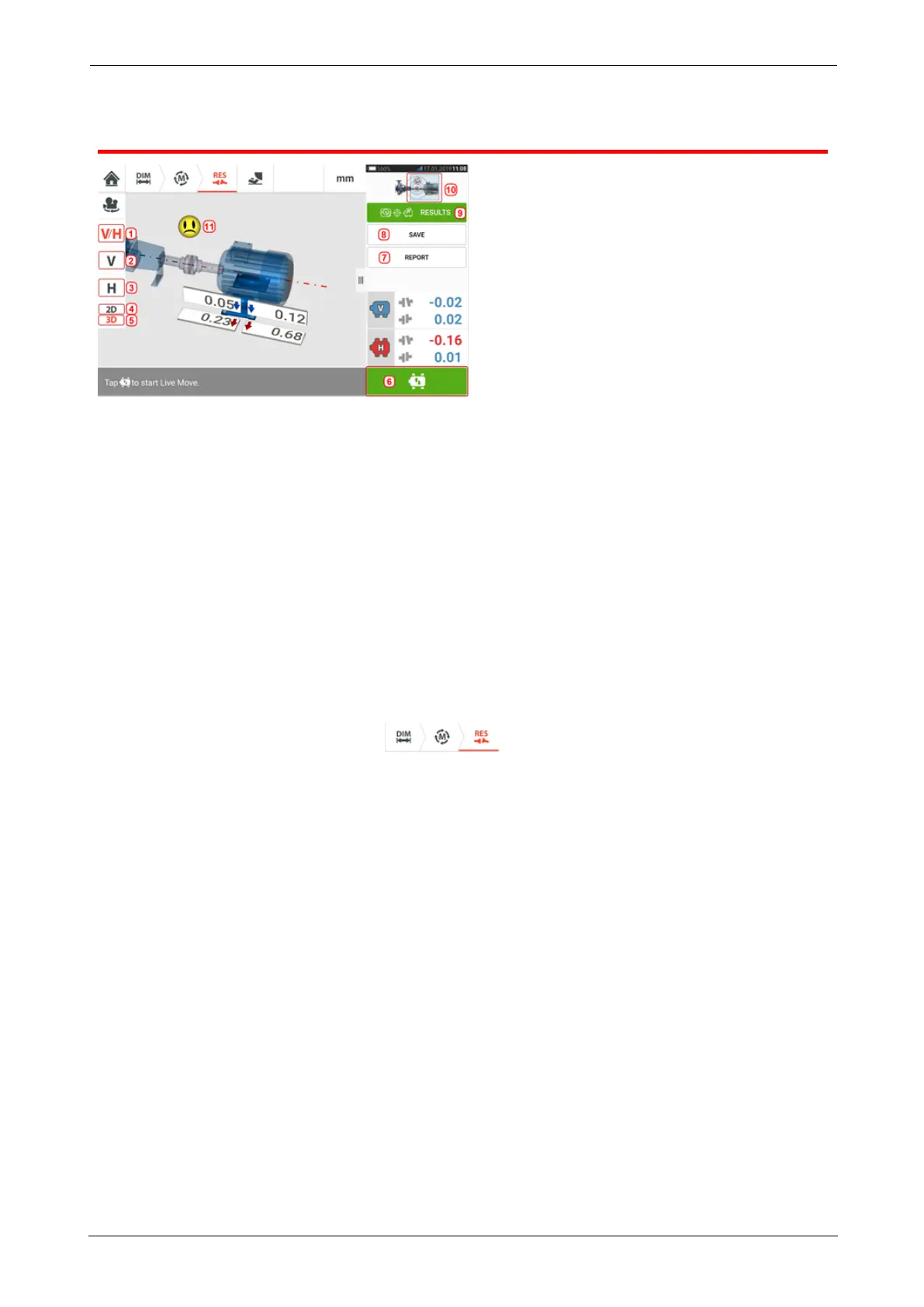
Results
l (1) Displays both horizontal and vertical foot results in 2-D simultaneously
l (2) Used to display vertical foot results only
l (3) Used to display horizontal foot results only
l (4) Used to display foot results in 2-D
l (5) Used to display foot results in 3-D
l (6) Starts Live Move
l (7) Used to generate asset measurement report
l (8) Used to save asset measurements in asset park
l (9) Used to select results mode
l (10) Tapping the slider on the machines icon opens the triple "Train Manager" / "Train
Setup" / "Train Fixation" screen
l (11) Alignment condition tolerance symbol
In the results screen, the three icons – dimensions, measurement and results –
are active and may be used anytime.
The 2D V and H foot results screens show the vertical (V) and horizontal (H) foot positions
respectively.
The colors of the bold arrows next to the feet correction values are directly related to the coup-
ling alignment condition as follows:
Blue – excellent [foot should not be moved]
Green – good [if possible foot should remain unaltered]
Red – poor [foot requires moving to attain a better alignment condition]
ROTALIGNtouch EX 65
On-board help



 To Next Page