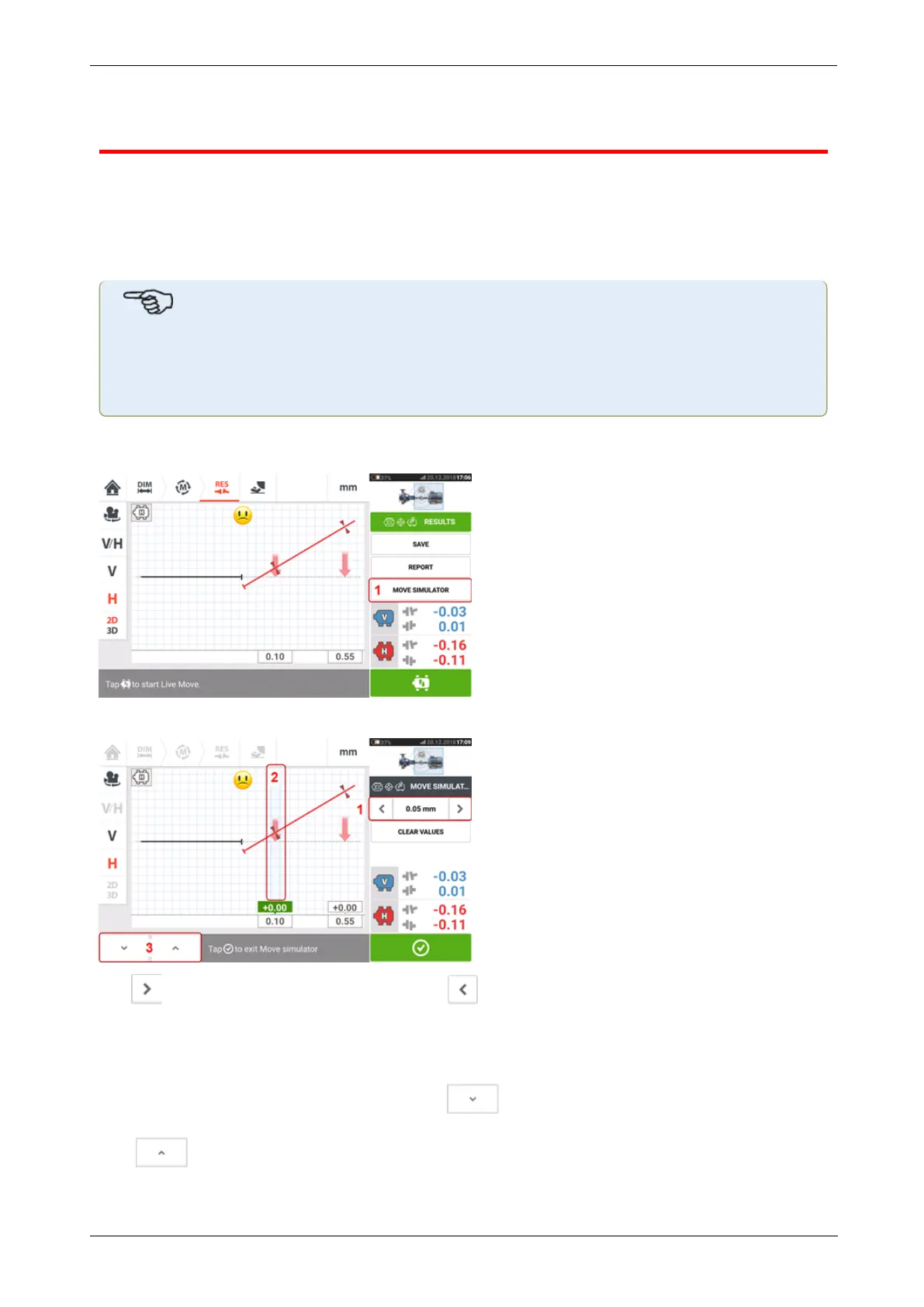
Move simulator
As the name suggests, the Move simulator is used to simulate shim values and horizontal
movement corrections that are required to correct the alignment condition. The simulator
takes into account the shim thickness available and the amount by which the machines can be
physically moved.
Note
Move simulator can be used on a single plane only (either Vertical or Horizontal). Sim-
ulation is possible for the current (or "as left") measurement only. And the simulation
may be carried out in 2D or 3D view.
The Move simulator is initiated from the results screen. After taking a measurement, display
the results in either 2D or 3D and on a single plane only.
Tap 'Move simulator' (1).
Tap to increase movement step value or to decrease step value (1). The step value
ranges from 0.025 mm – 1.0 mm for metric units and 1.0 thou – 40.0 thou for imperial units.
Tap machine feet pair to be simulated. A light blue cursor appears on the selected feet pair
(2).
With the cursor on the selected feet pair, tap to move the machine downwards (in
Vertical view) or towards viewer (in Horizontal view) by the movement step value factor. Tap-
ping moves the machine upwards (in Vertical view) or away from viewer (in Horizontal
view) [3] by the movement step value factor. Carry out the simulation while observing the
78 Version:2.3
On-board help



 To Next Page