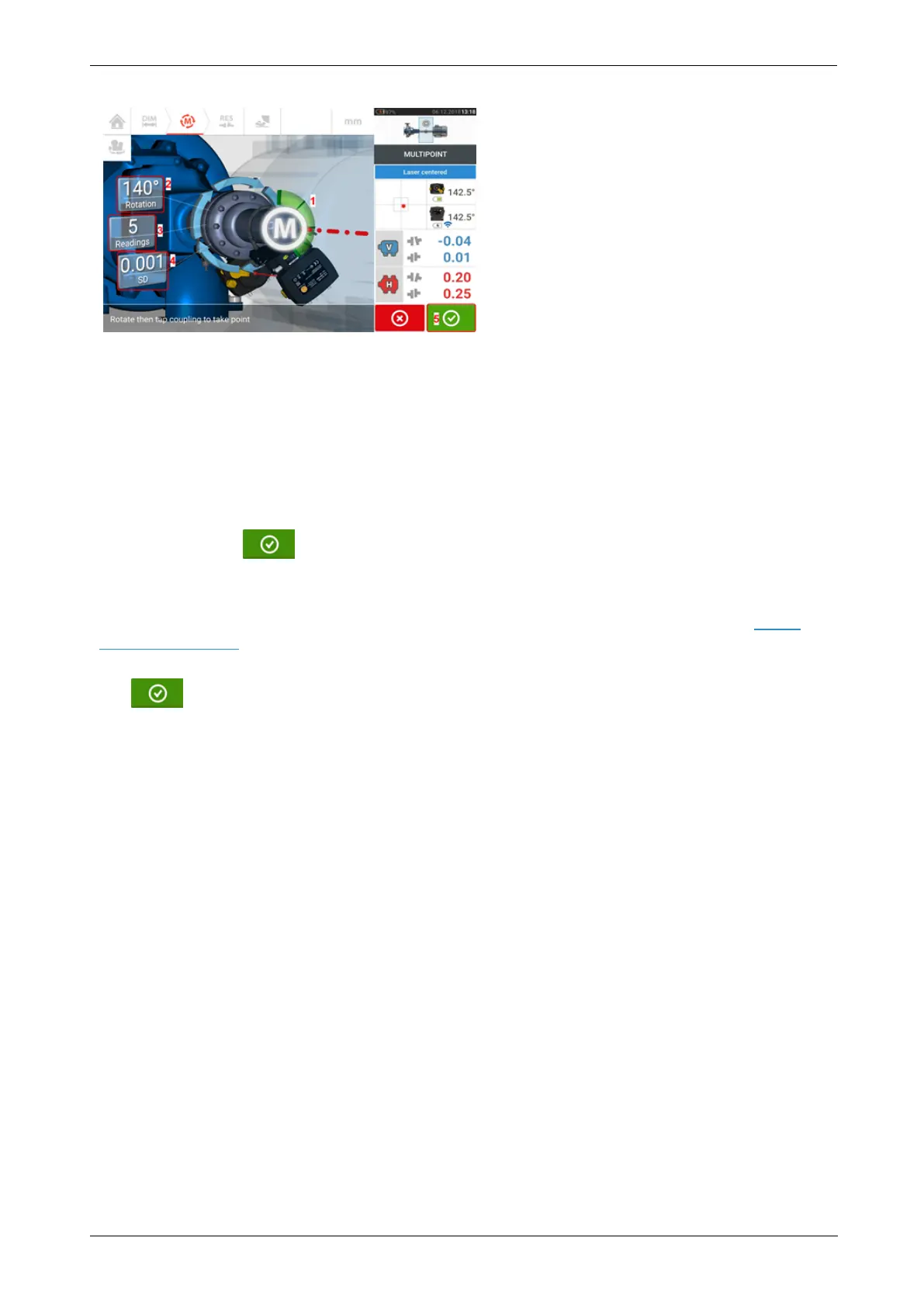
l (1) Rotational arc showing points taken and rotational angle covered by the shafts. The
arc changes color from red [< 60°] -> amber -> green [> 70°]
l (2) Rotational angle completed by the shafts for current measurement
l (3) Number of measurement points taken for current measurement
l (4) Standard deviation attained in current measurement
l (5) 'Proceed' icon – tap to continue to view measurement results
The ‘Proceed’ icon (whose color changes with the rotational arc) becomes active after
three measurement points have been taken.
The horizontal and vertical coupling results are displayed when the shafts are rotated at least
over 60°, and a minimum of three measurement positions are recorded. If however, meas-
urement quality has been selected, the coupling results are displayed when the rotational
arc (1) turns yellow.
Tap the ‘Proceed’ icon to continue to view results or to re-measure.
If required, Live Move may be accessed via the 'Results' screen.
52 Version:2.3
On-board help



 To Next Page