EasyManua.ls Logo

GigaBlue hd quad plus - Program Informations

GigaBlue hd quad plus
92 pages
Print Icon
To Next Page IconTo Next Page
To Previous Page IconTo Previous Page
Loading...
Program Information`s
Program Information’s
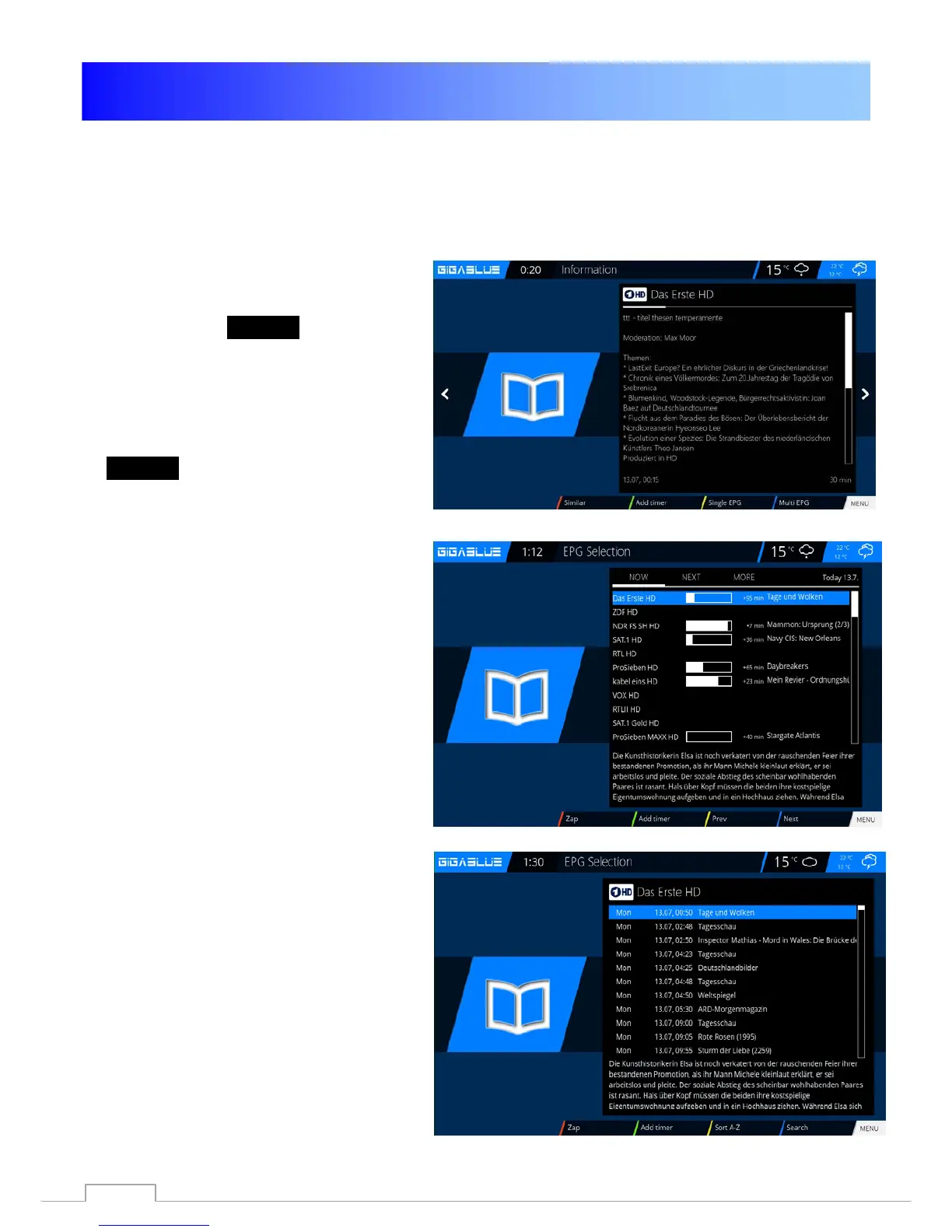
Fig.1
Fig.2
Fig.3
By pressing the
INFO button can
From the running TV program Information
about the film / consi
gnment learn.
By pressing the arrow keys
◄► you get
information about
the next shipment.
By pressing the
YELLOW, BLUE or RED
key to access the
simple EPG of the
transmitter or
Multi EPG. Will be described
below
Fig.1.
Here in simple
EPG you get Information
rundown of Channel. You can press the
YELLOW
key to A-Z or time
sort. Navigate
with the Arrow keys ▲ ▼, when you press
the
INFO
button to get information for each
program Fig.2.
If you
select multiple bouquets (Page 44
)
allow
to put yes who appears as the first
one
Selection of bouquets. Decide You
are
interested in the
bouquets for you a Multi
EPG
to display. You now get an overview
of the
current channels.
Links will of history
Broadcast graphed. In
the
right column shows the name of the
channel
. With the OK button you will
receive
Information on the individual
Broadcast.
Navigate with the arrow keys
▲ ▼ to your channel and press the
RED
button to access this channel to
Change Fig.3.
28

Table of Contents

Related product manuals