Operation of GigaBlue Box
Add channels
You can add from the All-, Satellite- and Providers view list the channels to your favorites list. By
using the RED, GREEN and YELLOW button, go to the respective menu. We explain the add
reference to the previously created test bouquet and by all views of multiple channels.
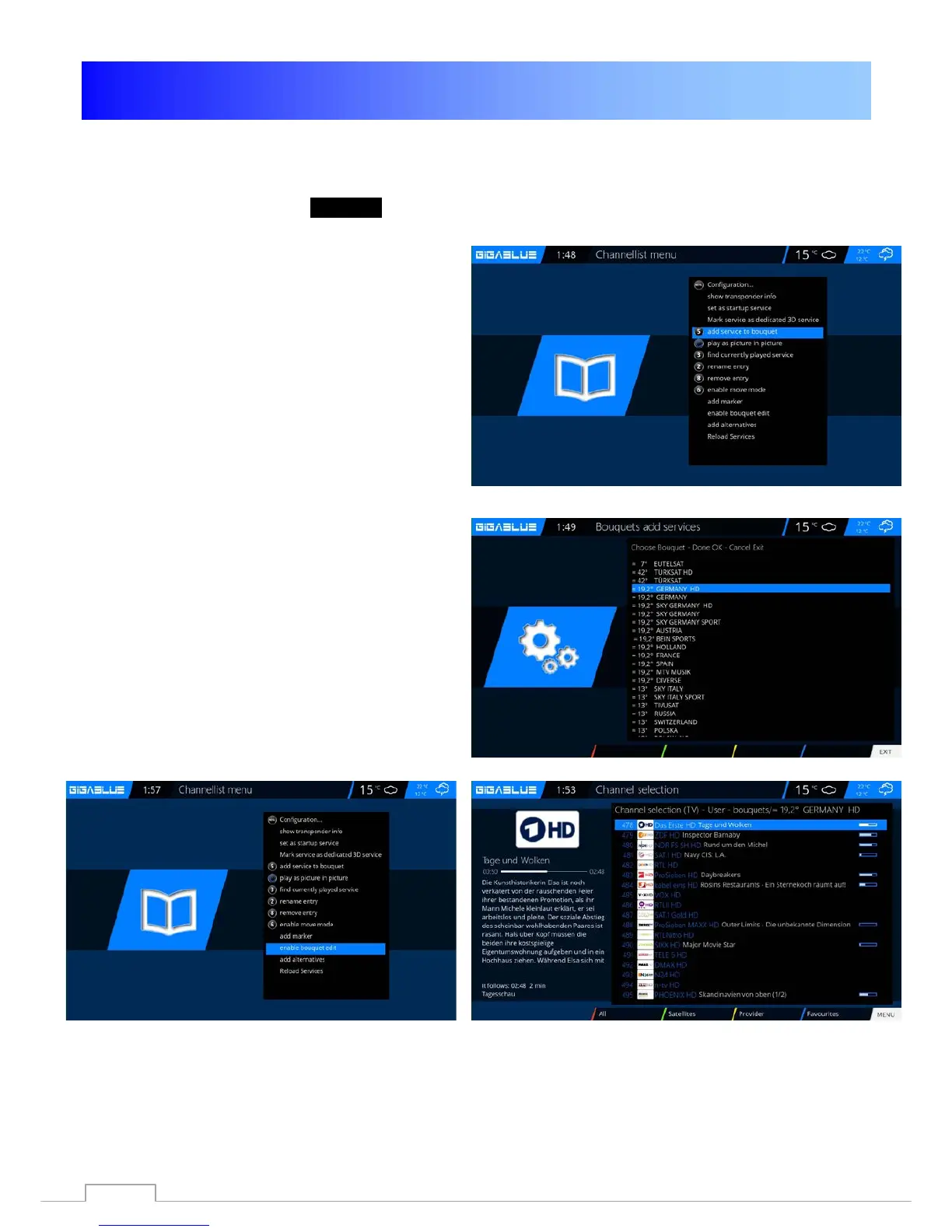
Press the arrow keys ▲ ▼ This takes you to the
channel list, select a channel from the one
bouquet you want to add, for example, Das
Erste. Next, you press the Menu key, select
item to add bouquet.
Select the bouquet created (in this case,
German HD) and presses the OK button, the
selected channel is added to the bouquet. Fig.3
When you add more channels, proceed as
follows.
Go to your created bouquet (in this case,
German HD), press Menu button
.
Navigate to enable the arrow keys ▲ ▼ to the
point bouquet edit confirm with OK Fig.4.
This takes you to the channel list.
Fig. 4
Fig. 1
Fig. 2
Fig. 3
31



 To Next Page