Operation of GigaBlue Box
Create Bouquet
What is a bouquet and what can that mean?
When you open your browser, you will definitely have websites that are visited by you, they have you
determined your favorites stored under a folder to start it later quickly. The principle at the bouquet is
exactly the same. Do you want to have all your sports channels in a folder, create a bouquet and copy
the individual channels of the bouquet. Must be to create the bouquet option under Customize on
Several Bouquet allow set to YES (page 44). Create Bouquet is described below.
Note: Channels can be erased only in the
Favorites view. Channels in the All can not be
deleted. This serves the purpose of which
there is a list of the always all channels.
If you will perform a search, all channels are
all stored in the view. Your previously created
bouquets, remain unaffected.
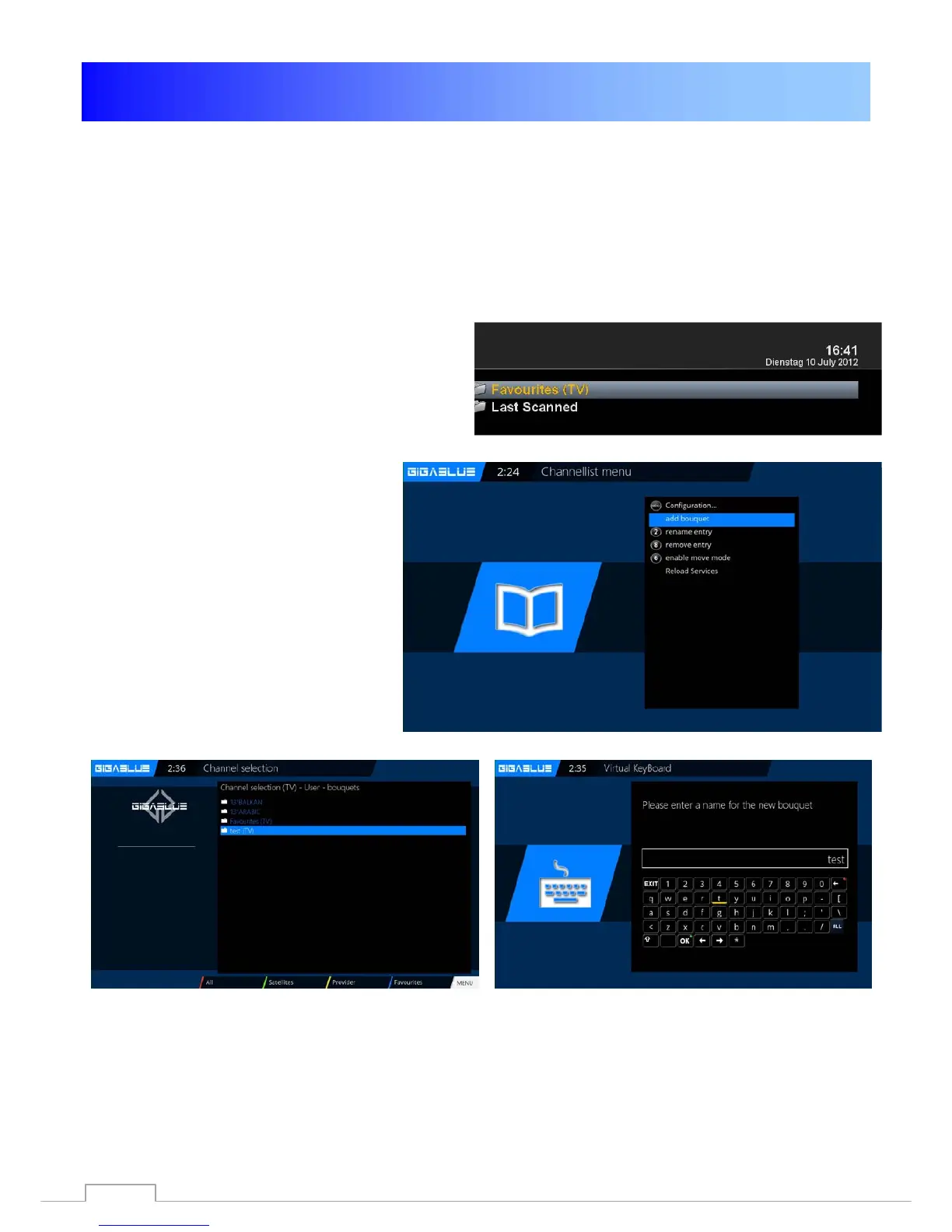
Press the arrow buttons ▲ ▼ on the
remote control. This opens the channel
list. Then press the
BLUE button
FAVOURITES Fig1.
Now press the Menu button and you will
see the channel lists menu Fig.2.
Please choose add bouquet
Assign the name for the new bouquet,
in our case, test Fig.3.
Confirm with OK and you will see your
created Bouquet Fig.4.
To create additional Bouquet proceeds
as described above.
Fig. 2
Fig. 4
Fig. 3
30



 To Next Page