Operation of GigaBlue Box
Move channels from the favorites list
Use the arrow keys ▼ ▲ to enter the
channel list. Press the
BLUE button to
display in your favorites list, and then select
the bouquet of where the channel is you
want to move.
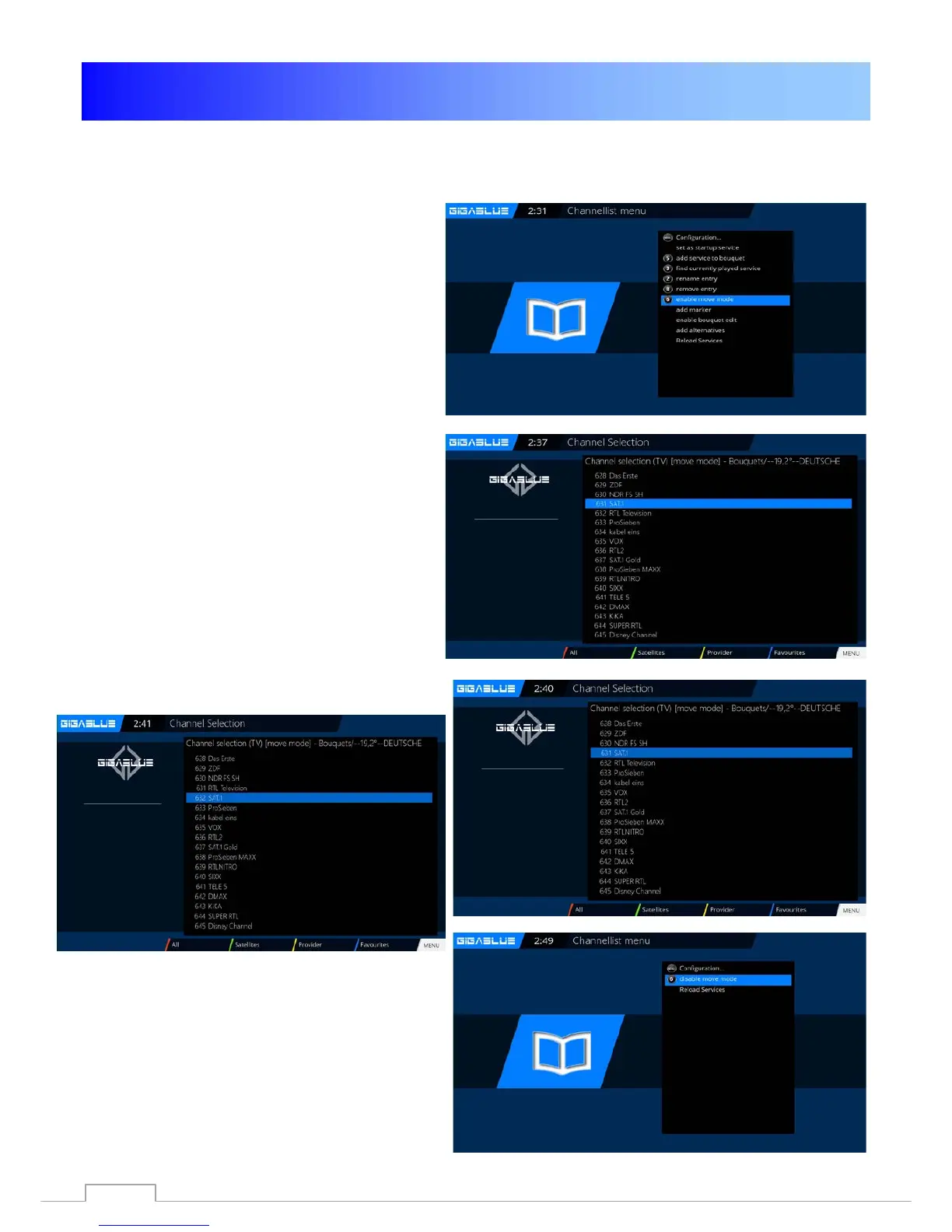
Press the Menu button and select
Activate move mode, you press OK Fig.1
Now proceed with the arrow keys ▲ ▼ to
the channel you want to move,
Select channel by pressing the OK button
Channel is highlighted in
RED Fig.2.
Fig. 1
Now move the channel to the desired
location
and press the OK button Fig.4. If all the
channels on the desired location are pressing
the Menu key and exit the Move mode Fig.5.
Now move the channel to the desired
location and press the OK button Fig.4.
If all channels are at the desired
location, press the Menu key and exit
the Move mode Fig.5.Now move the
channel to the
Fig. 2
Fig.3
Fig. 4



 To Next Page