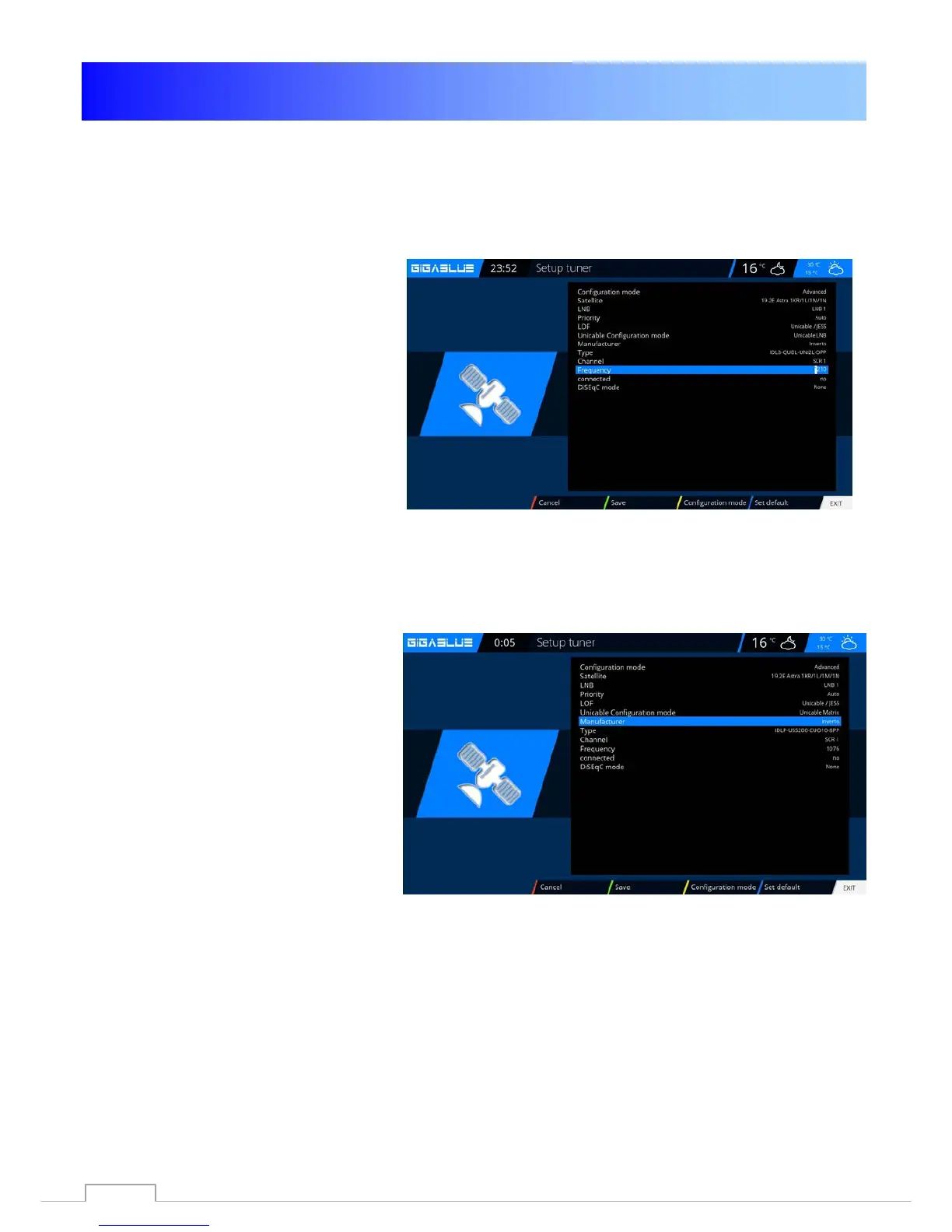
Unicable GigaBlue Box
Unicable Configuration
Unicable LNB
Menu -> Setup -> Tuner -> Basic setting -> Choose Tuner
Configuration mode -> Advanced
Satellit -> Select a satellite (for
example,Astra 19.2°E)
LNB -> LNB1
Priority -> Auto
LOF -> Unicable
Unicable Configuration -> Unicable LNB
Manufacturer -> Manufacturer of LNB
Type -> Type of LNB
Channel -> select one of the 4 channels
Frequenz -> is permanently linked with the
channel and can not be changed here
Unicable house wiring with Unicable multi-switch on a satellite
Menu -> Setup -> Tuner -> Basic setting -> Choose Tuner
Configuration mode -> Advanced
Satellit -> Select a satellite (for
example,Astra 19.2°E)
LNB -> LNB1
Priority -> Auto
LOF -> Unicable
Unicable Configuration -> Unicable Matrix
Manufacturer -> Manufacturer of Matrix
Type -> Type of Matrix
Channel -> select one of the 4 channels
Frequenz -> is permanently linked with the
channel and can not be changed here
60



 To Next Page