GWN7000 User Manual
Version 1.0.6.28
DMZ
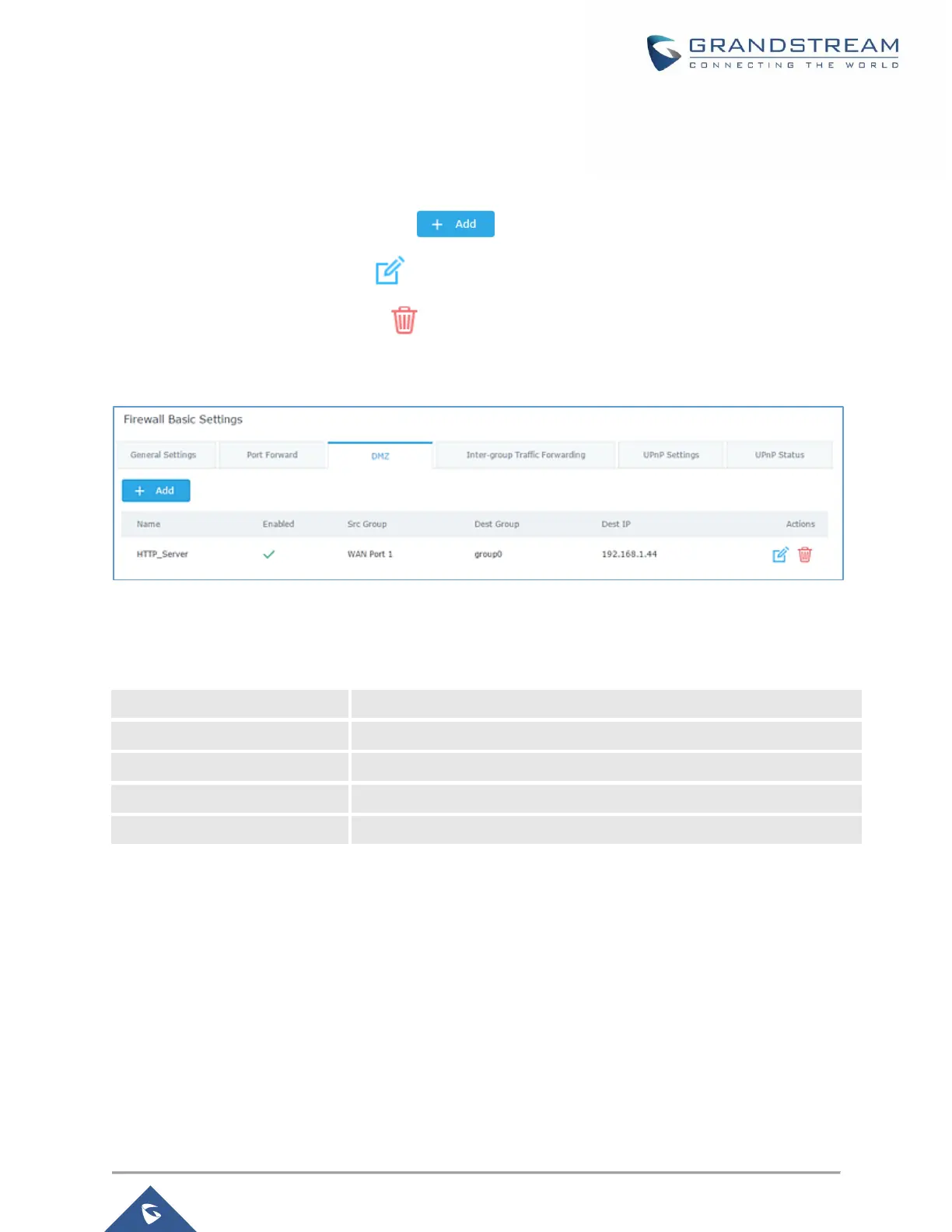
GWN7000 support DMZ, where it is possible to specify a LAN client to be put on the DMZ.
• To add an IP into the DMZ, click on .
• To edit a DMZ entry, click on .
• To delete a DMZ entry, click on .
Figure 67: DMZ
Refer to below table for DMZ fields:
Table 36: DMZ
Specify a name for the DMZ entry.
Check to enable this DMZ entry.
Set the destination IP address.
UPnP
GWN7000 supports UPnP that enables programs running on a host to configure automatically port
forwarding.
UPnP allows a program to make the GWN7000 to open necessary ports, without any intervention from the
user, without making any check.
UPnP settings can be accessed from GWN7000 WebGUI→Firewall→Basic→UPnP Settings.
Refer to below Table for UPnP settings.

 To Next Page
 Loading...