Mounting the Ripple-2 Node housing
6. Follow any additional mounting steps provided by the pedestal manufacturer.
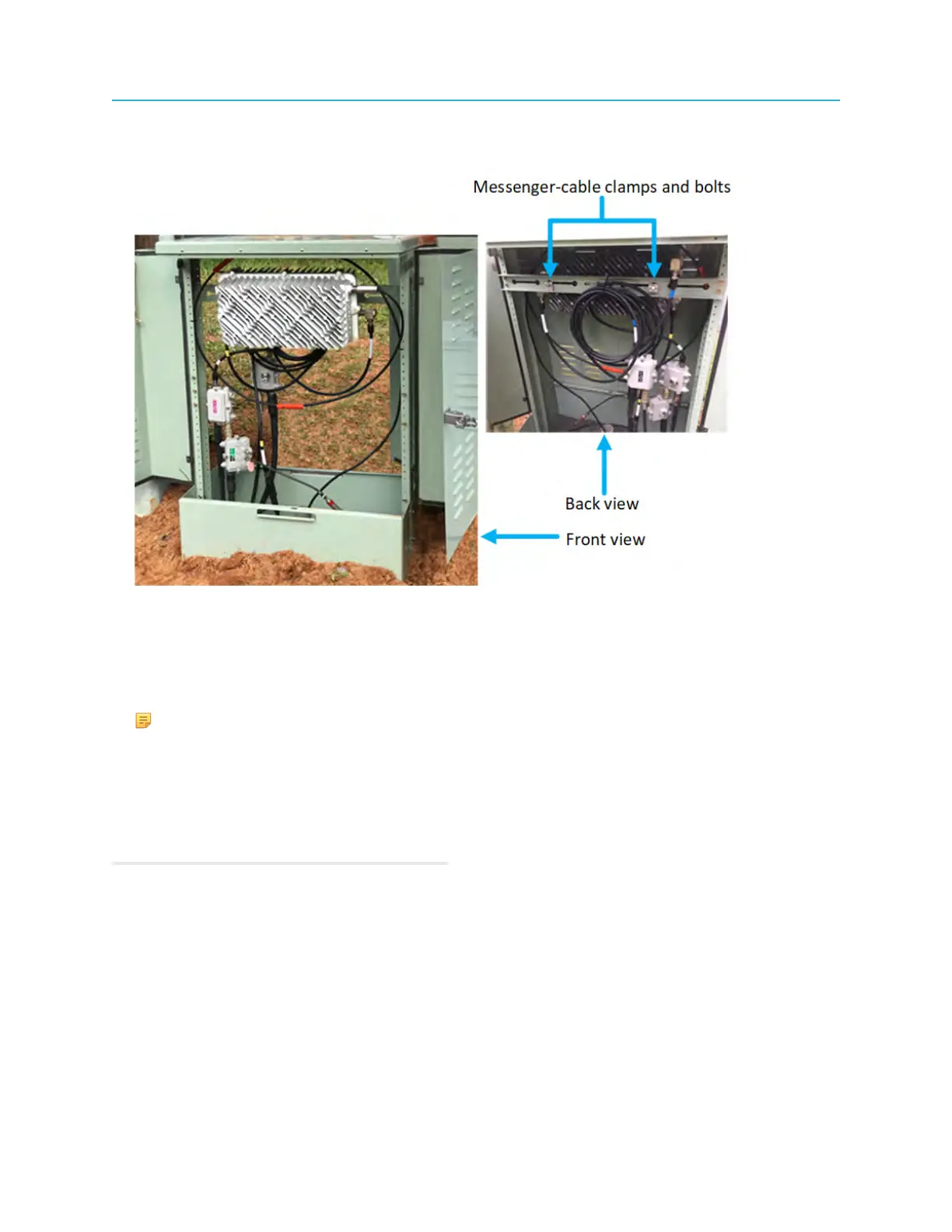
Front and back views of a Ripple-2 node mounted in a pedestal:
Figure 4-17: Ripple-2 node mounted in a pedestal
You are now ready to connect the coaxial cables and to ground the equipment.
7. Connect the coaxial cables to the pin connectors according to the manufacturer’s specifications. See
also relevant section below.
NOTE: Depending on the pedestal size, 90-degree adapters may also be required to connect
the coaxial cables to the node. The adapters may be purchased separately from a third party
CATV adapter and connector provider.
8. Ground the equipment in accordance with local codes and regulations. See also relevant section
below.
9. Connect the RF-coaxial and optical-fiber cables.
Related information
Connecting coaxial cables
Connecting fiber cables to the Ripple-2 Node
Connecting coaxial cables
Installing the fiber cables into the Pebble-1 module
53 Installation Guide



 To Next Page