Affirm Breast Biopsy Guidance System User Guide
Chapter 3: Installation, Verification, and Removal
MAN-06411-002 Revision 003 Page 15
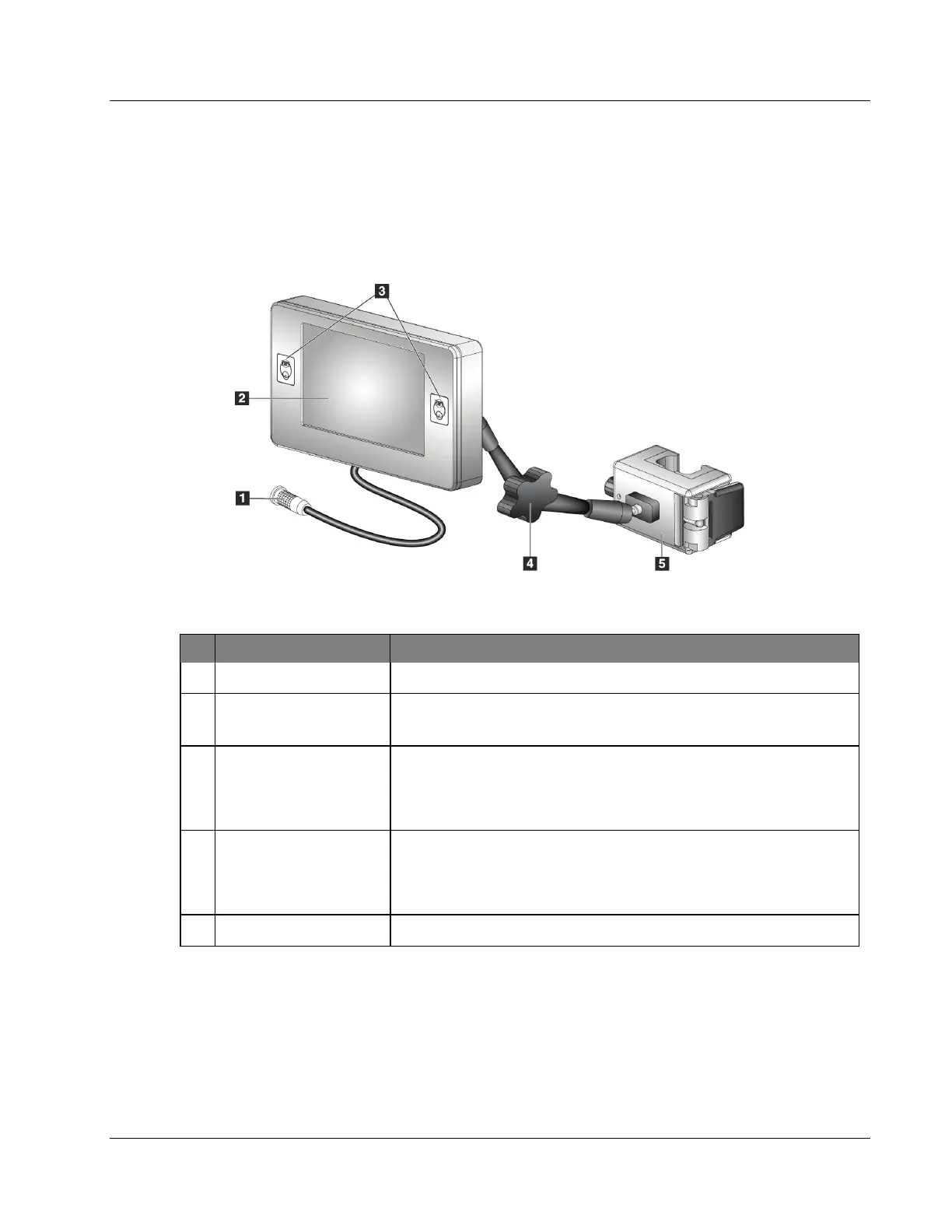
3.2 Biopsy Control Module Components
The Biopsy Control Module attaches to either the left or right handle on the Biopsy
Guidance Module with a bracket (item 5). The display screen (item 2) is a touch screen
for the user to perform the desired tasks. Motor Enable buttons (item 3) on either side of
this module (and at the rear) activate motorized movement of the biopsy device.
Figure 7: Biopsy Control Module
Table 2: Components of the Biopsy Control Module
# Name Description
1 Cable Connects to the Biopsy Guidance Module.
2 Display Screen
Shows targets, system status, the name of the biopsy device, and
safety margins. Touch screen buttons permit option selection.
3 Motor Enable Buttons
Front and back button pairs on either side of the display. Press the
front and back buttons of either side at the same time to activate
motor movement.
4
Articulating Arm Lock
and Release
Rotate to release the lock and adjust the module. Rotate in the
opposite direction to lock the arm and hold the module in the new
position.
5 Attachment Bracket Attaches to either handle of the Biopsy Guidance Module.












 To Next Page