Affirm Breast Biopsy Guidance System User Guide
Chapter 4: User Interface - Biopsy Control Module
Page 48 MAN-06411-002 Revision 003
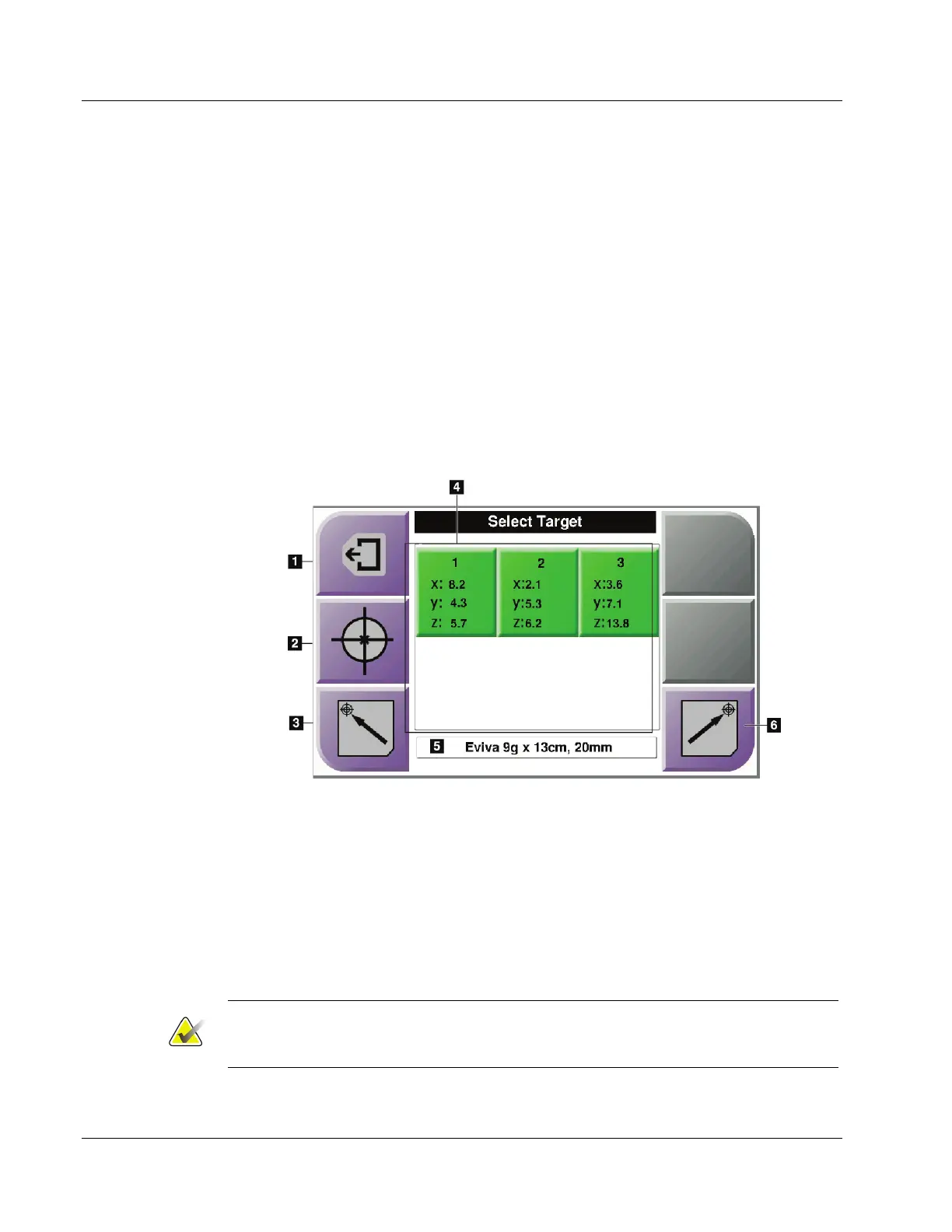
4.1.4 Select Target Screen
This screen allows the user to select a different target for biopsy guidance or to move to
one of the Home positions. The buttons in the Select Target screen allow the user to go to
the previous screen (item 1), go to the Target screen (item 2), or go to the Left or Right
Home Position (item 3 or item 6).
The display area (item 4) of the Select Target screen shows one of more sets of target
coordinates. The name of the biopsy device that was selected also displays (item 5).
To move the biopsy device to one of the targets shown in this screen:
1. Press one of the target coordinates icons or the Home buttons.
The system changes to the Target Guidance screen.
2. Press and hold a right or left Motor Enable button pair on the Biopsy Control
Module. The needle moves to the X and Y positions.
Figure 42: Select Target Screen
Figure Legend
1. Go to the previous screen
2. Go to the Target Guidance screen
3. Go to the Home Left Position
4. Target Coordinates
5. Biopsy Device
6. Go to the Home Right Position
Note
You must simultaneously press both switches of a right or left Motor Enable pair to
start the motor movement.












 To Next Page