Affirm Breast Biopsy Guidance System User Guide
Chapter 4: User Interface - Biopsy Control Module
Page 42 MAN-06411-002 Revision 003
4.1.2 Target Guidance Screen
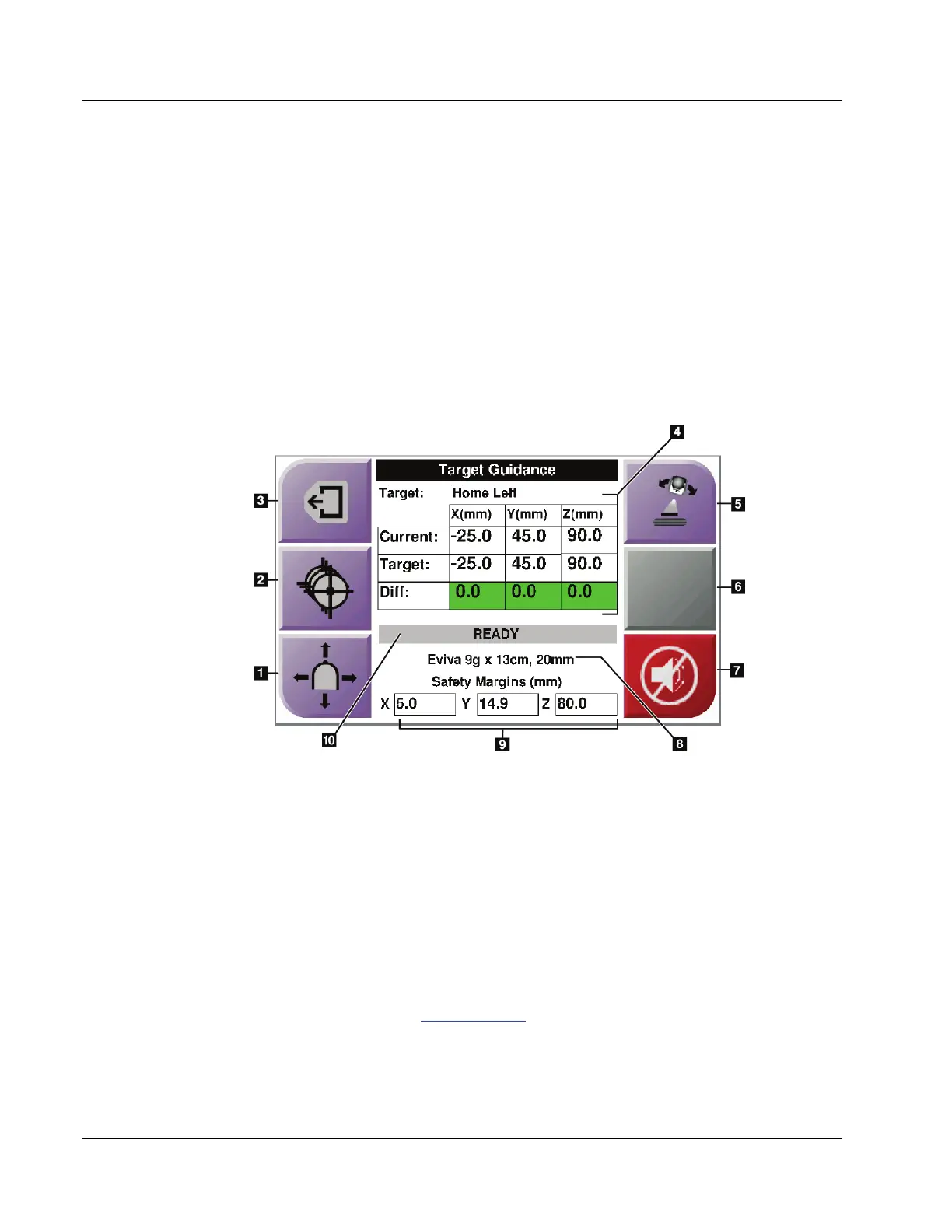
The following figure shows the main screen of the Biopsy Control Module. This screen
shows the current position of the biopsy device, the selected target coordinates and the
Cartesian difference between the two positions.
The buttons in the Target Guidance screen allow the user to go to the previous screen
(item 3), go to the screen for target selection (item 2), go to the screen for motorized
movement of the biopsy device in the X and Y axes (item 1), select the C-Arm Mode or
Stereo Mode for the C-arm rotation (item 5), and cancel an audible signal (item 7).
The display area (item 4) of the Target Guidance screen shows the difference between the
current position of the biopsy device and the target coordinates, the status of the system
(item 10), the biopsy device installed on the system (item 8), and the safety margins (item 9).
Figure 34: Target Guidance Screen
Figure Legend
1. Go to the Jog Mode screen
2. Go to the Select Target screen
3. Go to the previous screen
4. Target Information
5. Switch between C-Arm Mode or Stereo Mode (when
the system is set for Manual C-Arm Stereo Mode).
6. This button is gray and disabled.
7. Mute or Enable Sound (An icon displays on this button
and an alarm sounds when there is a system fault.
Refer to The Sound Button on page 45.)
8. Selected Biopsy Device
9. Safety Margins
10. System Status












 To Next Page