Affirm Breast Biopsy Guidance System User Guide
Chapter 4: User Interface - Biopsy Control Module
Page 44 MAN-06411-002 Revision 003
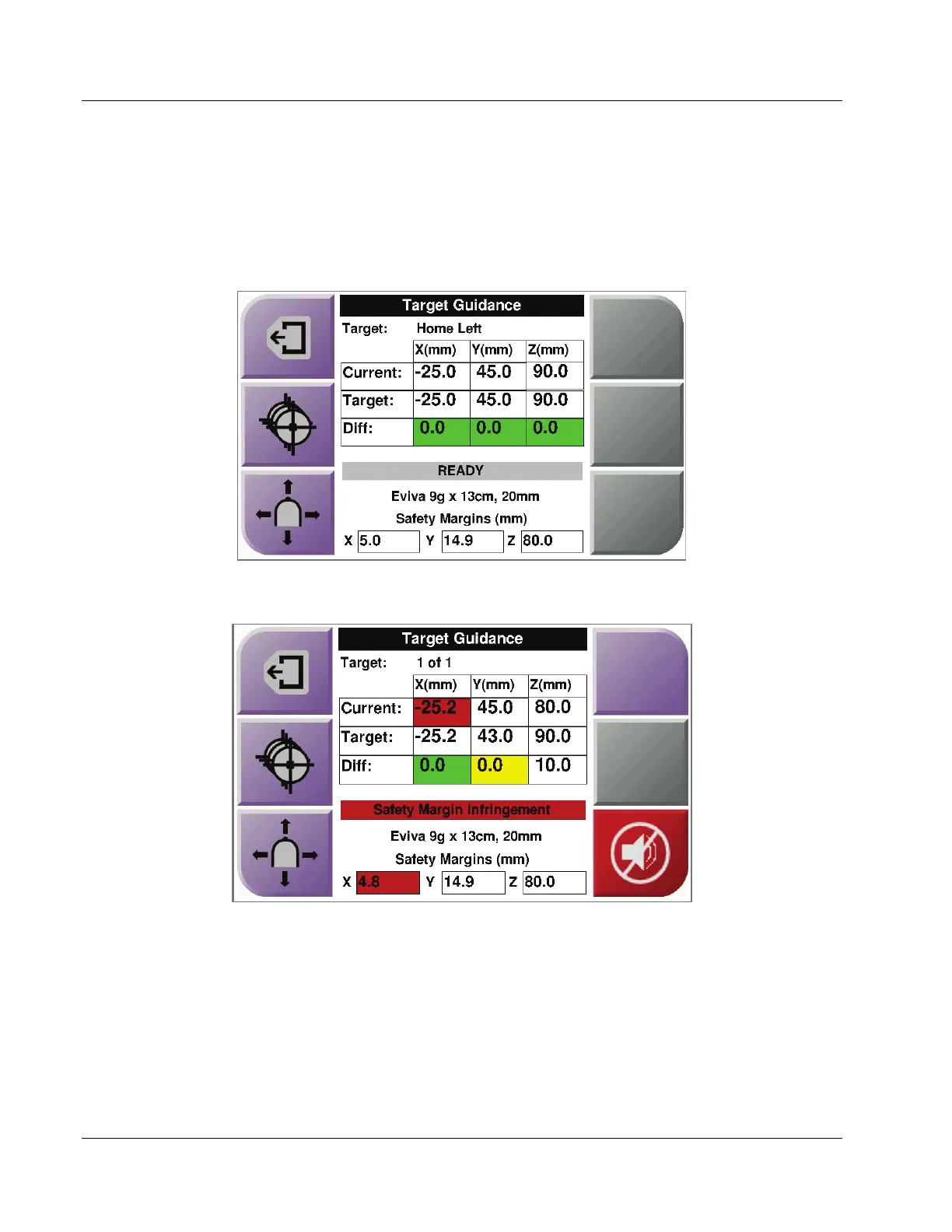
Colored Cells in the Screens
Green Cells
When all Diff cells are green, the biopsy device is in the correct position for the selected
target. When the biopsy device is fired, the target is at the center of the aperture of the
device.
Figure 36: Green Differential Cells
Yellow and Red Cells
Figure 37: Yellow and Red Cells
• Yellow indicates that the biopsy device is in the correct position for that axis, but you
must move the device to the final Z-position. When the biopsy device is in the final
Z-position, the yellow cell changes to green.
• Red indicates a problem with a safety margin. The Sound button appears and the
system makes repeated beeps. Make adjustment in the axis indicated by red. When
the cell is not red, the device is within the safety limits.












 To Next Page