Affirm Breast Biopsy Guidance System User Guide
Chapter 4: User Interface - Biopsy Control Module
Page 46 MAN-06411-002 Revision 003
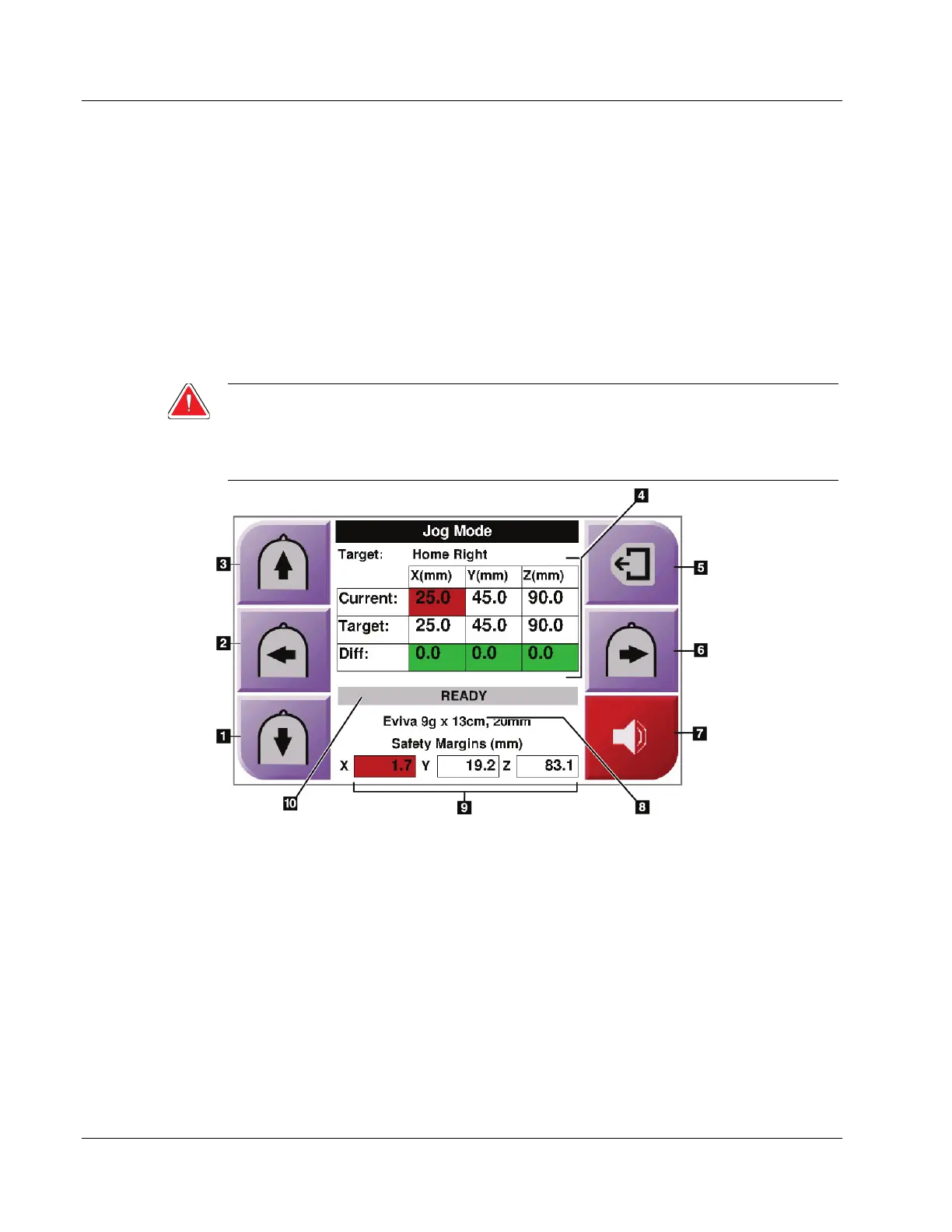
4.1.3 Jog Mode Screen
This screen allows the user to manually overwrite the targeting coordinates of the Biopsy
Guidance Module. The arrow buttons in the Jog Mode screen change the Jog value of the
X and Y coordinates. Other buttons in this screen allow the user to go to the Target
Guidance Screen (item 5), and cancel (item 7) an audible signal that sounds when there is
a problem with a safety margin.
The display area (item 4) of the Jog Mode screen shows the difference between the current
position of the biopsy device and the target coordinates, the status of the system (item
10), the biopsy device installed on the system (item 8), and the safety margins (item 9).
Warning:
Red cells indicate a problem with a safety margin. Patient injury or
equipment damage may occur if you continue. Make adjustments to be
within safety limits.
Figure 40: Jog Mode Screen












 To Next Page