Affirm Breast Biopsy Guidance System User Guide
Chapter 3: Installation, Verification, and Removal
Page 32 MAN-06411-002 Revision 003
Biopsy Device Adapter
Installation of the Biopsy Device Adapter
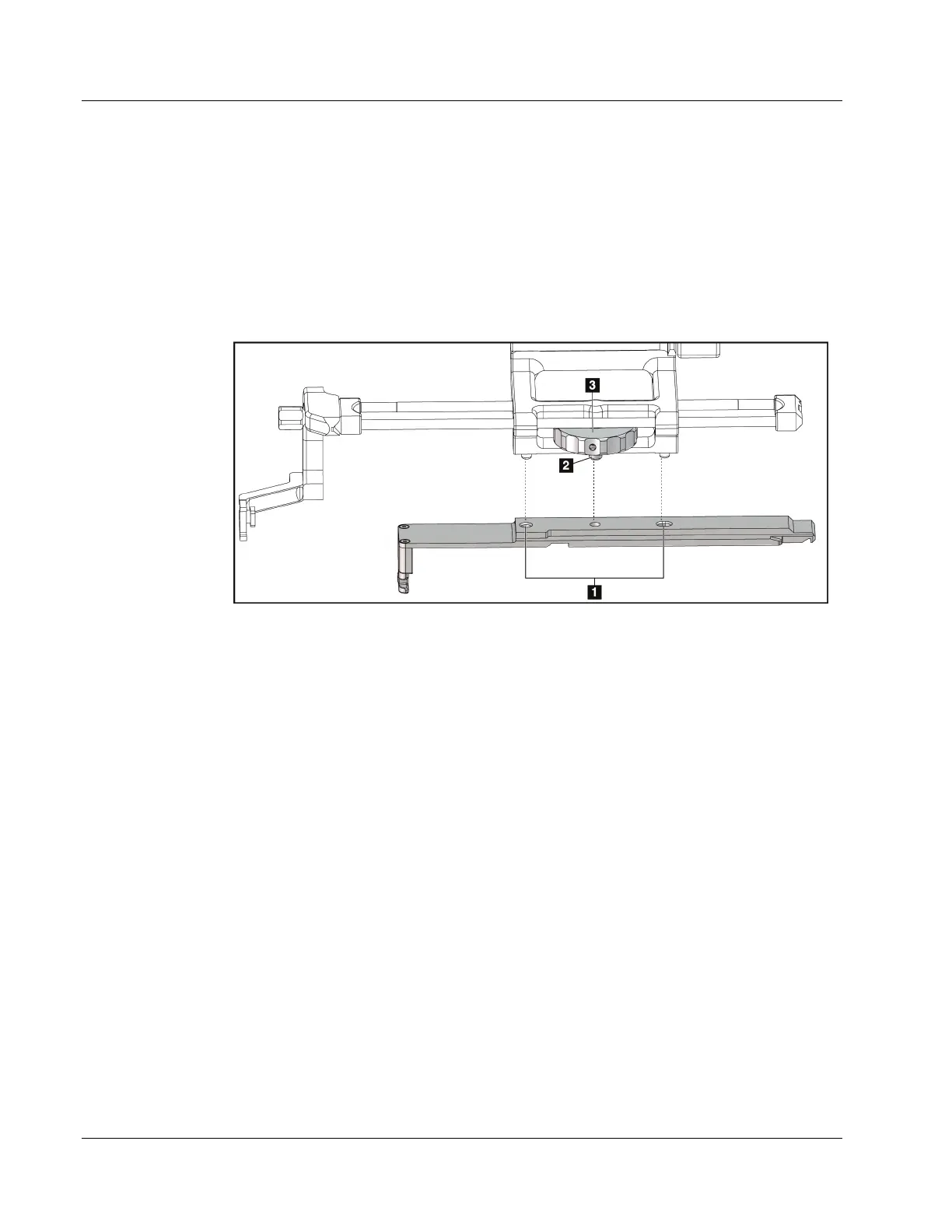
1. Align the outer holes in the biopsy device adapter (item 1 in the following figure)
with the guide pins on the device mount.
2. Align the center hole in the biopsy device adapter with the mount screw (item 2).
3. Turn the device mount knob (item 3) to secure the biopsy device adapter.
Figure 26: Attaching the Biopsy Device Adapter to the Device Mount (Lateral Arm)
Figure Legend
1. Biopsy Device Adapter Holes
2. Device Mount Screw
3. Device Mount Knob
Removal of the Biopsy Device Adapter
1. Turn the mount knob to release the biopsy device adapter.
2. Pull the biopsy device adapter away from the device mount.












 To Next Page