Affirm Breast Biopsy Guidance System User Guide
Chapter 5: Biopsy
MAN-06411-002 Revision 003 Page 59
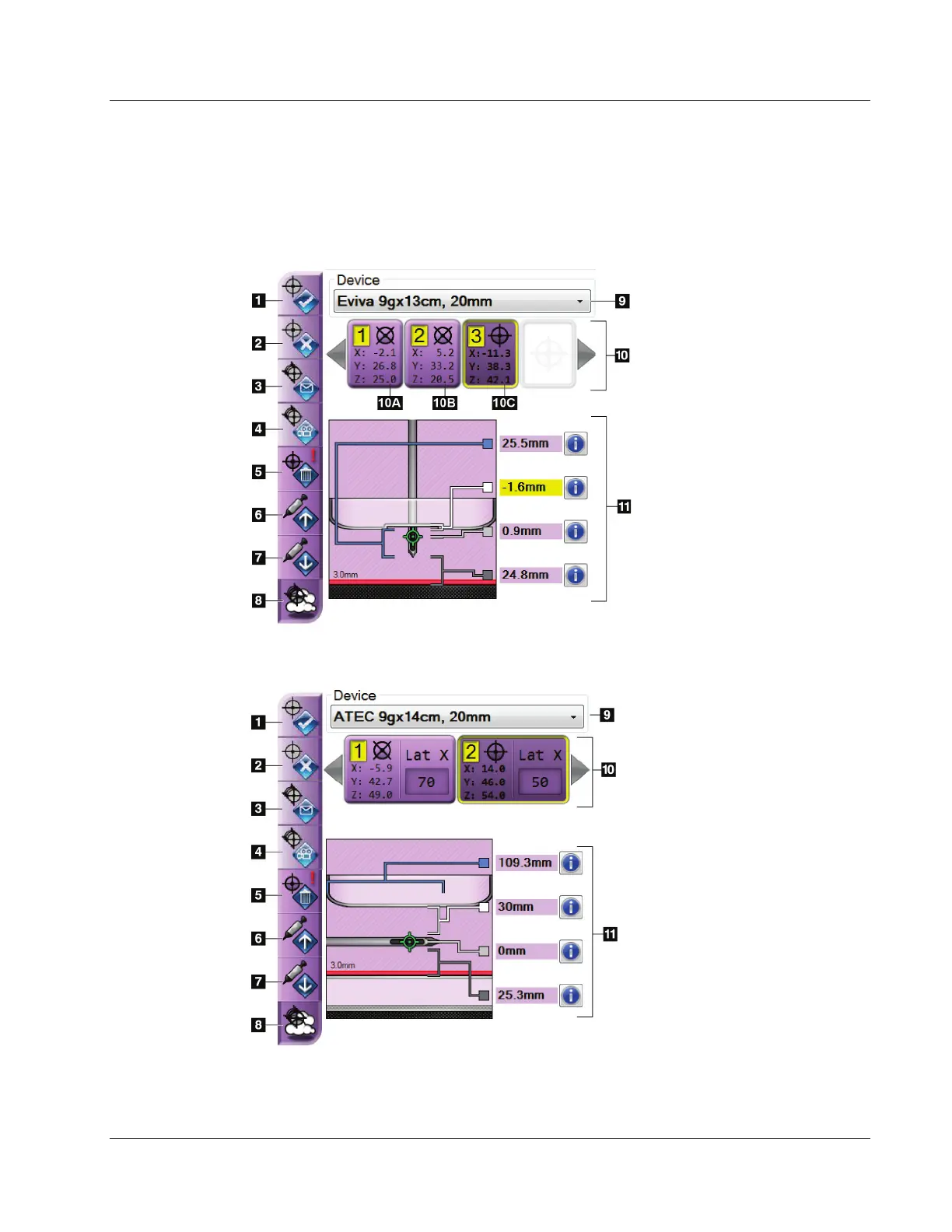
5.3.1 Biopsy Options
The buttons in the Biopsy Options area communicate target information to the Biopsy
Control Module. The area on the right side of the buttons shows the selected target and
biopsy device.
Figure 53: Function Buttons and Data on the Biopsy Tab
(Standard Needle Approach)
Figure Legend
1. Create Target Button
2. Reject Target Button
3. Resend Target Button
4. Project Target Button
5. Delete Target Button
6. Move Z-Target Up Button
7. Move Z-Target Down Button
8. Show/Hide Targets Button
9. Selected Biopsy Device
10. Target Set
11. Status Indicators
Figure 54: Function Buttons and Data on the Biopsy Tab
(Lateral Needle Approach)
Figure Legend
1. Create Target Button
2. Reject Target Button
3. Resend Target Button
4. Project Target Button
5. Delete Target Button
6. Move Z-Target Up Button
7. Move Z-Target Down Button
8. Show/Hide Targets Button
9. Selected Biopsy Device
10. Target Set
11. Status Indicators












 To Next Page