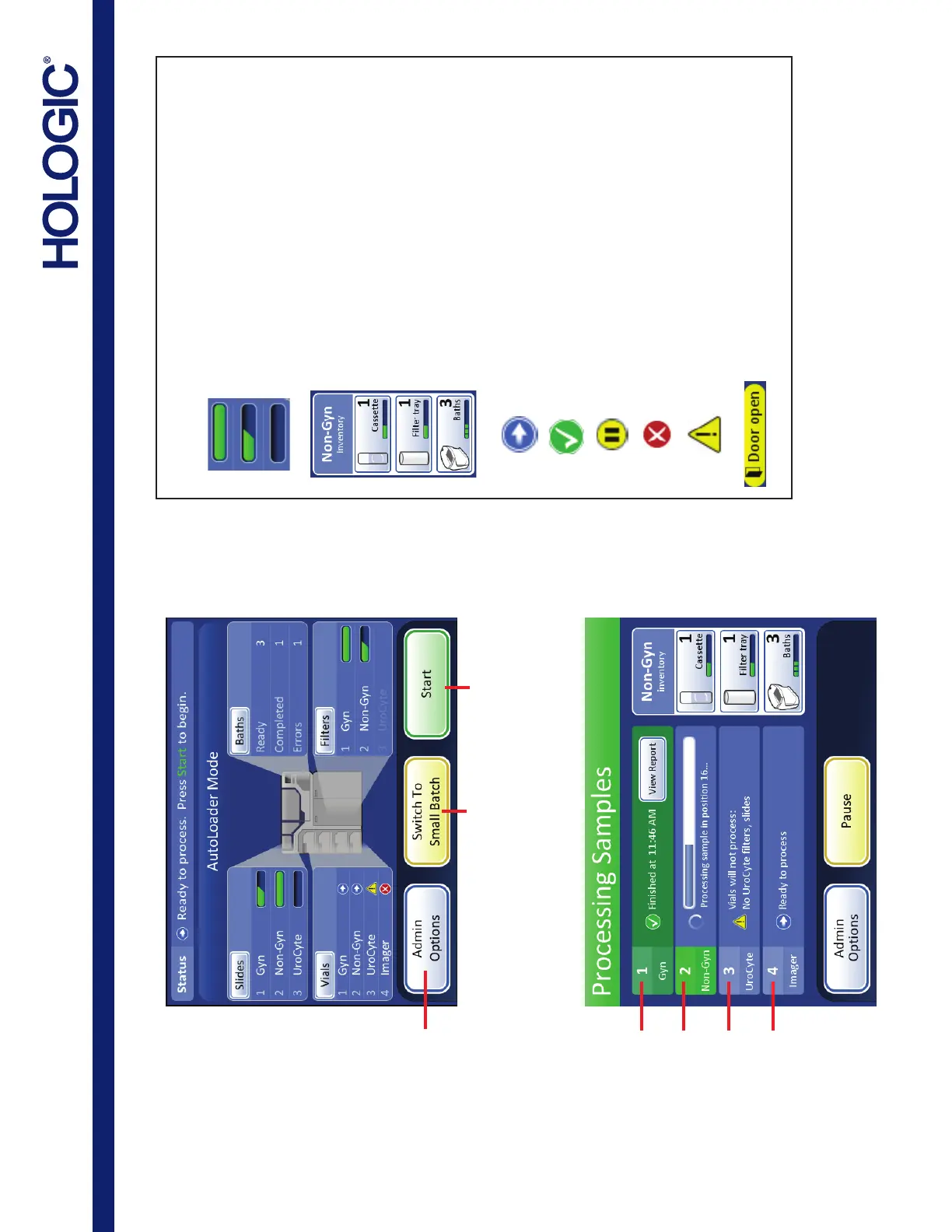
Administrative Options:
System Settings
Reports and Logs
Clean Screen
Empty Liquid Waste
Design Labels
Configure Barcodes
Clean System
Change Air Filter
Shutdown the
instrument
Switch to
Small Batch
Begin
Processing
AutoLoader Mode - Idle
ThinPrep
®
5000 Processor with Autoloader Quick Reference Guide
AW-19174-001 Rev. 001
AutoLoader Mode - Processing
Completed
Ready for processing
The batch has been paused
Not ready or error. Read the message
in the status bar.
Vial tray cannot be processed -
missing or low inventory
Full slide cassette or filter tray
Partial slide cassette or filter tray
Empty slide cassette or filter tray
User action prompt
Sample type being processed
(Non-Gyn example)
Number of Non-Gyn slide cassettes available
Number of Non-Gyn filter trays available
Number of Non-Gyn fixative baths available
Status Indicators Used on the Interface
Vial Tray 1 (Gyn)
completed processing
Vial Tray 2 (Non-Gyn)
is processing
Vial Tray 3 (UroCyte)
needs operator action
Vial Tray 4 (Imager)
ready for processing
Refer to the ThinPrep 5000 Autoloader Operator’s Manual for complete
operating instructions.



 To Next Page