USER INTERFACE
6.10
ThinPrep™ 5000 Processor with AutoLoader Operator’s Manual
Baths
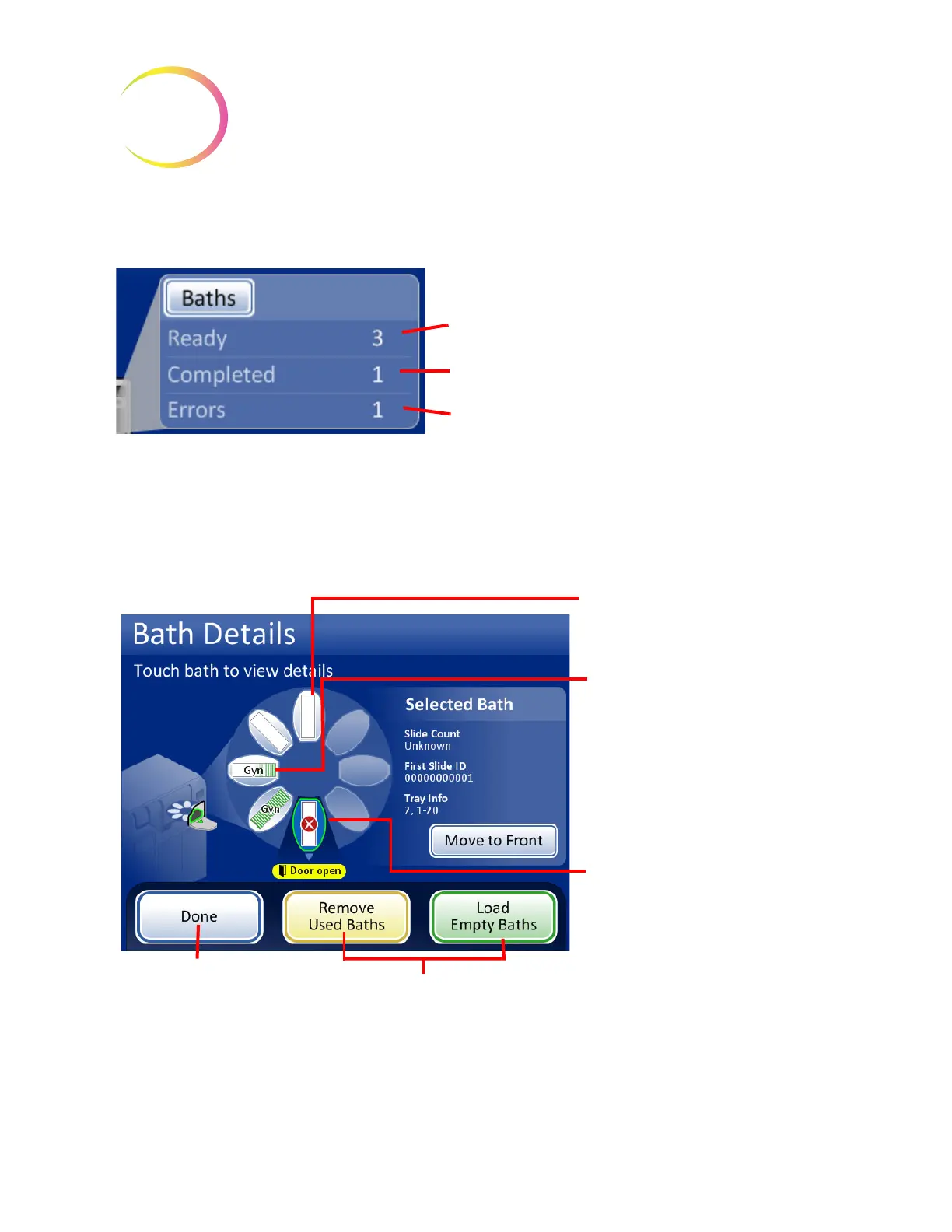
Figure 6-9 Baths Pane on Main Screen
The baths pane shows how many fixative baths are on board and what condition they are in: ready,
completed or with an error. Touch the
Baths
button or anywhere on the baths pane to display the
Bath Details screen.
Figure 6-10 Bath Details Display
Touch the
Baths
button or anywhere on the pane to open
the Bath Details display
How many baths are in the instrument, ready to process
How many baths are in the instrument that have
completed slides and must be unloaded
How many baths are in the instrument that need operator
action to correct an error
Fixative bath position
(8 total)
Fixative bath position during
processing
Touch a bath on the touch screen
once to display details about that
bath.
Touch a bath on the touch screen
twice to move the bath to the front
position (door position).
Bath door position for loading or
removal
The selected bath’s position is
outlined in green.
Bath movement commands
Done button to
return to main
screen



 To Next Page