USER INTERFACE
6.14
ThinPrep™ 5000 Processor with AutoLoader Operator’s Manual
Filters
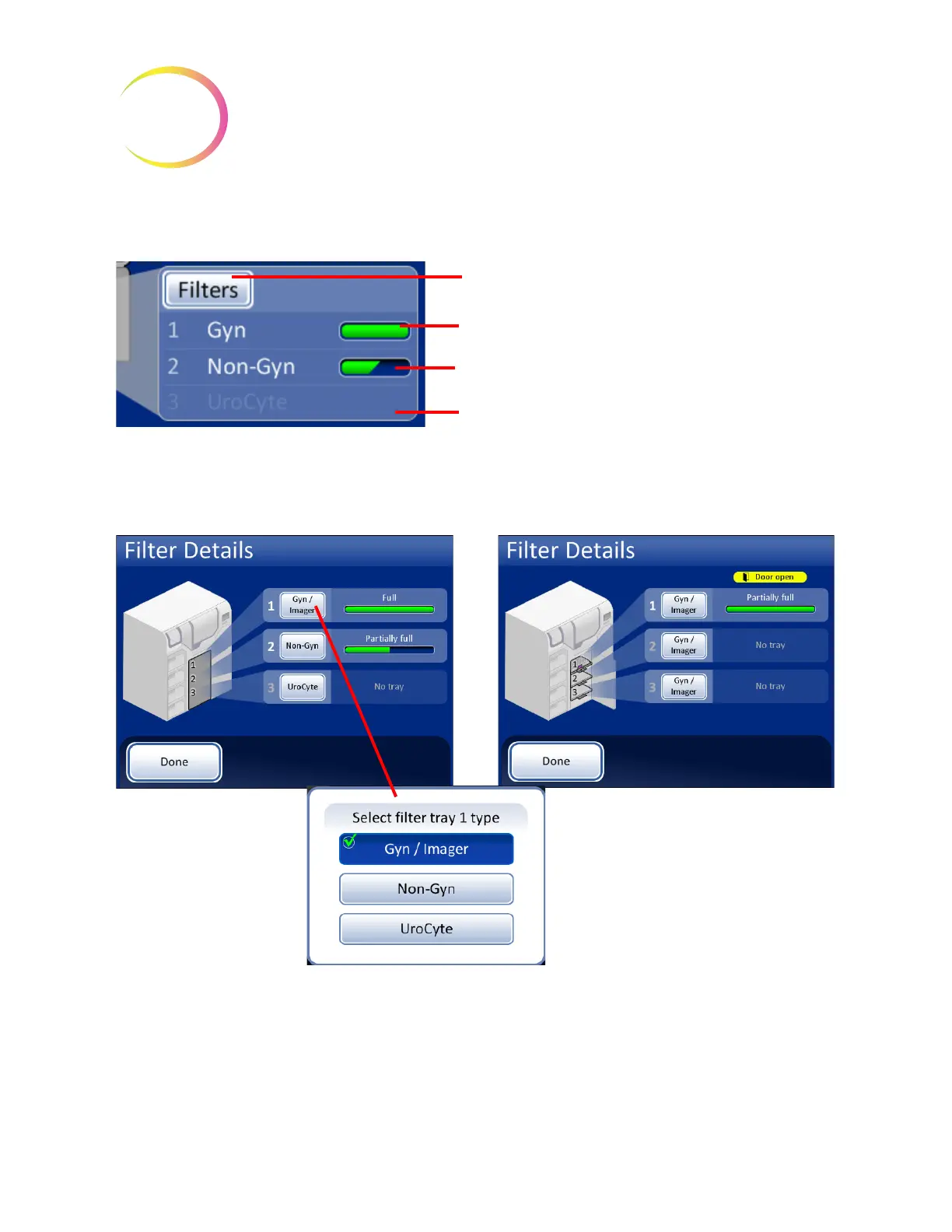
Figure 6-13 Filters Pane on the Main Screen
Figure 6-14 Filter Details Display
When a filter tray is placed into the instrument, the system assumes it is “full” until it checks for the
presence of filters in the tray. The status is “partial” after the system has used filters out of a tray. The
status is “empty” when the tray has no filters left OR if it finds an empty position. If a filter tray is not
present, the status is “No tray.”
Touch the
Filters
button or anywhere on the pane to
open the Filters Details display.
Tray 1 is selected as Gyn filter type and it is full
Tray 2 is selected as Non-Gyn filter type and it is
partially full
Tray 3 is selected as UroCyte filter type and the tray is
not present
Filter door closed Filter door open
The filter tray number
corresponds with the
position it is in when
placed in the instrument
Press the button to select the type of slide
in the cassette.
Press the Done button to return to the
main screen



 To Next Page