USER INTERFACE
6.8
ThinPrep™ 5000 Processor with AutoLoader Operator’s Manual
Vials
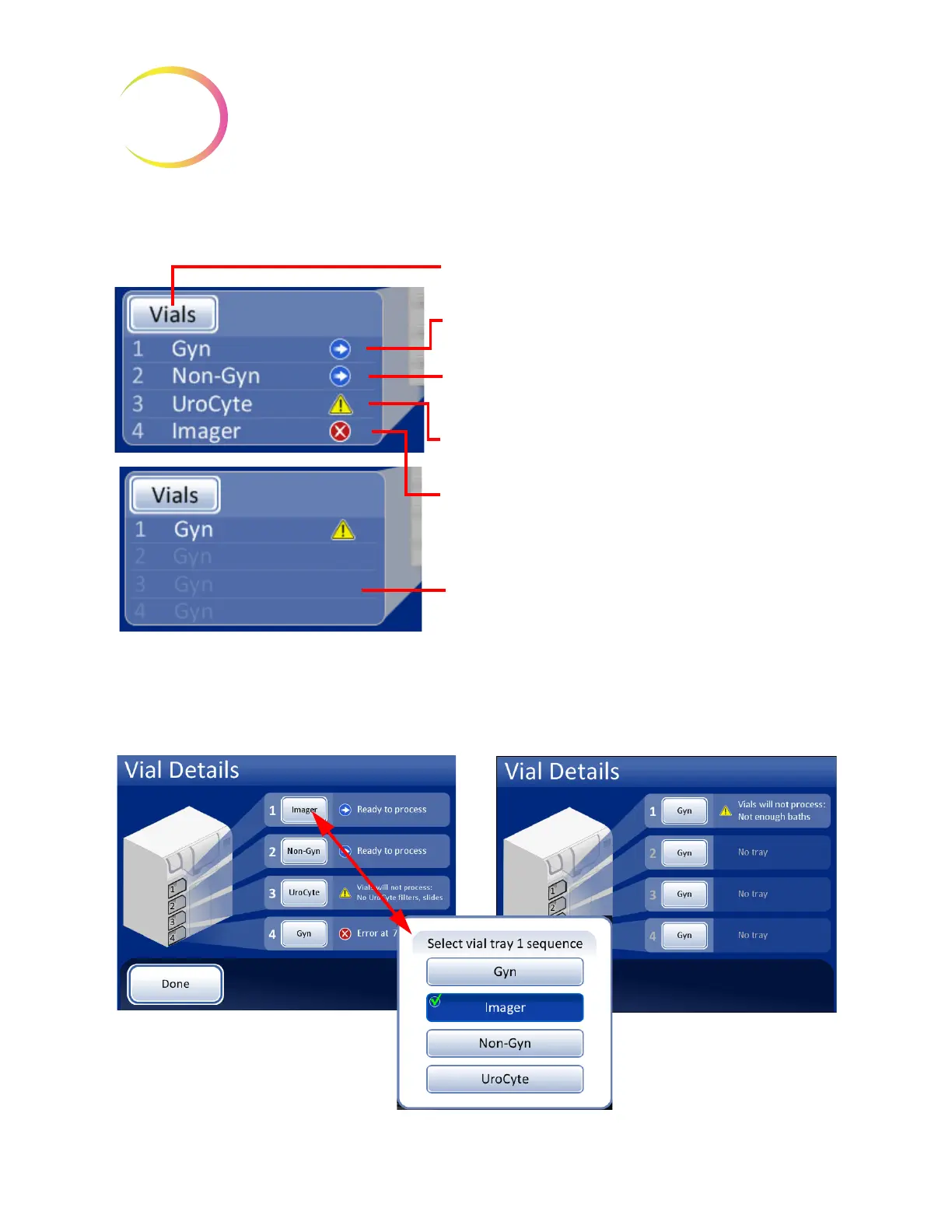
Figure 6-6 Vials Pane on Main Screen
The vials pane shows how the vial trays are configured by sample type and indicates whether the
trays are present and ready for processing. Touch the
Vials
button or anywhere on the vials pane to
display the Vial Details screen.
Figure 6-7 Select Vial Tray Sequence (Sample Type)
Touch the
Vials
button or anywhere on the pane to open
the Vial Details display.
Tray 1 is selected as Gyn sample type and it is ready for
processing
Tray 2 is selected as Non-Gyn sample type and it is ready
for processing
Tray 3 is selected as UroCyte sample type and it is unable
to process
Tray 4 is selected as Imager sample type (a Gyn sample
that will subsequently be run on the ThinPrep Imaging
System) and it has an error
Grayed out:
Trays 2, 3 and 4 have been selected as Gyn sample type,
but the tray is not present
Press the button to select the sample
type for that vial tray
Press the Done button to return to the
A warning symbol indicates that
a vial tray is unable to be
processed. A message lists the
reason why.



 To Next Page