ThinPrep™ 5000 Processor with AutoLoader Operator’s Manual
6.3
USER INTERFACE
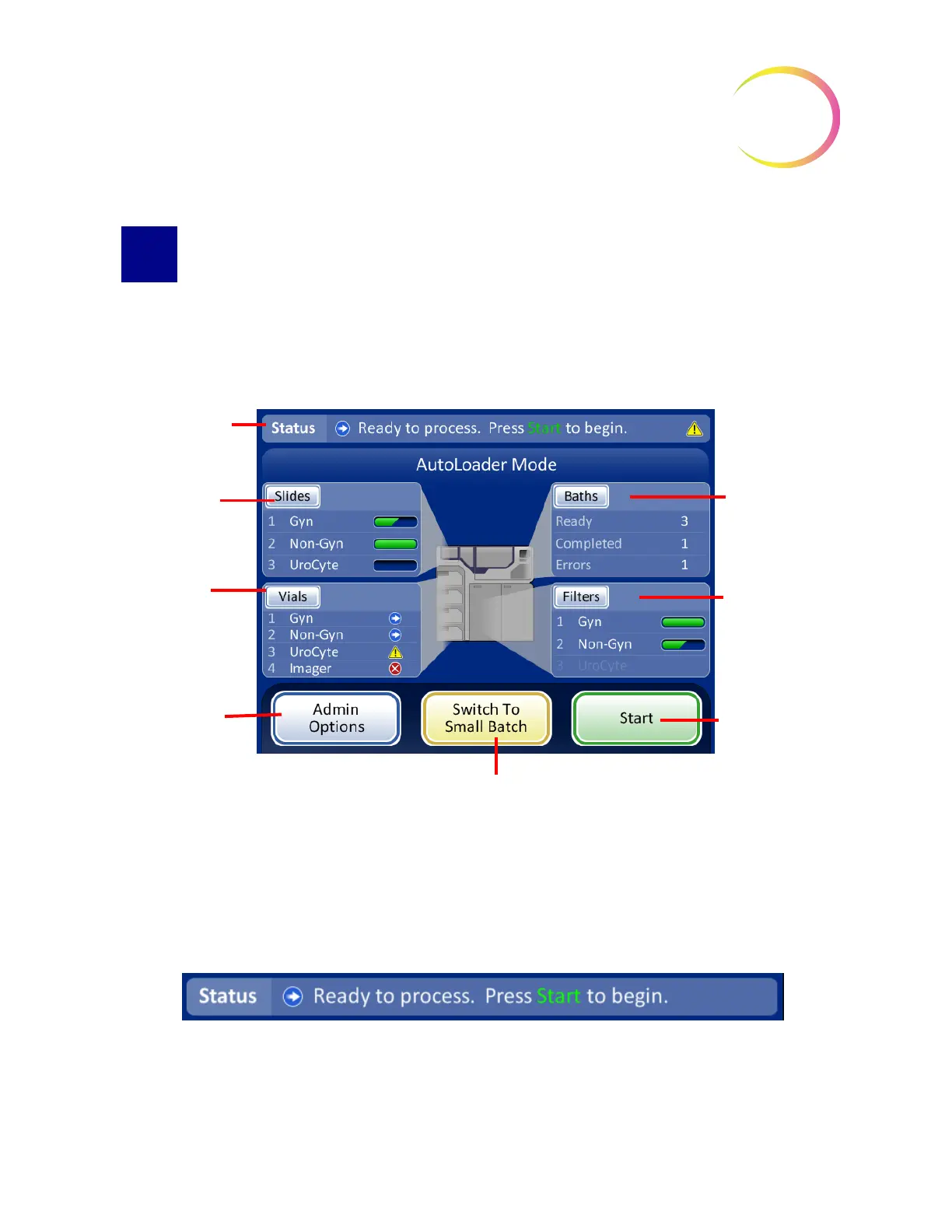
MAIN SCREEN, INSTRUMENT IDLE
When the ThinPrep
™
5000 processor with AutoLoader is powered on and ready for use, the
main screen will be displayed.
Figure 6-1 Main Screen, Status Ready to Process
Status Bar
The status bar indicates whether the system is ready to begin processing. If the system determines
that slides, vials, filters and baths are present and match the sample type selected, the status will be
Ready
.
Figure 6-2 System Status Ready
If the system determines operator action is required, a message is displayed on the status bar and the
batch will not begin until the item(s) have been resolved. If multiple items need to be resolved, a
Status bar -
indicates readiness
for processing or
prompts for user
action
Slides status
Vials status
Baths status
Filters status
Administrative
Options
button to
access user
preferences and
settings
Start
process
button
Switch to Small Batch Mode
button



 To Next Page