USER INTERFACE
6.78
ThinPrep™ 5000 Processor with AutoLoader Operator’s Manual
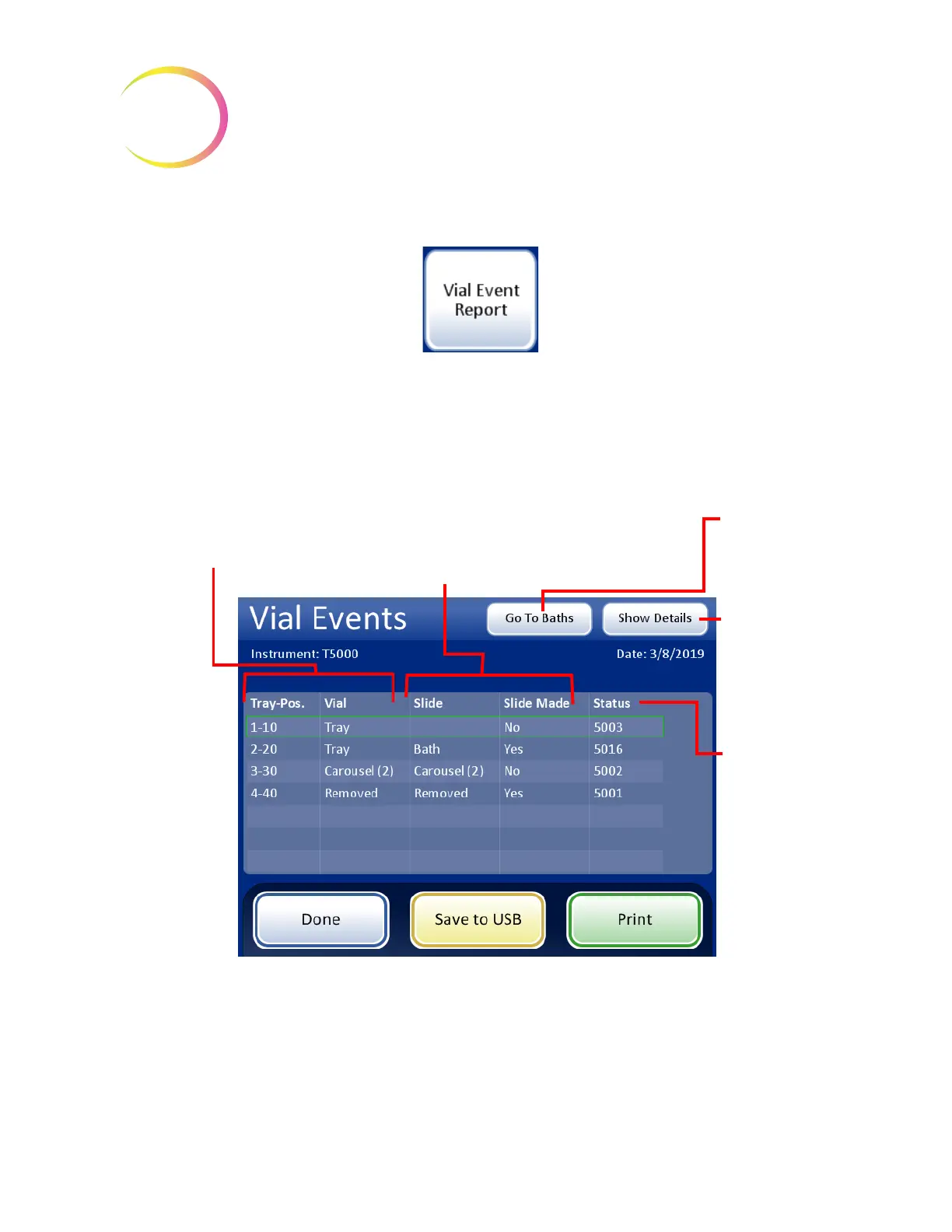
Vial Event Report
A Vial Event Report is generated every time vials are processed. The vial events report identifies the
position of a vial when an error occurs during processing. A vial event report only lists a vial tray if
that vial tray has a processing error. The vial events report indicates whether or not a slide was made.
The vial events report retains data for a vial until the vial tray is removed and replaced in the
AutoLoader.
Figure 6-97 Vial Events Report
Status:
This lists the
code for the vial
event. Touch the
code for
information
about the vial
event.
Vial information:
Starting position in tray
Current location of the vial
Save to USB
or
Print
(if enabled)
Done
button to return to the
Reports and Logs screen
Slide information:
Current location of the slide
Slide Made:
Yes if sample was processed onto the slide;
No if the sample was not processed onto
the slide.
Go To Baths
to
view the Baths’
screen
Select an entry
and press
Show
Details
to see
Vial Event Details
for an entry



 To Next Page