EasyManua.ls Logo

Huawei NetCol5000-C - Connecting Power Cables

Huawei NetCol5000-C
152 pages
Print Icon
To Next Page IconTo Next Page
To Previous Page IconTo Previous Page
Loading...
NetCol5000-C Chilled Water-Cooled In-Row Precision
Air Conditioner
User Manual
3 Installation Guide
Huawei Proprietary and Confidential
Copyright © Huawei Technologies Co., Ltd.
41
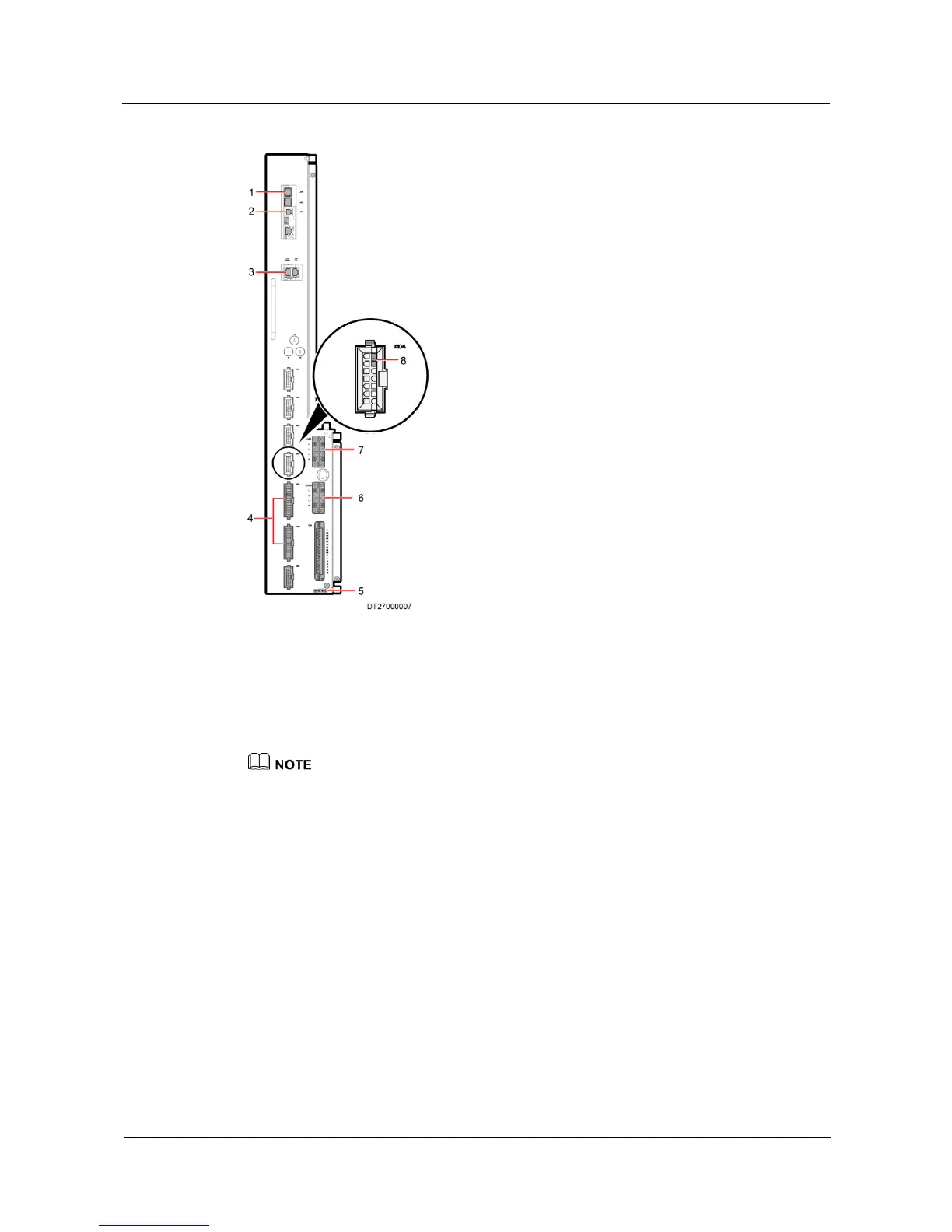
Figure 3-23 Electrical ports
1. Port for the humidity and
temperature sensor
2. Controller port
3. J73 group control
communications port
4. Voltage jumper port
5. Ground PE port
6. Power input port X200
7. Power input port X100
8. Outside water
sensor port
Single power supply: X200 is the power input port.
Dual power supply: The primary power supply connects to the X100 port, and the secondary power
supply connects to the X200 port.
3.13.3 Connecting Power Cables
Remove the transparent plastic cover of the terminal block, connect the cord end terminals to
the power cables, and connect two power cables to the 4PIN terminal, as shown in Figure
3-24, route power cables from the bottom as shown in Figure 3-25. Then cover the plastic
cover.


Table of Contents

Related product manuals