If you need to change fan settings, log in as the Engineer user or other types of users that have
higher permission.
Min speed cannot be greater than Max speed.
Min ret/sup air temp diff cannot be greater than Max ret/sup air temp diff.
Drain Device Settings
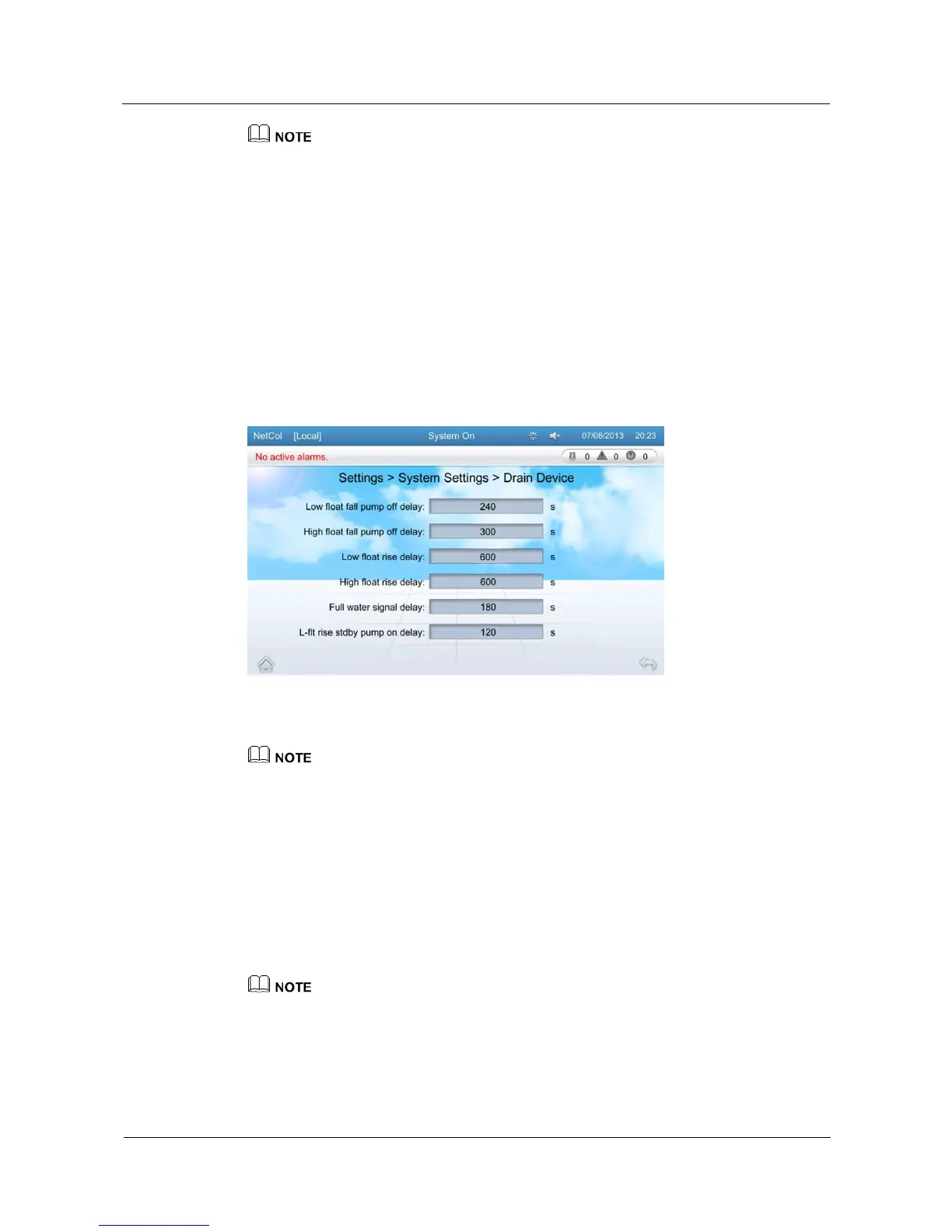
On the drain device settings screen, you can configure the low float fall pump off delay, high
float fall pump off delay, low float rise delay, high float rise delay, full water signal delay, l-flt
rise stdby pump on delay.
Tap Settings > System Settings > Drain Device on the home screen to enter the drain device
settings screen, as shown in Figure 5-34.
Figure 5-34 Drain device Settings
Tap items on the drain device settings screen to configure related parameters.
You need to log in as the Admin user when changing drain device settings.
Low float fall pump off delay cannot be greater than High float fall pump off delay.
High float rise delay cannot be greater than Low float rise delay.
L-flt rise stdby pump on delay cannot be greater than Low float rise delay.
5.11.5 Basic Settings
On the basic settings screen, you can set the language, time, date, and system.
Tap Settings > Basic Settings on the home screen to enter the basic settings screen, as shown
in Figure 5-35, Figure 5-36, and Figure 5-37.
The Guest user can perform basic settings only after the NetCol5000-C is powered on for the first time.
Otherwise, if you need to perform basic settings, please log in as the Operator user or other types of
users that have higher permission.
The process of basic settings is as follows:







 To Next Page