10
GPS/GPS-A OPERATION
10-10
5
GPS Memory longitude programming6.
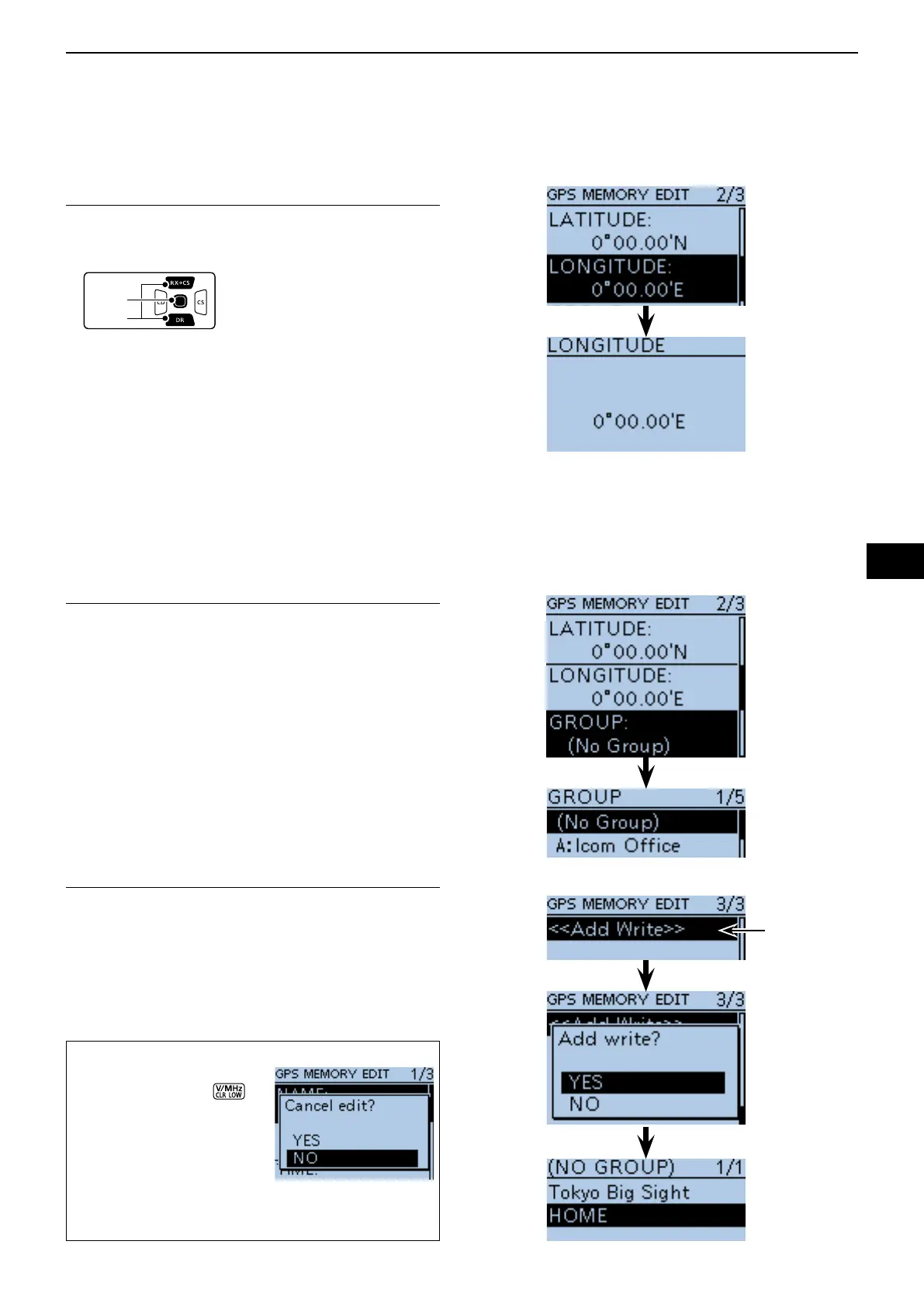
@7 Push D-pad() to select “LONGITUDE,” and then
push D-pad(Ent).
• The longitude edit screen is displayed.
@8 Rotate [DIAL] to edit the longitude.
• The longitude between 0°00.00' to 180°00.00' are pro-
grammable.
If "ddd°mm'ss"" is selected in the POSITION FORMAT
screen, between 0°00'00" to 90°00'00" are programmable.
(MENU > GPS > GPS Set > Position Format)
@9 Push D-pad() to move the cursor to backward or for-
ward to select and edit degrees or decimal minutes.
#0 Repeat steps @8 and @9 to enter a GPS Memory lon-
gitude.
• Select “E” to program the east longitude, and “W” when
program the west longitude.
#1 After entering the longitude, push D-pad(Ent).
GPS Memory Group programming7.
#2 Push D-pad() to select “GROUP,” and then push
D-pad(Ent).
• The group edit screen is displayed.
#3 Push D-pad() to select a group between A to Z, or
select “OFF,” and then push D-pad(Ent).
• Each group is capable of storing up to 200 GPS memo-
ries.
#4 After selecting the memory group, push D-pad(Ent).
Writing GPS Memory8.
#5 Push D-pad() to select “<<Add Write>>,” and then
push D-pad(Ent).
• If a previously added GPS memory is edited, select
“<<Overwrite>>.”
#6 Push D-pad() to select “YES,” and then push D-
pad(Ent).
(Example)
When “HOME”
is saved in
“(NO GROUP)”.
To cancel the programmed data:
To cancel the programmed q
data, push [CLR] to
display “Cancel edit?.”
Push D-pad( w
) to select
“YES,” and then push D-
pad(Ent) to cancel pro-
gramming and return to
the GPS Memory’s chan-
nel list screen.
GPS memory operation ■ (Continued)
Select


 To Next Page
 Loading...













