10
GPS/GPS-A OPERATION
10-19
D Setting GPS-A
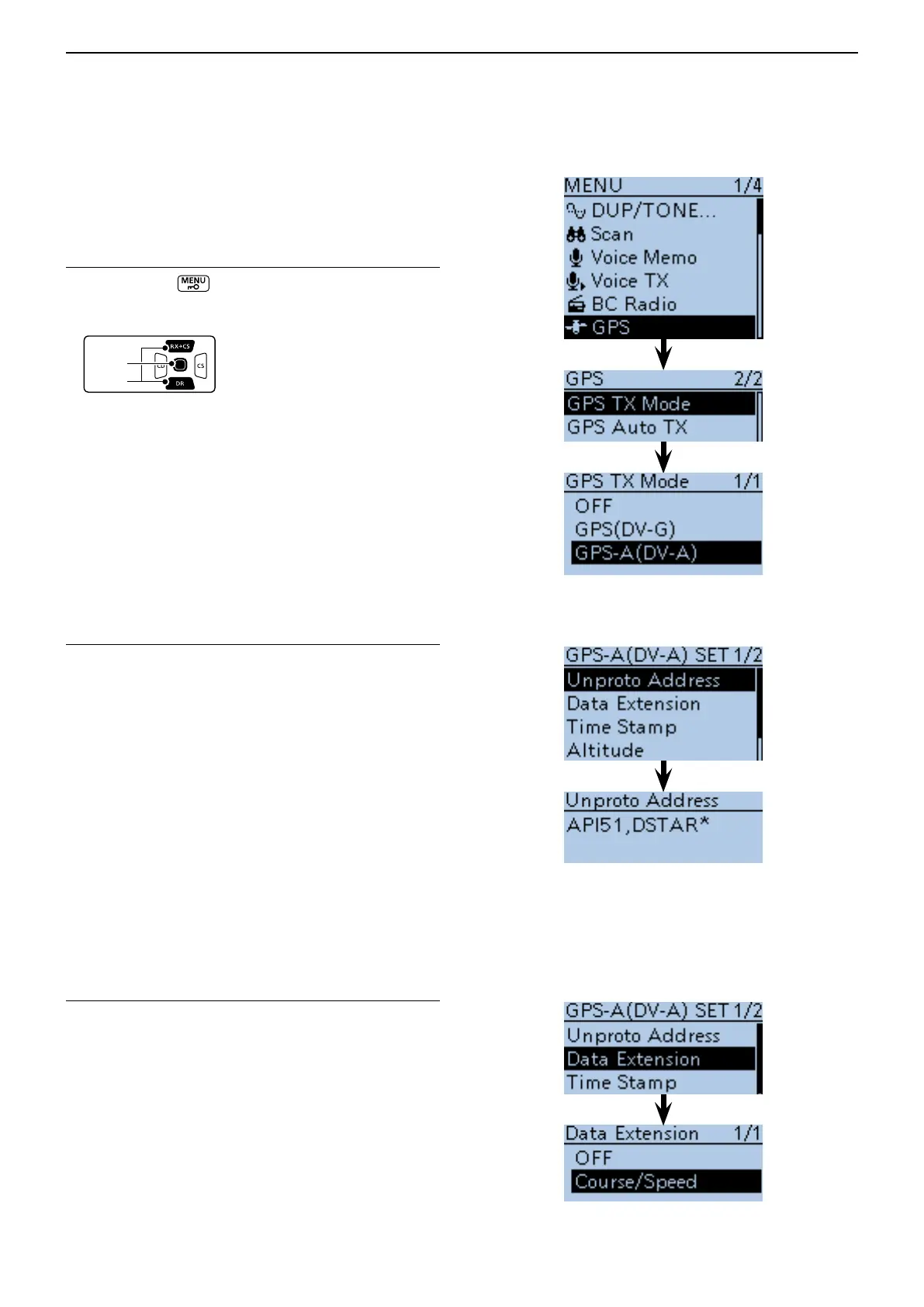
Set to transmit in the GPS-A mode.
Setting GPS-A in the GPS TX Mode1.
q Push [MENU]
.
w Push D-pad() to select the root item (“GPS”), and
then push D-pad(Ent) to go to the next screen.
( MENU > GPS > GPS TX Mode > GPS-A(DV-A))
e Refer to the menu sequence shown directly above,
and push D-pad() to select, and then D-pad(Ent)
to enter, one or more times until the last screen is
displayed.
Unproto Address display2.
The default address should be used, and editing is not
recommended.
r Push D-pad() to select
“
Unproto Address,” and then
push D-pad(Ent).
• The default setting is
“
API51,DSTAR*.”
t Push D-pad(Ent) to return to the previous screen.
Setting Data Extension3.
Set the data extension of your station's course direction
and speed.
y Push D-pad() to select
“
Data Extension,” and then
push D-pad(Ent).
u Push D-pad() to select
“
Course/Speed,” and then
push D-pad(Ent).
Transmitting GPS-A data (Continued) ■
Continued on the next page ☞


 To Next Page
 Loading...













