22
1.5.2. Auto-induction Mode
There’s no need to click the trigger under the Auto-induction Mode, the users just need
to move the barcodes to be scanned in front of the light band of Inateck P6, in which a
red light line will show up indicating the scanner is ready to scan. The scanning will not
stop until the scanner is under the following situation:
* Read a barcode successfully;
* The pre-set timeout expires (the default time is 2s, the same as the auto laser-o time).
You can also set up the best auto-induction distance according to actual demand, the
default distance is long distance.
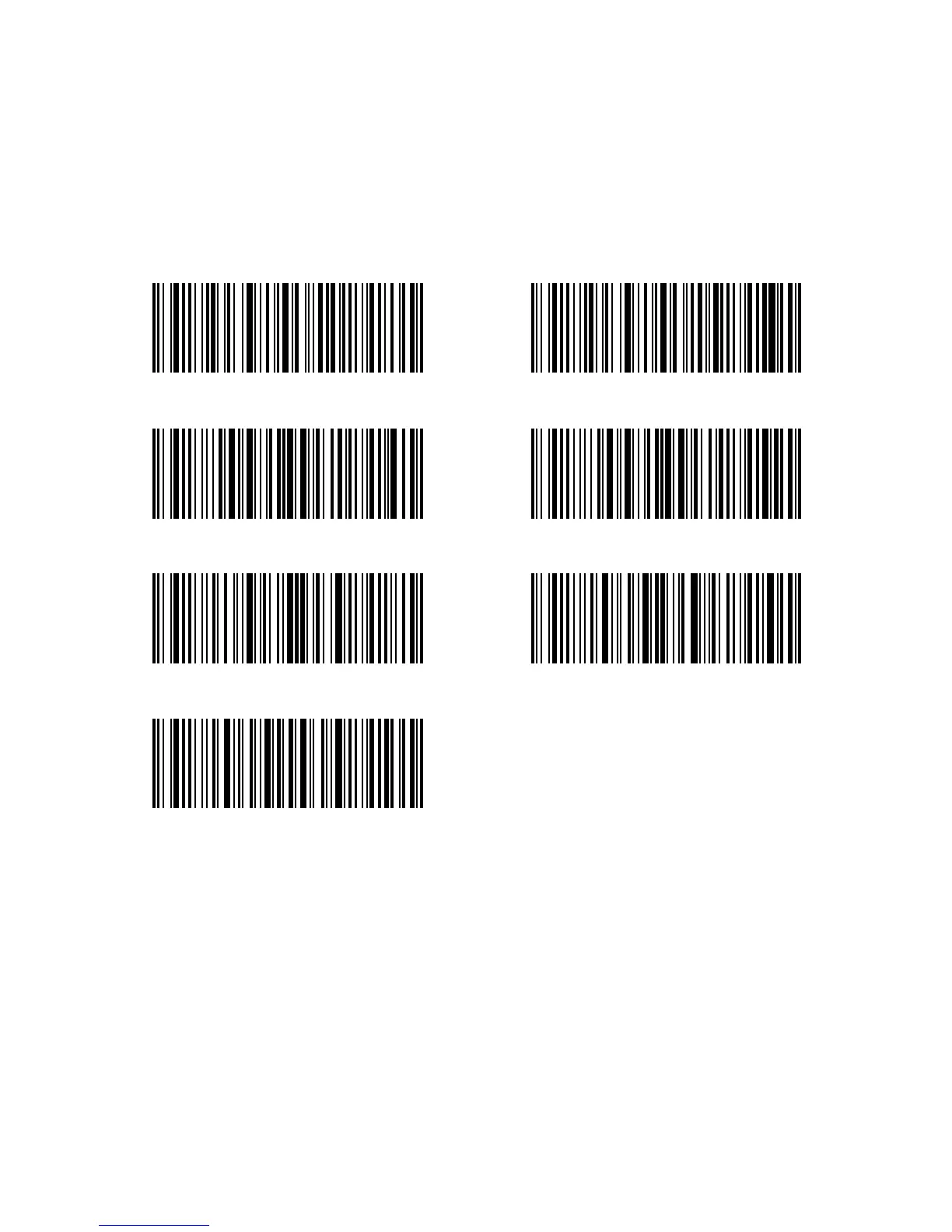
Auto Induction Mode
Short Distance
Enter setup
Exit without Save
Setup Auto-induction Distance
(*)Long Distance
Exit with Save
For Example, Steps to set the scanner into auto induction mode are as below:
1. Read the “Enter Setup” barcode;
2. Read the “Auto-induction Mode” barcode;
3. Read the “Exit with Save” barcode.
Steps to set the scanner into auto induction mode and set the auto-induction distance as
“Short Distance” are as below:
1. Read the “Enter Setup” barcode;
2. Read the “Auto-induction Mode” barcode;
3. Read the “Setup Auto-induction Distance”barcode ;
4. Read the “Short Distance” barcode;
5. Read the “Exit with Save” barcode.



 To Next Page