37
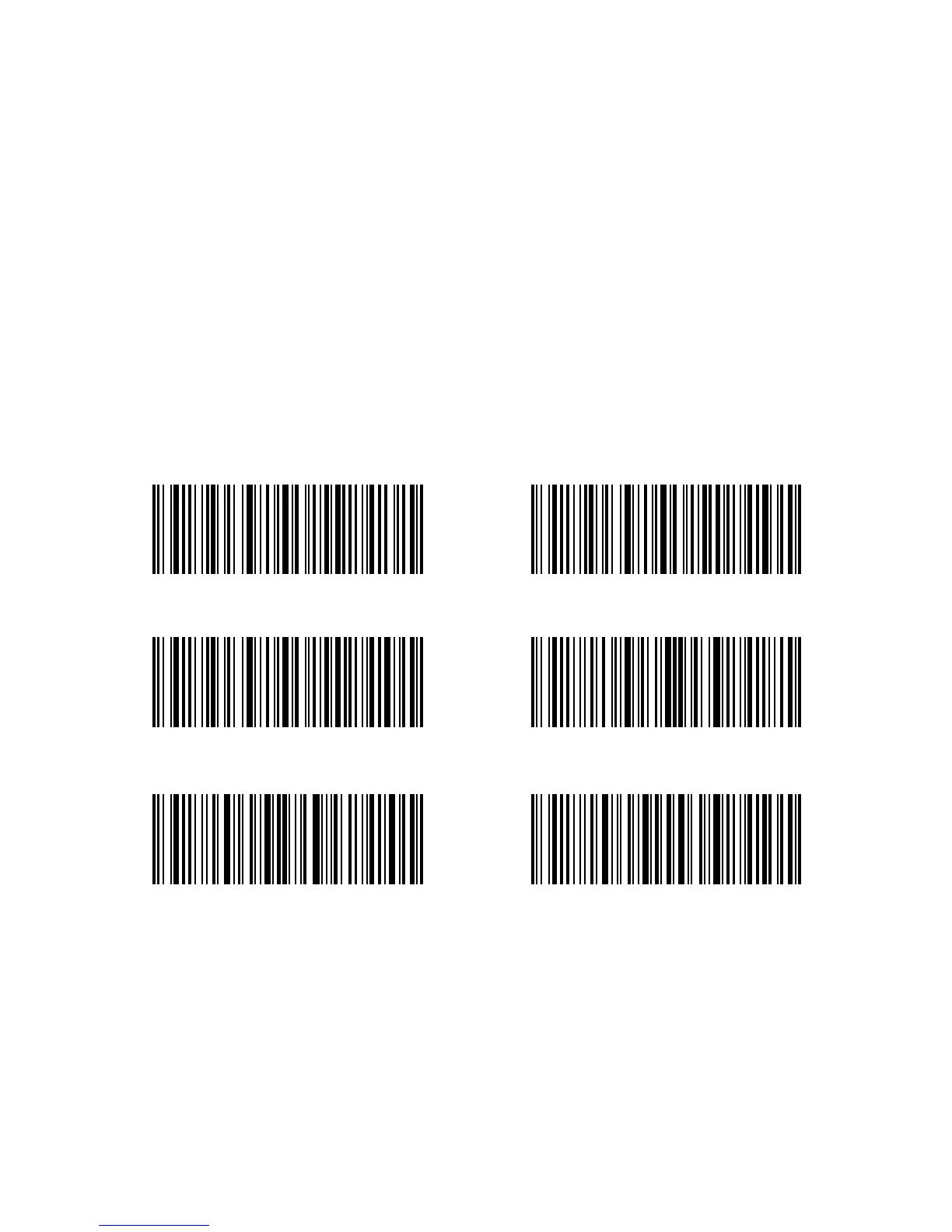
(*) Do Not Verify Verify with Output Checksum
Character
Enter SetupVerify without Output Checksum
Character
Exit without SaveExit with Save
3.4.3. Checksum Verication
Checksum character is not enforced to be included in the data of Code 39. If checksum
character is included, it should be the last character of the barcode data. As a calculate
value based on all of the data, Checksum character is used to check whether the data is
correct or not.
If the scanner is set to "Do Not Verify”, which is the default, then the scanner will read all
the barcode data.
If the scanner is set to "Verify with Output Checksum Character", and the scanner will
check the data based on the last character of the barcode data. If the check passes, It will
read and output the Checksum Character as the last character of normal data; However it
will not be able to read Code 39 without checksum character.
If the scanner is set to "Verify without Output Checksum Character", and the scanner will
check the data based on the last character of the barcode data. If the check passes, It will
read but will NOT output the Checksum Character as the last character of normal data;
However it will not be able to read Code 39 without checksum character.
For example, Operations are as below if you want to set Verify with Output Checksum
Character:
1. Read the "Enter Setup" barcode;
2. Read the "Verify with Output Checksum Character" barcode;
3. Read the "Exit with Save" barcode.



 To Next Page