2.13 Replacing the Bridge Board
2.13.1 Installing the Bridge Board
1. Power off the compute module and disconnect the power cable(s).
2. Remove the air duct. See section 2.3.1
.
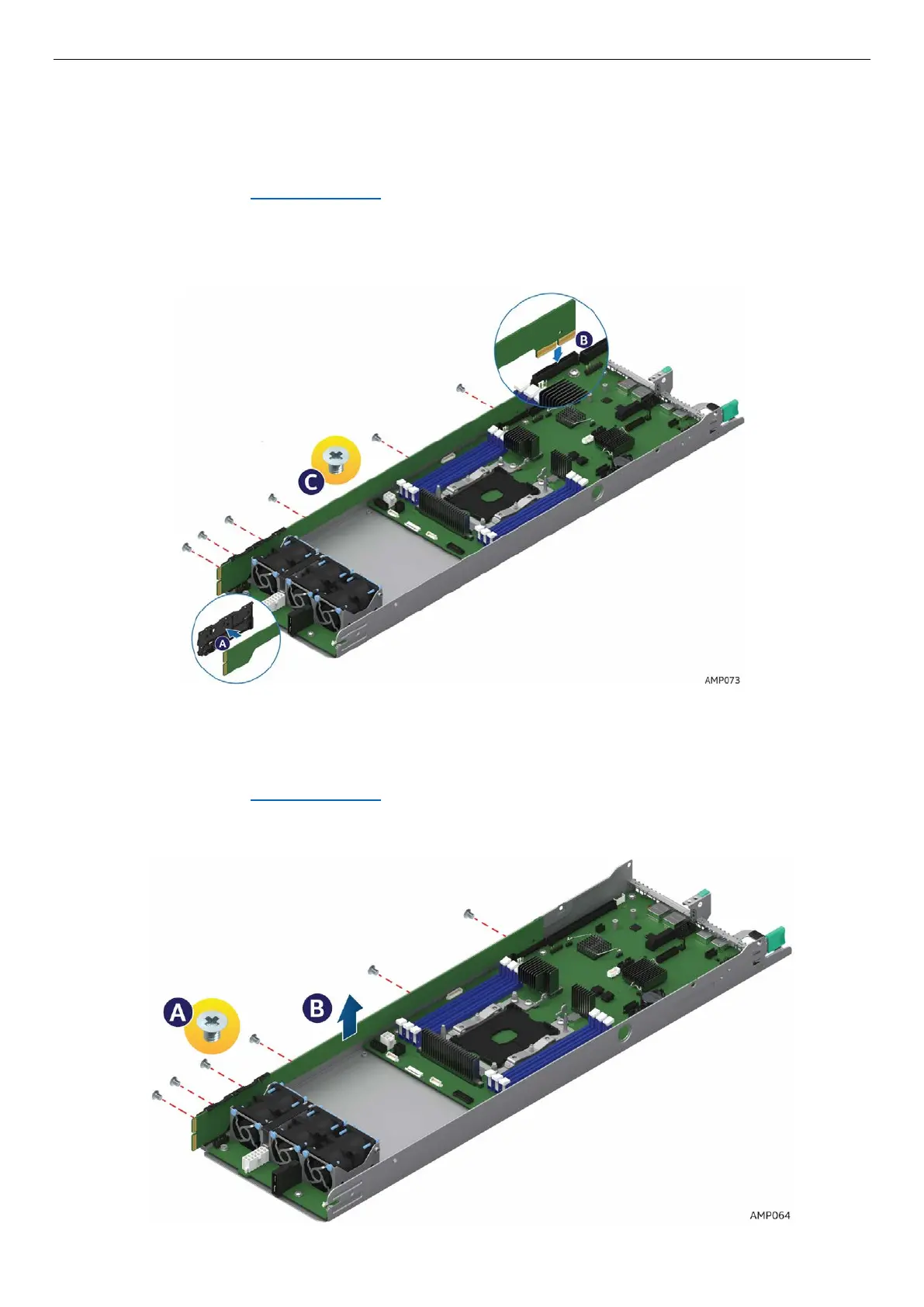
3. Ensure the plastic holder on the front end of the bridge board is attached and seated properly
(See letter A).
4. Insert the rear end of the bridge board into the slot on the server board (See letter B).
5. Secure the bridge board to the side wall with the six screws (See letter C).
Figure 75. Installing the Bridge Board
2.13.2 Removing the Bridge Board
1. Power off the compute module and disconnect the power cable(s).
2. Remove the air duct. See section 2.3.1
.
3. Remove the six screws (See letter A) on the bridge board.
4. Lift the bridge board straight up to remove it from the server board (See letter B).
Figure 76. Removing the Bridge Board



 To Next Page