2.15 Installing and Removing the Power Docking Board
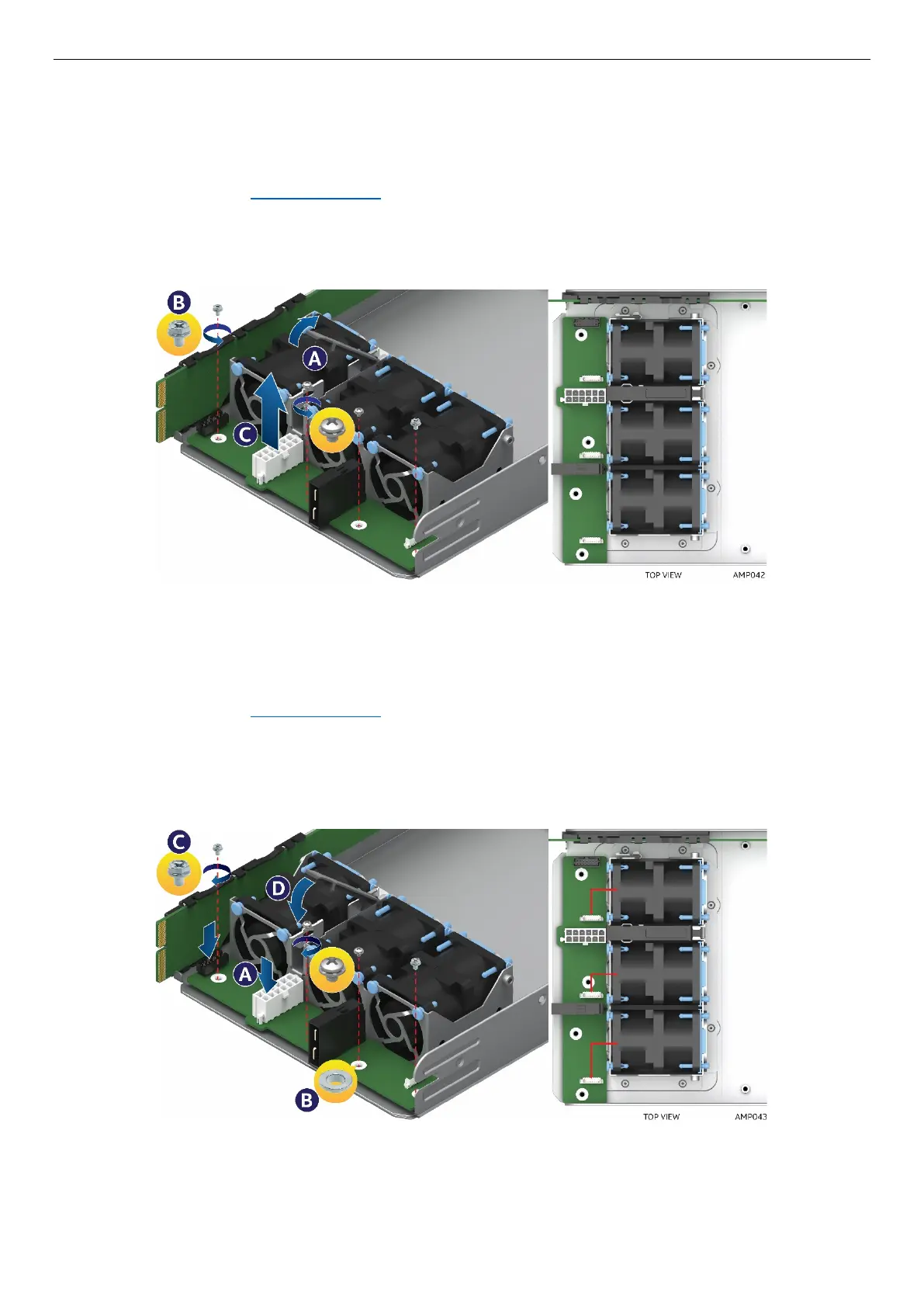
2.15.1 Removing the Power Docking Board
1. Power off the compute module and disconnect the power cable(s).
2. Remove the air duct. See section 2.3.1
.
3. Pull up retaining latch (See letter A) and disconnect all cables from the power docking board (PDB).
4. Remove the four screws (See letter B).
5. Lift the power docking board straight up and out of the enclosure (See letter C).
Figure 81. Removing the Power Docking Board
2.15.2 Installing the Power Docking Board
1. Power off the compute module and disconnect the power cable(s).
2. Remove the air duct. See section 2.3.1
.
3. Place the power docking board into the compute module base (See letter A).
4. Ensure that the two inside screws have the washer and are inserted first. (See letter B).
5. Secure the power docking board using the four screws (See letter C).
6. Connect all cables to the power docking board and close retainer latch (See letter D).
Figure 82. Installing the Power Docking Board



 To Next Page