2.14 Replacing the Server Main Board
2.14.1 Removing the Server Board
1. Power off the compute module and disconnect the power cable(s).
2. Remove the air duct. See section 2.3.1
3. Remove the processors and DIMMs. See section 2.5 and section 2.11.2.
4. Remove the bridge board. See section 2.13.2.
5. Remove the PCIe* Riser and Add-In Card from the Riser Slot 1 if there is any. See section 2.8.2
6. Remove the PCIe* Riser and Add-In Card from the Riser Slot 2 if there is any. See section 2.9.2.
7. Remove the TPM if installed. See section 2.18.2
8. Remove RMM if installed. See section 2.12.2
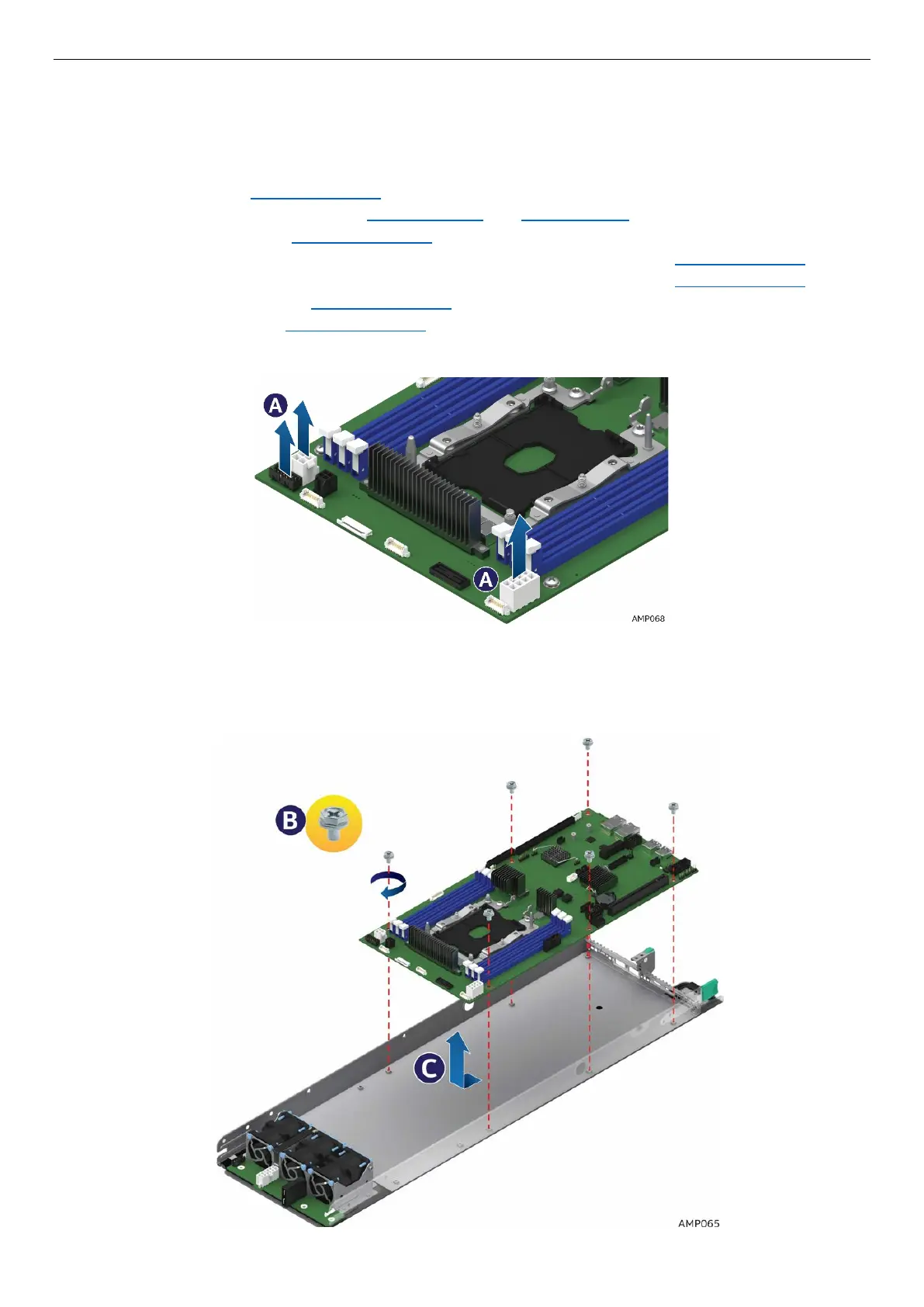
9. Disconnect the cables from the server board. (See letter A)
Figure 77. Removing the Cable Connections from the Server Board
10. Remove the six screws from the server board (See letter B).
11. Move the board slightly forward, then lift straight up and out of the node enclosure. Be careful not to
damage the components at the rear of the board when removing (See letter C).
Figure 78. Removing the Server Board



 To Next Page