6-3
Chapter 6 Adjust Mode
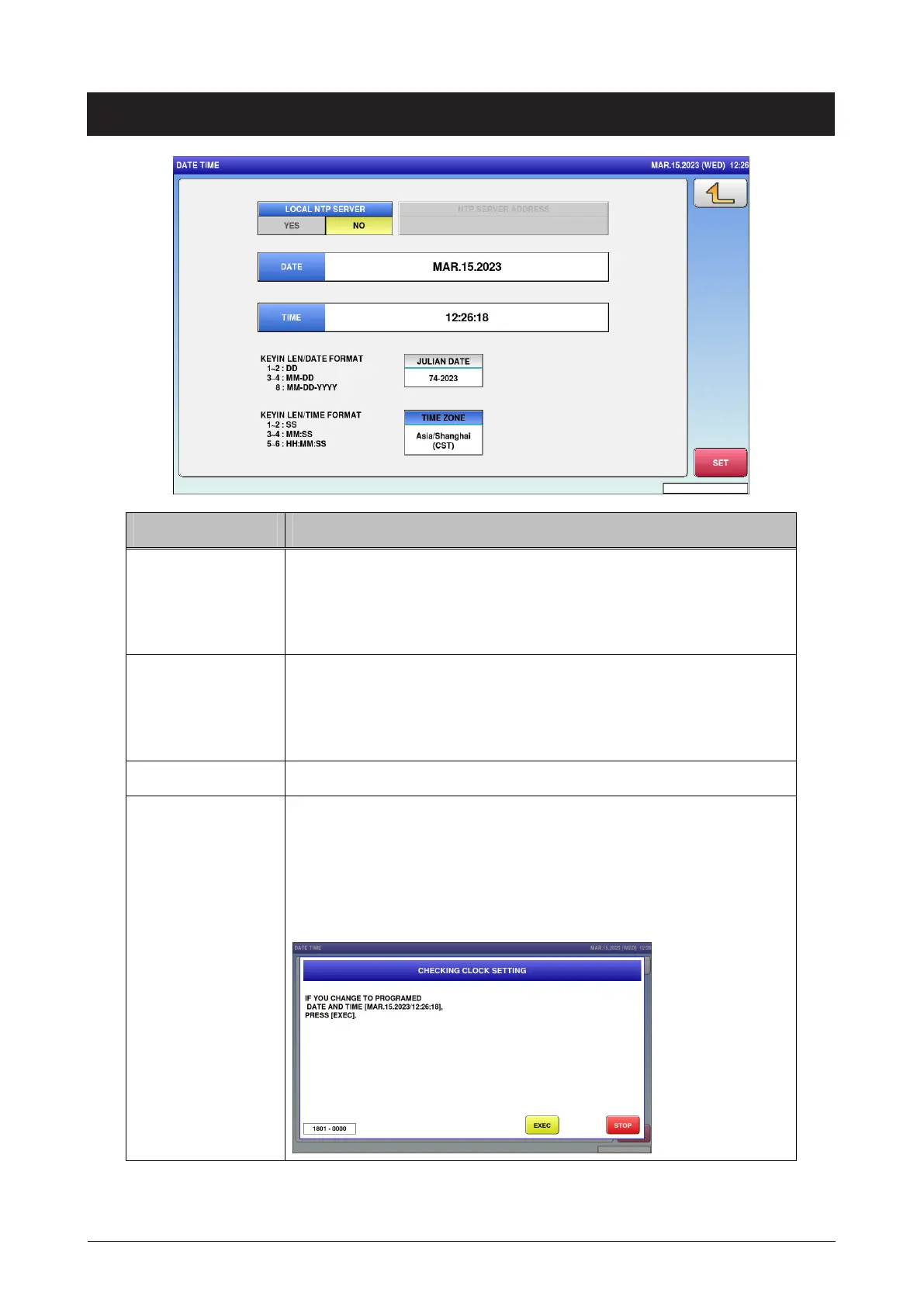
6.2 Date time
Menu name Specification
DATE Enter the date conforming to KEYIN LEN/DATE FORMAT.
If "25072016" is entered, "JUL.25.2016" is displayed.
If "25" is entered, " JUL.25.2016" is displayed.
If "2507" is entered, " JUL.25.2016" is displayed.
TIME Enter the time conforming to KEYIN LEN/TIME FORMAT.
If "00" is entered, "13:11:00" is displayed.
If "1100" is entered, "13:11:00" is displayed.
If "131100" is entered, "13:11:00" is displayed.
JULIAN DATE Display the number of days counted from January 1.
SET Set the entered date and time.
CHECKING CLOCK SETTING dialog appears to ask whether to
change the date and time.
When any change is made, save the setting (with confirmation
message).



 To Next Page