6-18
Capter 6 Adjust Mode
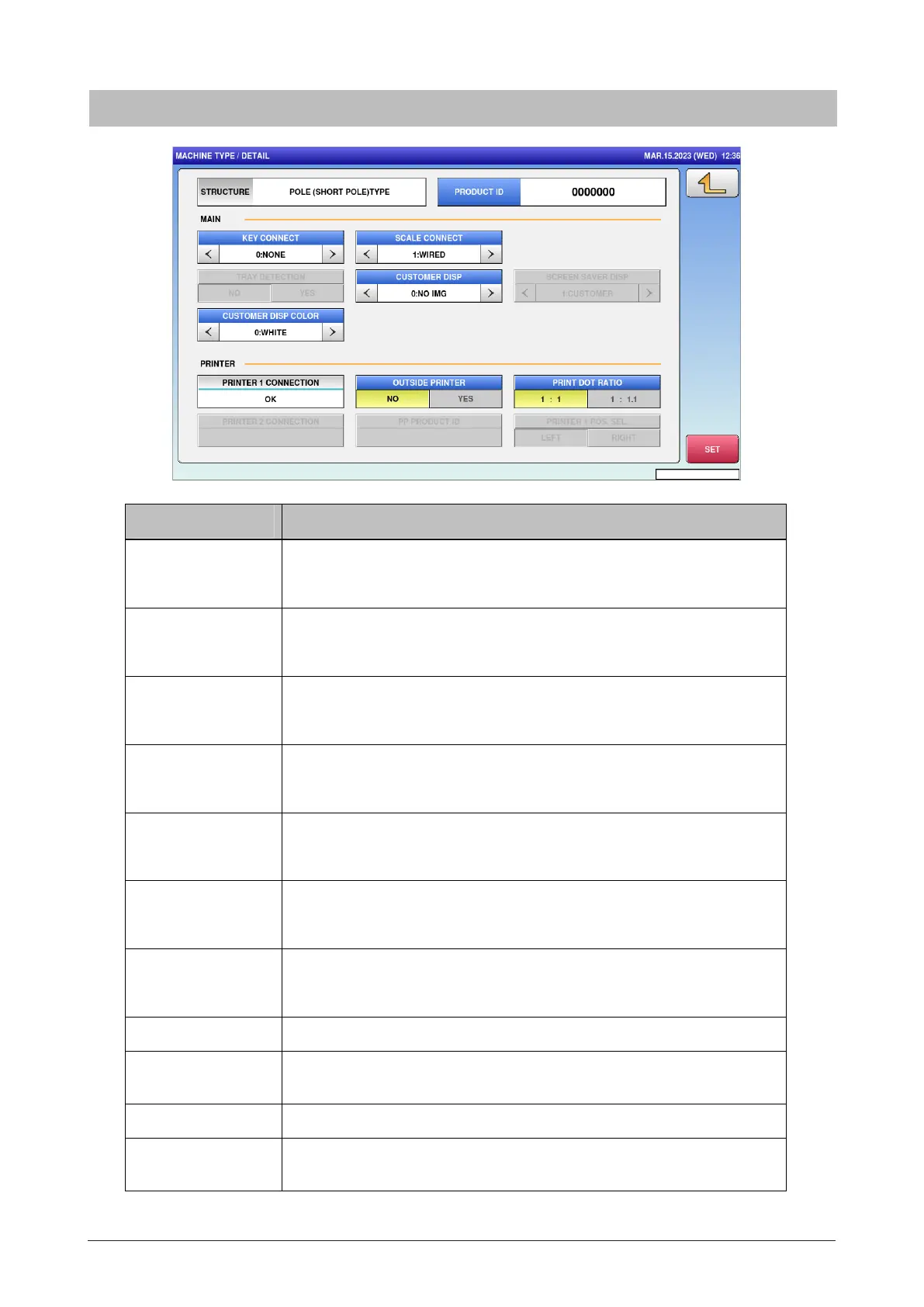
Menu name Specification
PRODUCT ID Enter the product ID in seven digits.
Input range: 0 to 9999999
KEY CONNECT Select whether to connect the numeric keys.
0: NONE / 1: 3x6 / 2: 6x4
SCALE CONNECT Select whether to connect the scale.
0: NONE / 1: WIRED / 2: WIRELESS
TRAY DETECTION Select whether to use the tray detection function.
NO / YES
CUSTOMER DISP Select whether to connect the customer display.
0: NO IMG / 1: IMG
SCREEN SAVER
DISP
Select display to indicate the screen saver.
0: SHOP / 1: CUSTOMER
PRINT DOT RATIO Select printing dot ratio.
1:1 / 1:1.1
SET Save the setting (with confirmation message).
STRUCURE Display the configuration selected by the previous screen [MACHINE
TYPE].
STATUS Display the communication status with the wrapper.
PRINTER 1
CONNECTION
Display the communication status with Printer No.1.
6.8.1 Detail



 To Next Page