5-31
Chapter 5 Setup Mode
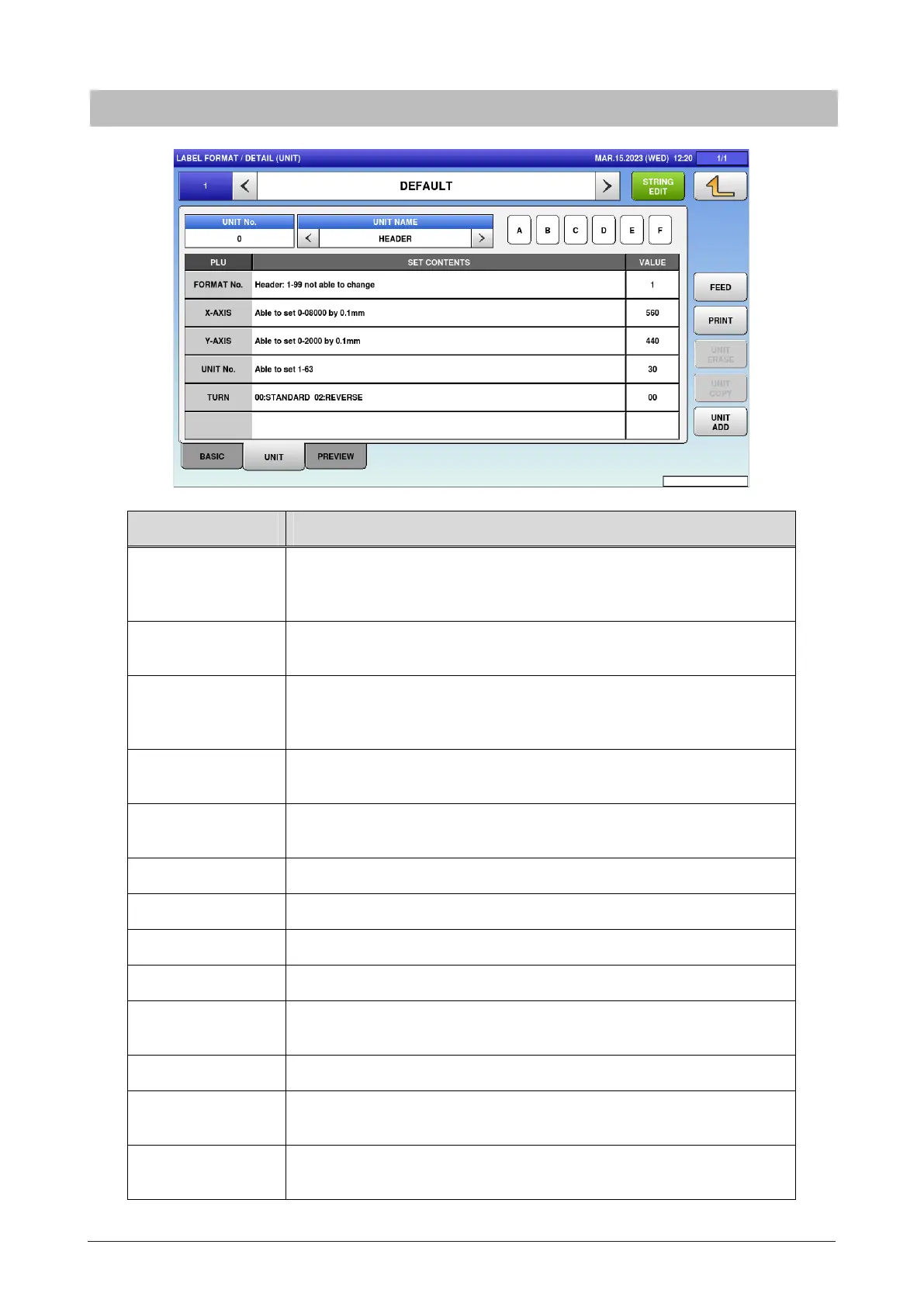
5.14.2 Detail (unit)
Menu name Specification
FORMAT NAME Press button to open the format name edit screen.
Press "<" and ">" located at both sides of the box to select the next (or
previous) format master.
STRING EDIT Open the format string edit screen.
Up to 526 bytes
UNIT No. Display the unit number.
Press button to open the unit list set for the current format.
UNIT tab also has the same function.
UNIT NAME Display the selected unit name.
If nothing is selected, "HEADER" is selected.
ABCDEF Enter the alphabetical character.
For hexadecimal entry.
PLU Display the name of set item.
SET CONTENTS Display the set contents.
VALUE Enter the value for set contents.
FEED Feed the label.
PRINT Perform test printing by the format being called and the item
information set by [PLU No.].
UNIT ERASE Delete the selected unit.
UNIT COPY Enter numerical number and press COPY to copy the said numerical
number's format.
UNIT ADD Add the unit.
The header unit also increases by one at the same time.



 To Next Page