Home
ISHIDA
Scales
UNI-8
Page 32
ISHIDA UNI-8 - Page 32
158 pages
Manual
Save Page as PDF
To Next Page
To Next Page
To Previous Page
To Previous Page
Loading...
3-10
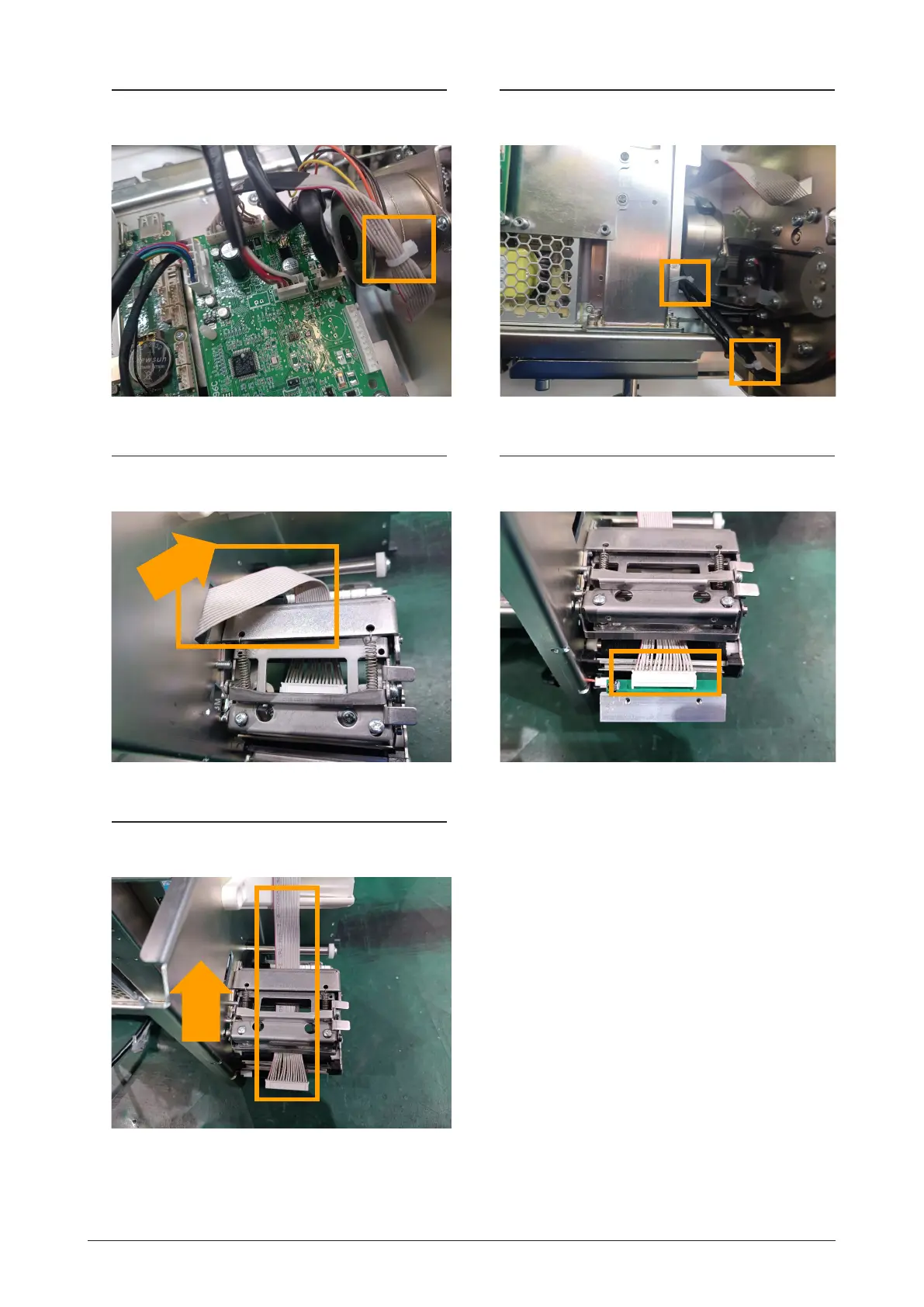
Capter 3 Machihe disassembly
3.
C
u
t off t
he
ca
b
le
ti
e.
4.
C
ut
off t
h
e tw
o
c
a
b
l
e t
i
es
.
5
.
Pull out
th
e
prin
t
c
onnec
t
ion c
able.
6
.
Unplug t
he
c
onnec
t
er
and
r
emo
v
e
Thermal Hea
d.
7
.
Pull out
th
e
prin
t
c
onnec
t
ion c
able.
31
33
Table of Contents
Main Page
Revision History
2
Purpose of this Manual
3
Target Readers
3
Signal Words
3
Precautions for Handling
4
Precautions Wen Using Cleaning Fluids
5
Precautions for Installation
6
Table of Contents
7
Chapter 1 Overview
13
External Dimentions
13
Bench Type
13
Pole Type
14
Hanging Type
15
Specifications
16
Weighing Unit
16
Operator/ Customer Unit
16
Printer Unit
16
Others
17
Power Supply
18
Chapter 2 Mechanical Hardware
19
Bench Type
19
Exploded View
19
Pole Type
20
Exploded View
20
Hanging Type
21
Exploded View
21
Chapter 3 Machine Disassembly
23
For each Type
23
Case Cover
23
Support and Load Cell
24
Pole Type
27
Pole Unit
27
Hanging Type
29
Case Cover
29
Module Board
30
Thermal Head
31
Printer Unit
33
A/D Board
34
PS-096C Printer Board
34
Main Board
34
Power Board
35
Power Supply
35
Load Cell
36
Chapter 4 Electric Components
39
Disassembly Procedure
39
Printer Board PS-096C
39
Module Board PS-105
40
Main Board PC-100
41
Display Board PS-098
42
Power Board PS-097
43
Main Display and Touch Panel Board
44
Customer Display
46
Thermal Head
47
Electrical Signals
48
Ps-096C
49
Chapter 5 Setup Mode
55
Setup Menu
55
Startup
55
Machine No. Setting
57
Basic
57
Alone
57
Master
58
Master Port
58
Sat
59
IP Address
60
Default Gateway
60
Pc Com
61
Wifi
63
Ssid (Wireless Network Name)
63
Wep Key Index
63
Global SV
64
Sales Mode
65
Password
66
Operate
66
Key Lock
67
Display Key
67
Function Key
68
Data Storage
69
Total ADD
69
Total PROC
70
Transaction
71
Sales Transaction
71
Strage
72
Preset Report
73
Daily
73
PLU Overwrite
74
PLU Initial Data
75
Sale 1
75
PLU Update
76
Receipt Setting
77
Title
77
Barcode
78
Receipt no
79
Cassete
80
Label Spec
82
Label Format
83
Detail (Basic)
83
Detail (Unit)
85
Format Name
85
Detail (Preview)
86
Barcode
87
POS Flag
87
POS Code
88
Item Code
89
Custom Barcode
90
Basic
90
Preview
91
Menu Title
92
Operate
92
Default Name
92
Operation Setting
93
Call1
93
Production
94
Timer
95
Cr1
96
Auto Mode Operation
96
Cr2
97
Input
98
Self
99
Print Mode
99
Manual / Auto
99
Search Type
99
Auto Print
99
Log
100
Operator Log
100
Talon
101
Auto PLU
102
Auto Plu Call
102
Scanner
103
Error Process
104
Issue
104
Call
105
Common
106
Error Log
107
Display
107
Log Level
107
Save
108
Tranceability
109
Dual Currency
110
Price Rounding
111
Frequent Sopper
112
Data Distribution
113
Machine
113
Data
114
Tax
115
Country
116
File Save/Load
117
Usb>Scale
117
Master Name
117
Scale>Usb
118
USB Data del
119
Scale INIT
120
Memory Space
120
Chapter 6 Adjust Mode
122
Adjust Mode Menu
122
Startup
122
Date Time
124
Sound
125
Firmware Details
126
Memory Clear
127
Total Memory
128
Free Memory
128
Printer
129
Head
129
Peel Sensor
131
Label Type
132
Label Feed
133
Calibration
135
Procedure for Adjusting Scale (Span)
136
Machine Type
138
Detail
139
Download
140
Main
140
Sub APP
141
Sub Boot
142
Option Check
143
Scanner
143
Usb
144
Device
145
Display Capture
146
Gravity
147
Chapter 7 Block Diagram
148
Bench Type / Pole Type
148
Hanging Type
149
Chapter 8 Appendix
150
Software Setup
150
Preparation
150
Backup the Master Data
150
Memorize Settings
153
Install the Backup Data
154
Check out Setting
156
Related product manuals
ISHIDA Uni-3
78 pages
ISHIDA UNI-7
189 pages
ISHIDA Uni-5
63 pages
ISHIDA UNI-7 series
285 pages
ISHIDA Astra
88 pages
ISHIDA IP-AI
139 pages
ISHIDA BC-4000
142 pages
ISHIDA INS-100
45 pages
ISHIDA IWB Series
3 pages
ISHIDA IGB Series
38 pages
ISHIDA IWQ Series
55 pages
ISHIDA IGX Series
40 pages



 To Next Page