OPERATOR'S STATION
1-84
Controller Part Name and Function
Mode/Temperature Control Switch
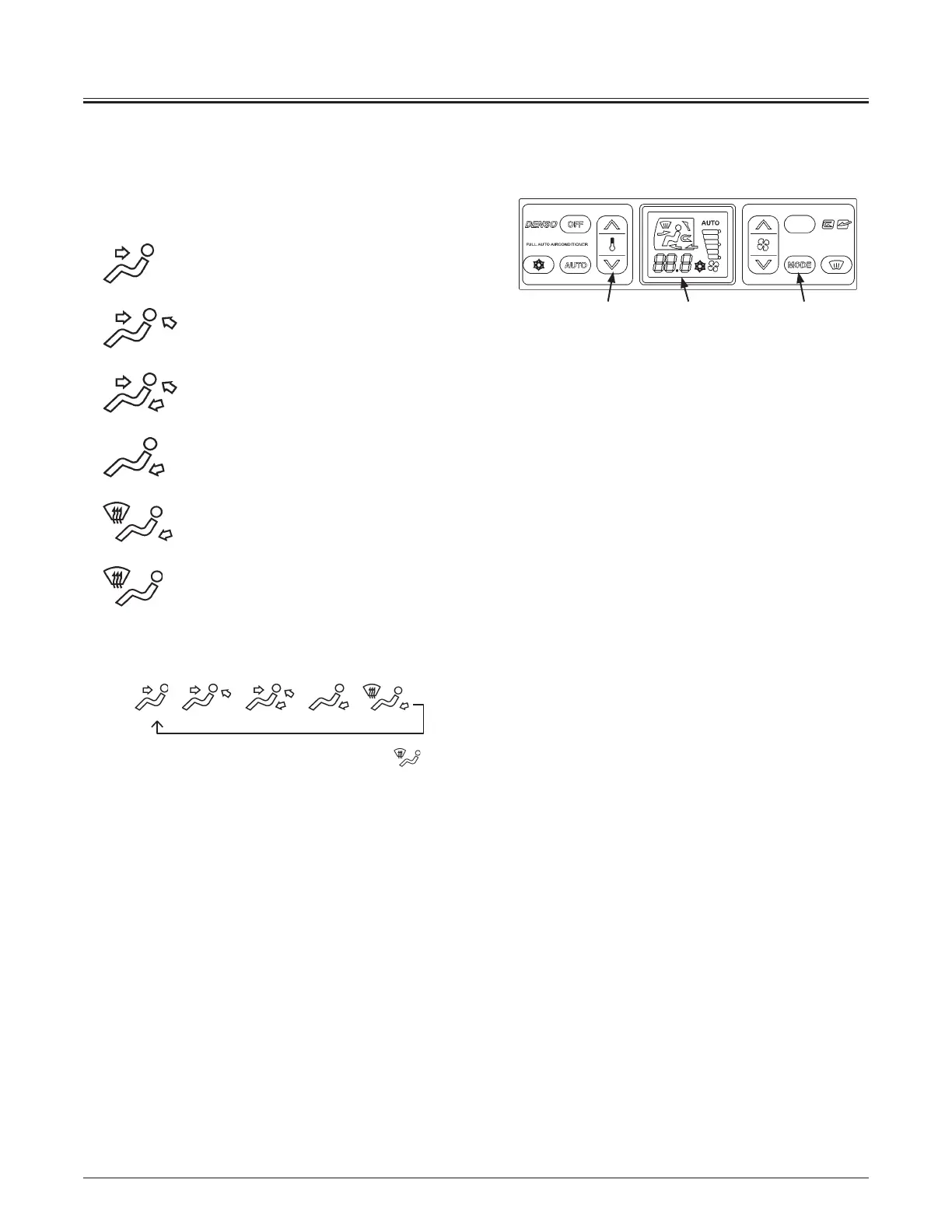
y Mode Switch (10)
Selects the air vent. The selected air vent is indicated on
LCD (8).
: Front Vent Mode
: Front/Rear Vent Mode
: Front/Rear/Foot Vent Mode
: Foot Vent Mode
: Foot/Defroster Vent Mode
: Defroster Vent Mode
Each time mode switch (3) is pressed, the vent location can be
changed in 6 stages as illustrated below.
AUTOJ
J J J J
Press defroster switch (4) to change defroster vent
mode.
x AUTO mode
The air vent location is automatically selected.
y Temperature Control Switch (9):
Sets temperature in the cab.
Temperature in the cab can be set from 18.0 to 32.0 °C by
pressing temperature control switch (9). Temperature can
be set by 0.5 °C increments.
The set-temperature is displayed on LCD (8).
MNDB-01-011
98 10



 To Next Page