394149/D
253
Youmustbeequippedwithastandardsetoftools.Thistoolsetmustcomprisethe
normaltoolsforcableinstallationtasks.Thisincludesdifferentscrewdrivertypes,
pliers,spanners,acablestripper,asolderingiron,etc.Eachtoolmustbeprovidedin
varioussizes.Werecommendthatalltoolsaredemagnetizedtoprotectyourequipment.
Dependingonthetasksathand,additionaltoolsmayberequired.
Context
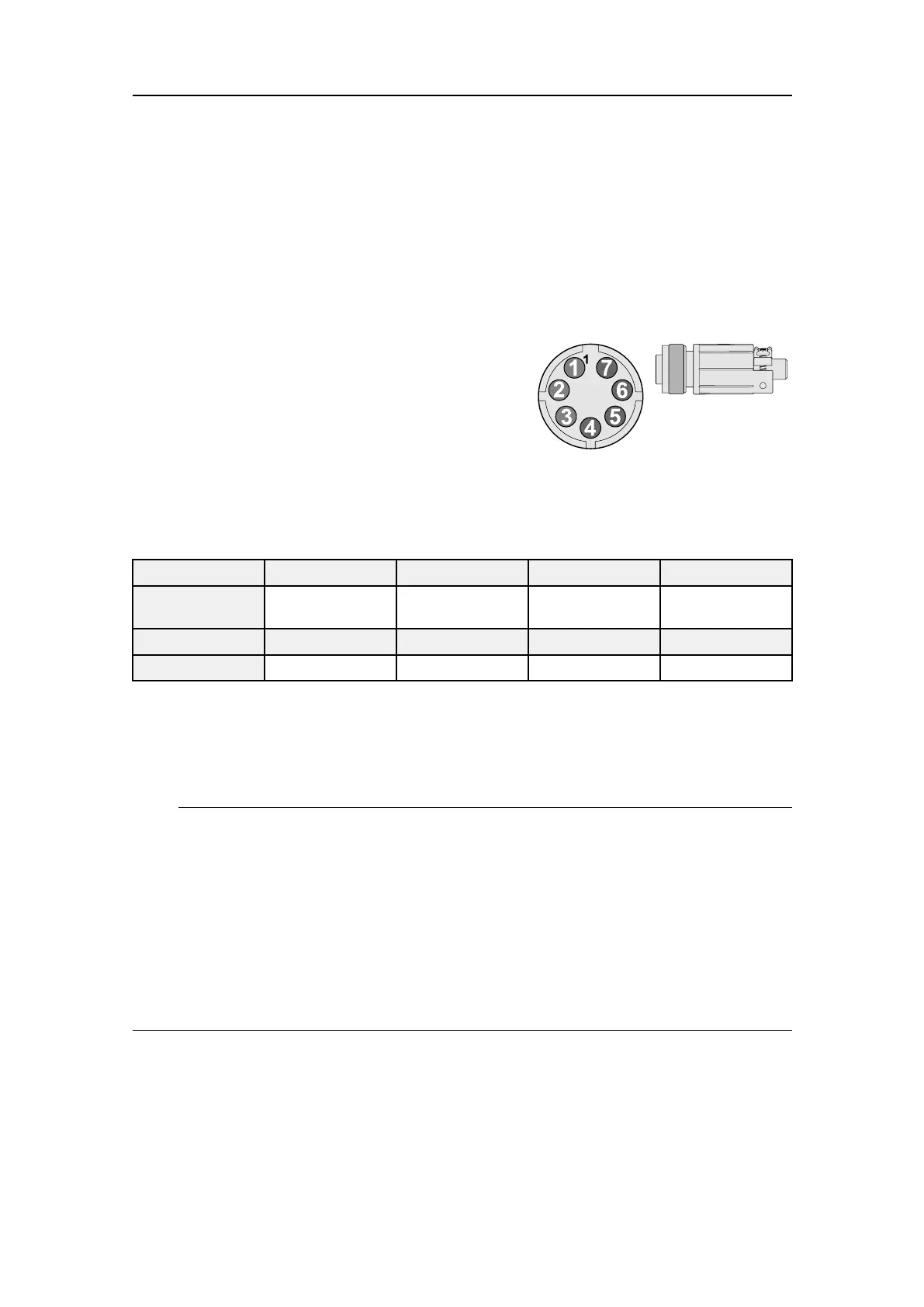
TheAuxiliarysocketontheWideBand
Transceiver(WBT)canbeusedtointerfacean
externalsynchronizationsystem.
ThesockettsaConxall7-pinMini-Con-X
®
shieldedplug.Theconnectionsaremadeonpins
2,3and5.Theplugcanbeorderedfromthe
manufacturerorpurchasedfromKongsbergMaritime.Usepartnumber387563.
•Manufacturer:SwitchcraftConxall
•Manufacturer’swebsite:http://www.conxall.com
Pinnumber1234
Signal
Futureuse
Synchronization
Output
Synchronization
Input
Futureuse
Pinnumber
5
6
7
Signal
DigitalgroundNotusedNotused
TheparametersontheSynchronizationpageallowyoutochoosewhichcommunication
porttouseforthephysicalconnectiontotheexternalsystem,andwhichsynchronization
modetouse.TheSynchronizationpageislocatedintheInstallationdialogboxonthe
Setupmenu.
Note
IfyouusemorethanoneWideBandTransceiver(WBT)inyourEK80system,all
synchronizationinputsignalstothe
Auxiliary
portsmustbeprovidedbythesame
source.IndividualsynchronizationofasingleWideBandTransceiver(WBT)isnot
supported.
IfyouusemorethanonecomputerinyourEK80system,thesynchronizationinputsto
the
Auxiliary
portscannotbeused.Thisfunctionalityisnotsupported.
TheSynchronizationDelayfunctionalityisunavailableifyouusethe
Auxiliary
porton
yourWideBandTransceiver(WBT)tosynchronizetheEK80.
Procedure
1ConnectthededicatedcablefromtheWideBandTransceiver(WBT)totheexternal
synchronisationsystem.
ThisisdescribedintheCablelayoutandinterconnectionschapter.Observethe
applicablerequirementsrelatedtocabling.
Settingtowork



 To Next Page