6-2
6.2 Name of each Component
6.2 Name of each Component
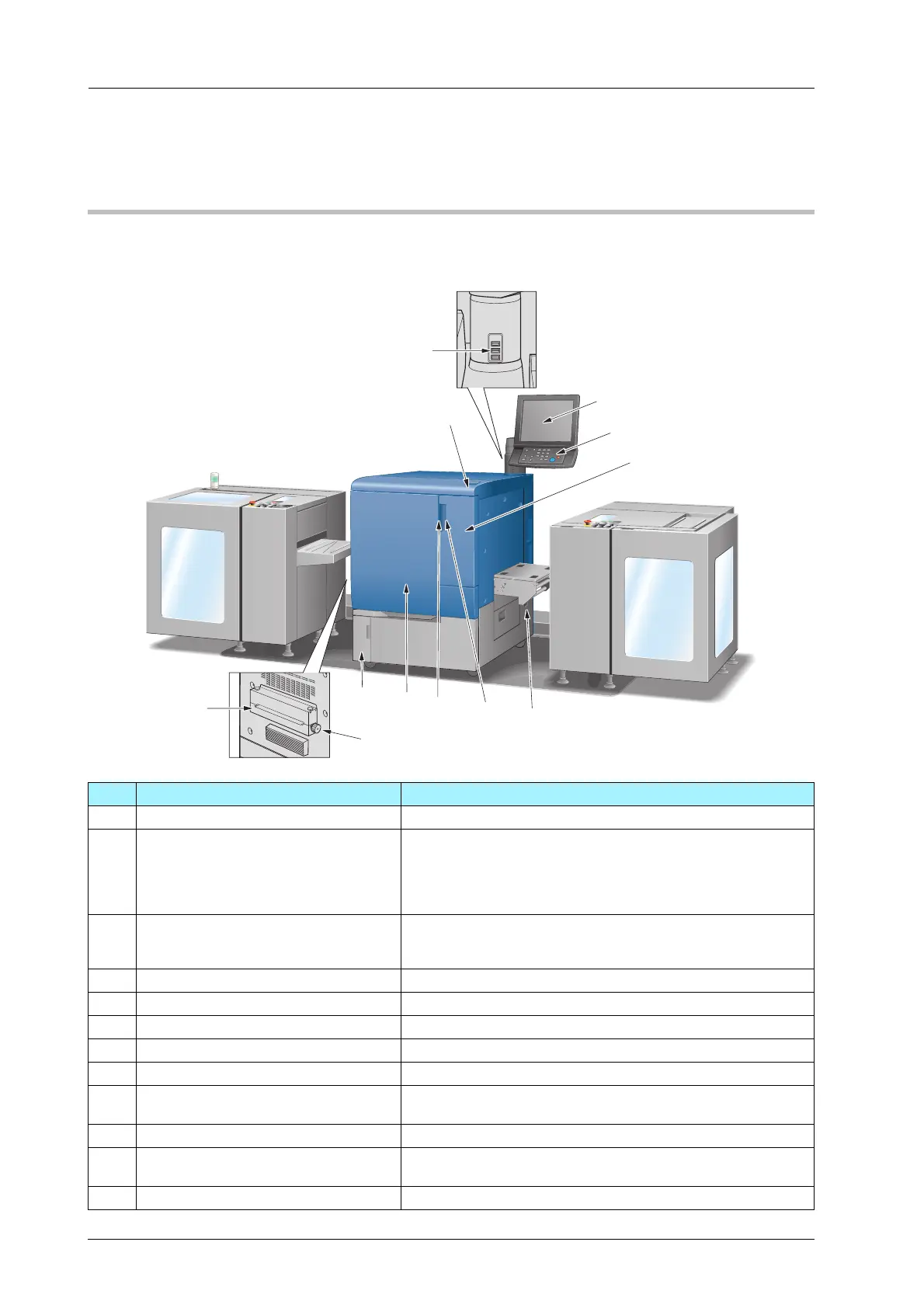
Main Body
)External Machine Items
No. Name Description
1 Sub power switch Turns machine power on/off when pressed.
2 Service port (USB 2.0 Type A e 3) Used to connect devices such as an external storage medium
(USB flash drive, USB-HDD), keyboard and mouse.
This port is available for low-power devices only. Please provide
an external supply of power for devices that require a large
amount of power.
3 Touch panel Displays screens such as the [MACHINE] screen to allow vari-
ous settings and machine operations. Also, operation or trou-
bleshooting procedures can be provided.
4 Control panel Used for various settings and machine operations.
5 Toner access door Opens to allow toner supply.
6 Leading section Installs the media into the main body from Roll Winder RW-101.
7 Toner access door handle Pulled to the right to open the toner access door.
8 Main body front door handle Pulled to the left to open the front door of the main body.
9 Front door Opens to allow removal of paper jam or to turn on/off the main
power switch.
10 Waste toner box door Opens to allow replacement of the waste toner box.
11 Feeding knob Turn to the right to convey media in the main body to the deliv-
ering section.
12 Delivering section Delivers the media from the main body.



 To Next Page