12 KRONE ISOBUS terminal (CCI 800, CCI1200)
12.3 Design of display
112
Comprima F 155
Original Operating Instructions 150001049_01_en
INFORMATION
For more details on how the terminal functions, follow the terminal operating instructions.
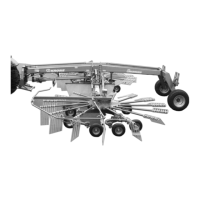
12.3 Design of display
EQG000-058
Pos. Designation Explanation
1 Status line
2 Main view left/right When operating the machine, KRONE recom-
mends positioning the machine application in the
main view.
3 Information view Additional applications (apps) can be selected
from the App menu and displayed in the Informa-
tion view. The apps can be dragged and dropped
into the Main view.
INFORMATION
For more details on how the terminal functions, follow the terminal operating instructions.
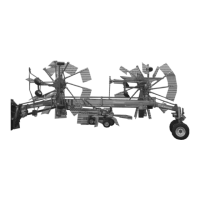
12.4 Design of the KRONE machine application
EQG000-059
The KRONEmachine application is divided into the following areas:
Status line (1)
The status line (1) indicates current states of the machine (depending on how it is equipped),
refer to page115.







 To Next Page