Terminal menus 15
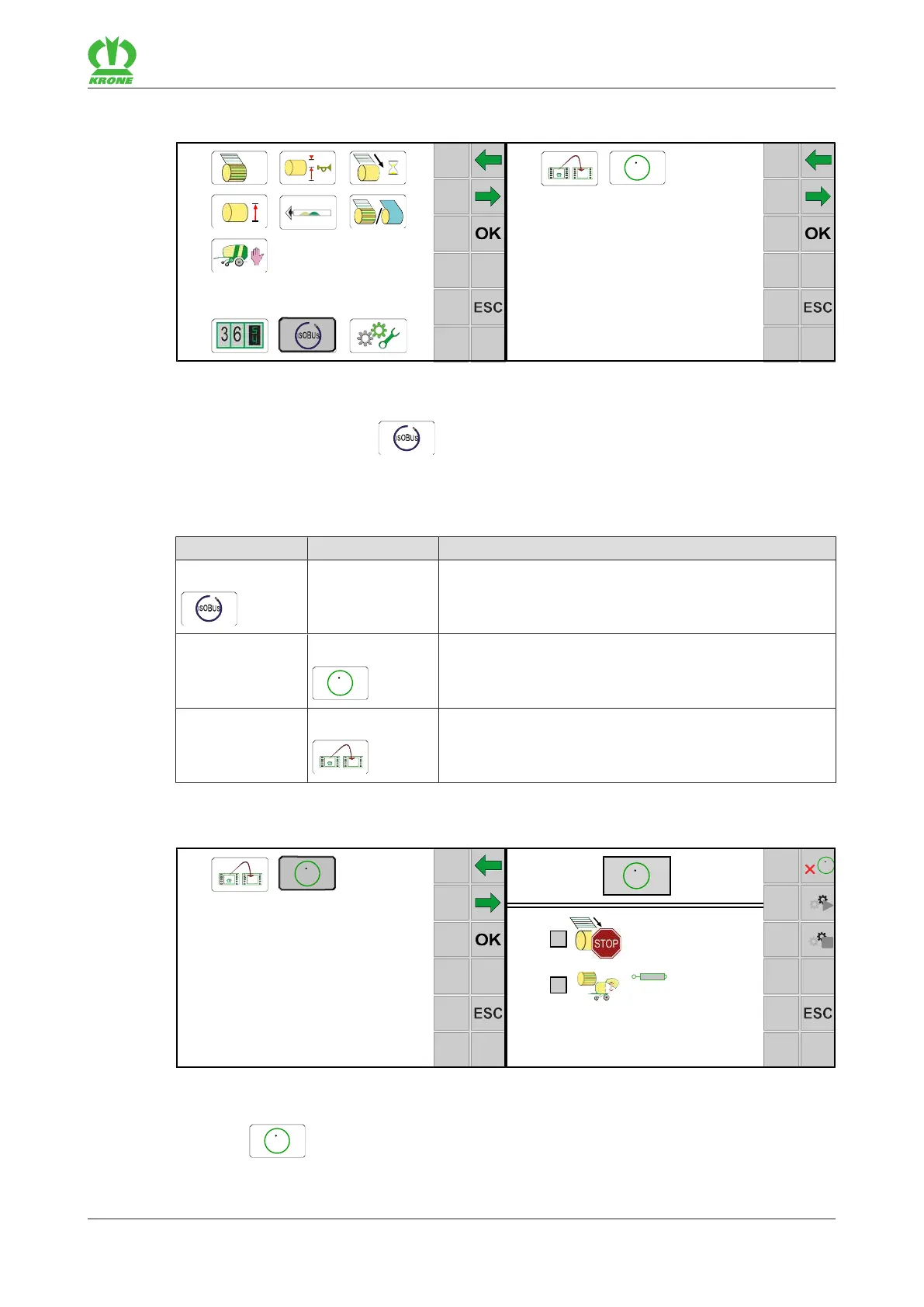
Menu 14 "ISOBUS" 15.19
Comprima F 155
Original Operating Instructions 150001049_01_en 145
15.19 Menu 14 "ISOBUS"
EQG003-014
ü The menu level has been selected, refer to page130.
To open the menu, press
.
Æ The display shows the "ISOBUS" menu.
Depending on the machine equipment, the "ISOBUS" menu is divided into the following
submenus:
Menu Sub-menu Designation
14 ISOBUS, refer to page145
14-5
Configure TIM software, refer to page145
14-9 Switching between terminals, refer to page147
15.19.1 Menu 14-5 "Configuring TIM software" (for "TIM 1.0" version)
Brand:
Model:
Function Instance:
EQG003-015
ü The menu 14 “ISOBUS” has been selected, refer to page145.
Select
to open the menu.
Æ The display shows the "Configuring TIM Software" menu.





 To Next Page