LM 287 User Manual – 30.10.2023
27
normal running temperature before heavy loading. In very cold or hot conditions it may be necessary to change the
engine thermostat to suit the conditions.
7. The engine oil pressure warning indicator (red) appears if the oil pressure is too low.
If engine oil pressure warning indicator appears turn off the engine
immediately.
Find and repair the cause of the indicator illuminating (sensor failure or lubricating system problem) before restarting the
engine. Low oil pressure can severely damage the engine and especially the turbocharger.
14. The operating time counter indicates the total operating time of the machine (the running time of the engine) so that,
for example, periodic maintenance can be scheduled. The display numbers are hours.
15. The engine overheating warning indicator appears if the engine's running too hot. See point 5.
19. The indicator flashes when a turn signal is switched on (left/right).
31. The regeneration indicator appears when the regeneration is on. See 4.4.2.1 on page 28.
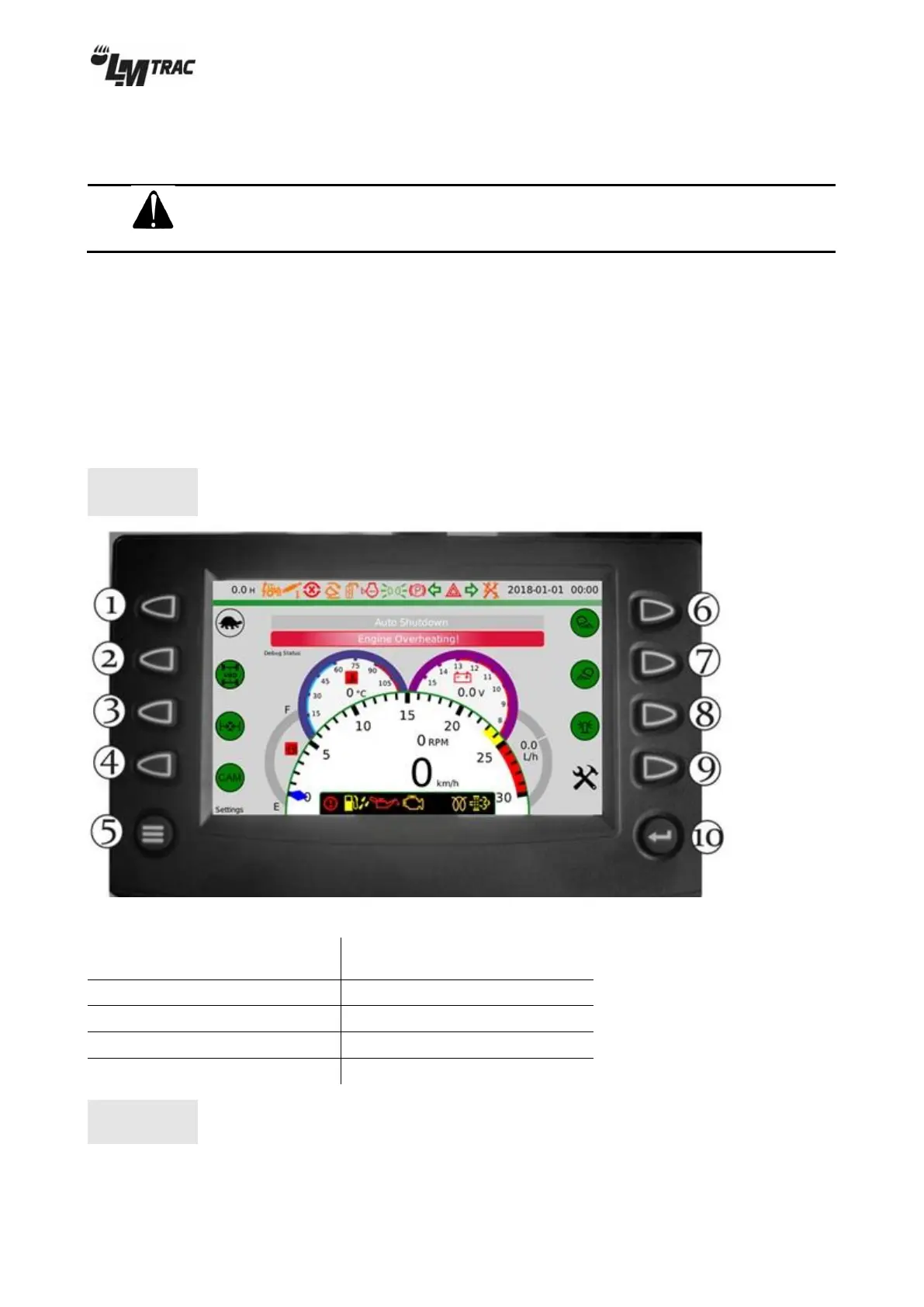
4.4.1 Main view screen buttons
Some of the screen buttons might have different functions depending on
your machine’s equipment.
Figure 29 – screen buttons on main view
1. Speed range selection
( fast / slow )*
2. 4WD (optional accessory)
*The speed range selection must always be made when
the machine is not moving.


 To Next Page