EasyManua.ls Logo

LM Trac 287 - Rear Camera View Screen Buttons (Optional Accessory)

LM Trac 287
116 pages
Print Icon
To Next Page IconTo Next Page
To Previous Page IconTo Previous Page
Loading...
LM 287 User Manual 30.10.2023
29
4.4.3 Rear camera view screen buttons (optional accessory)
NOTE
Screen buttons on rear camera view have different functions depending on
which view you had before you changed to the rear camera view.
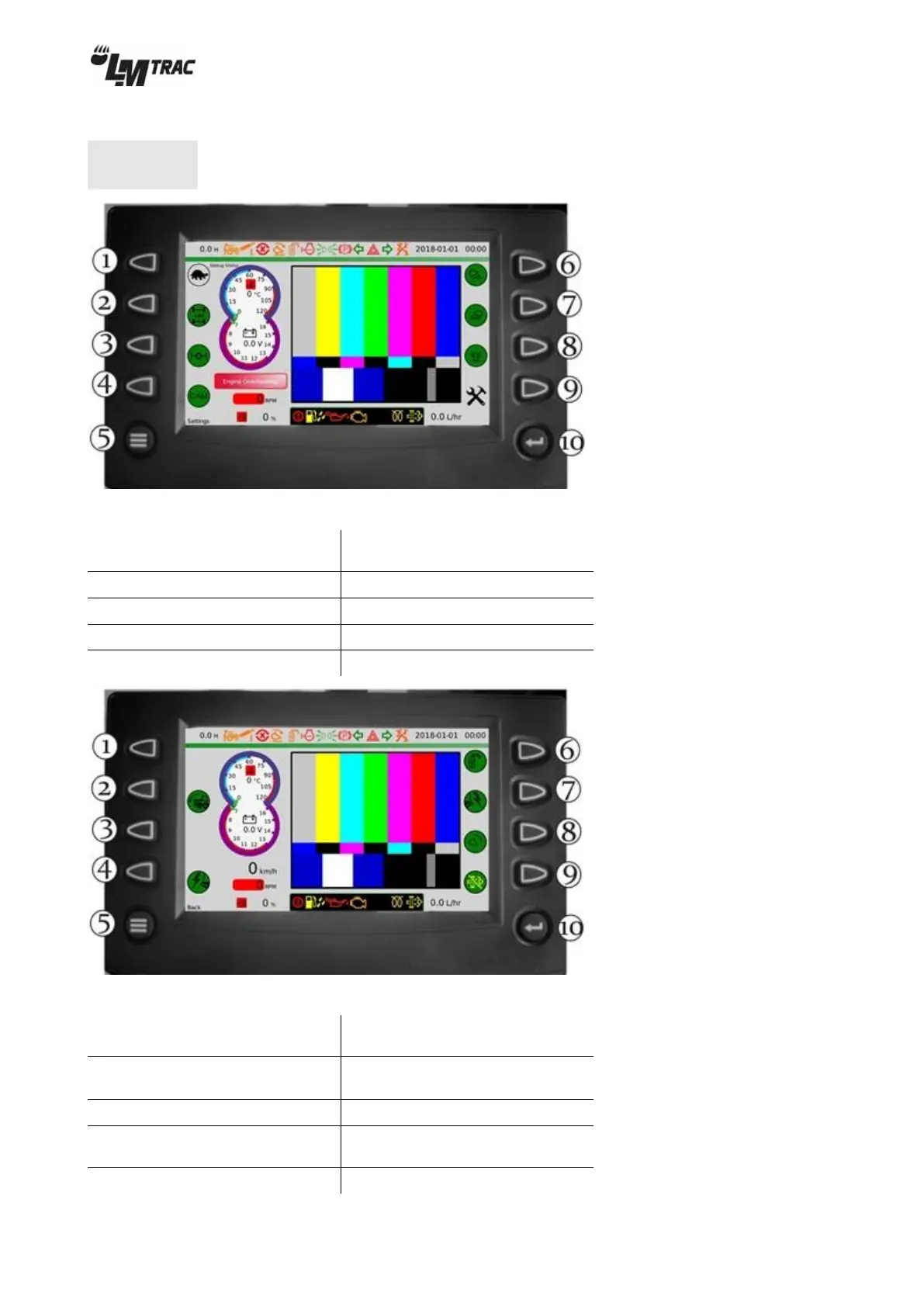
Figure 31 main view screen buttons on rear camera view
1. Speed range selection
( fast / slow )*
6. Front working lights
2. 4WD (optional accessory)
7. Rear working lights
3. Differential lock
8. Flashing beacon
4. Rear camera view
9. Tool view
5. Settings view (≡)
10. Enter (◄─┘)
Figure 32 tool view screen buttons on rear camera view
1. option
6. Mirror heating
(optional accessory)
2. Hydraulic bonnet tilting
(optional accessory)
7. Front power take-out 12V
(optional accessory)
3. option
8. Front tool floating
4. Rear power take-out
12V(optional accessory)
9. Regeneration deactivation
5. Back to previous view (≡)
10. Enter (◄─┘)

Table of Contents